 Arjun Menon
 The Zoccer betting site keeps its login process straightforward, which we confirmed firsthand when the TipsGG editorial team opened a real account, deposited funds, and placed live bets during our testing period. Whether you're returning to check your open wagers or looking to claim the 100% Bonus up to €100 welcome offer, getting into your account takes just a few seconds once you know where everything sits.
- Modern betting platform with wide sports coverage
- Fast payouts with convenient payment methods
- Professional 24/7 customer support and high security
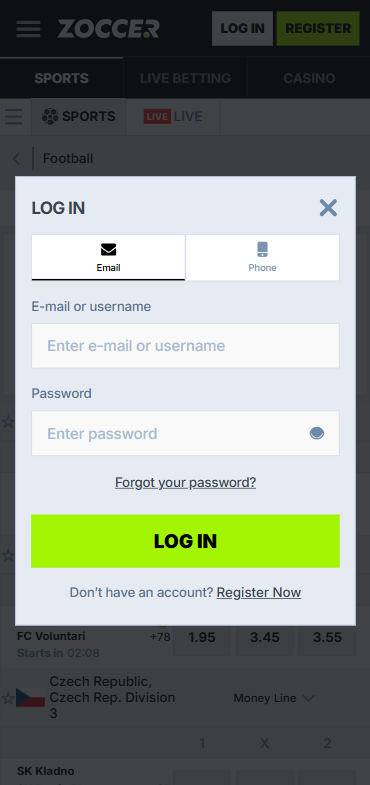
How to Login to Your Zoccer Account
- Visit the official Zoccer website or open the mobile app
- Locate the Login button in the top-right corner of the page
- Enter your registered email address or username
- Type your password in the designated field
- Click Sign In to access your account dashboard
That's the basic flow. If you have two-factor authentication enabled, you'll see an additional prompt asking for a verification code sent to your phone or authenticator app.
Login Zoccer via Official Website
On desktop, the experience is clean. Open your preferred browser, navigate to the official Zoccer website, and you'll immediately spot the login fields. During our tests we used Chrome, Firefox, and Safari without encountering any compatibility issues. The page loads quickly, the form auto-fills if your browser has saved credentials, and you land on the main sportsbook lobby within two to three seconds of clicking Sign In. We recommend bookmarking the official URL to avoid phishing pages that sometimes mimic betting sites.
Login Zoccer via Mobile App
The mobile app mirrors the desktop login but adds convenience. After downloading and installing the Zoccer app on iOS or Android, tap the app icon, and the login screen appears immediately. Enter your credentials the same way you would on desktop. The app remembers your last-used email so you only need to type your password on subsequent visits. Our team tested the mobile login on both an iPhone 15 Pro and a Samsung Galaxy S24, both returned sub-two-second load times for the main betting lobby after authentication.
Fingerprint or Face ID Login
If your device supports biometric authentication, Zoccer allows you to enable Face ID or fingerprint login through the app settings. After your first successful password login, navigate to Settings > Security > Biometric Login and toggle it on. From that point, a quick face scan or fingerprint tap replaces the need to type your password each time. We found this especially useful during live betting sessions where speed matters. The biometric data stays on your device and is never transmitted to Zoccer's servers, which aligns with standard security practices across best football betting websites.
Zoccer
Common Login Problems & Solutions
Even reliable platforms throw occasional errors. Here's a quick reference table covering the most frequent login hiccups we encountered or researched during our Zoccer review 2026 testing:
| Problem | Likely Cause | Quick Fix |
|---|---|---|
| ❌ Incorrect password error | Caps Lock on, outdated saved password | Reset password via email link |
| ❌ Account locked | Multiple failed login attempts | Wait 30 minutes or contact support |
| ❌ Page not loading | Scheduled maintenance or ISP block | Try a different network or check social media for updates |
| ❌ 2FA code not arriving | SMS delay or authenticator sync issue | Resync authenticator app or request code again |
| ❌ "Account suspended" message | Verification incomplete or policy violation | Email support with your account details |
| ❌ Geo-restriction notice | Accessing from a restricted country | Return to a permitted region; do not use VPN |
Forgotten Username or Password
Forgetting credentials happens. On the login page, click "Forgot Password?" directly below the password field. You'll be asked to enter the email address associated with your account. Zoccer sends a password reset link within minutes. Check your spam folder if it doesn't appear in your inbox. Click the link, create a new password meeting minimum complexity requirements (at least 8 characters, one uppercase letter, one number), and log in again. If you've also forgotten your username, the reset email will display it alongside the password reset instructions.
- Also read: Zoccer Review & Expert Rating 2026
Account Blocked or Suspended
Accounts get blocked for a handful of reasons. The most common is triggering the automated security system through too many consecutive failed login attempts, which locks the account for 30 minutes as a protective measure. Other causes include incomplete KYC verification past the platform's deadline, suspected multi-accounting, or a breach of the site's terms of service such as using fraudulent payment methods. If you believe the suspension is a mistake, reach out to Zoccer's customer support team with your registered email and any relevant documentation. They typically respond within 24 hours and can reinstate legitimate accounts once the issue is clarified.
Login Details Not Recognized
Sometimes you type everything correctly and the system still rejects your credentials. This can occur if you registered with a different email than the one you're entering, if your account was created through a social login method like Google, or if there was a backend migration that altered stored credentials. Try all email addresses you might have used. If none work, use the password recovery tool to confirm which email is linked to your account. Should the system say no account exists for any of your emails, it's possible you never completed registration, in which case you can sign up fresh and claim the welcome bonus.
Website/App Maintenance
Scheduled maintenance windows are rare but they happen. Zoccer typically performs updates during low-traffic hours, early morning European time, and the downtime seldom exceeds 30 minutes. During maintenance you'll see a branded splash page indicating the site will return shortly. There's nothing to do except wait. Following Zoccer's official social media accounts gives you advance notice of planned outages so you can place any time-sensitive bets beforehand.
Login from Restricted Region
If you're traveling and suddenly can't access your account, the platform's geo-restriction system has likely detected your IP address in an unsupported country. Zoccer operates under specific licensing that limits service availability to approved jurisdictions. Using a VPN to circumvent this restriction violates the terms of service and could result in permanent account closure and forfeiture of funds. The safest approach is to wait until you return to a permitted region. If your trip is extended, contact support to discuss options for your account and any pending withdrawals. For more on your rights as a player, check our dedicated guide.
- Modern betting platform with wide sports coverage
- Fast payouts with convenient payment methods
- Professional 24/7 customer support and high security
How to Register at Zoccer
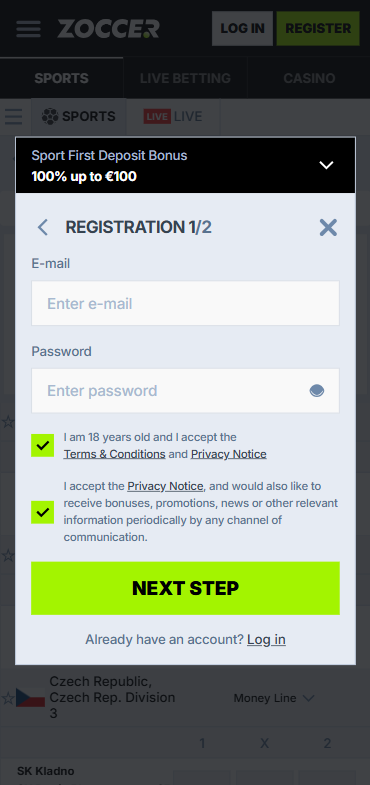
New to the platform? Registration takes under three minutes. We timed it. Here's the step-by-step process:
- Go to the official Zoccer website and click "Register" or "Sign Up"
- Enter your email address, choose a username, and create a strong password
- Fill in personal details: full name, date of birth, country of residence
- Select your preferred currency (EUR, GBP, USD, and others are available)
- Accept the terms and conditions and confirm you are 18+
- Click Create Account
- Verify your email by clicking the confirmation link sent to your inbox
- Log in and make your first deposit to activate the 100% Bonus up to €100 welcome offer
The whole thing is painless. We think it's one of the faster registrations among sports betting sites we've tested this year.
Zoccer
Verification & Login Security
After registration, Zoccer requires identity verification before you can process withdrawals. This is standard KYC (Know Your Customer) procedure mandated by licensing authorities to prevent fraud and underage gambling. Here's what you'll need:
| Document Type | Accepted Formats | Processing Time |
|---|---|---|
| 📄 Proof of Identity | Passport, national ID card, driving licence | Usually under 24 hours |
| 📄 Proof of Address | Utility bill or bank statement (dated within 3 months) | Usually under 24 hours |
| 📄 Payment Verification | Photo of card used (last 4 digits visible) or e-wallet screenshot | Up to 48 hours |
Once verified, your account security tightens. We strongly recommend enabling two-factor authentication immediately after your first login. This adds a layer that prevents unauthorized access even if someone obtains your password. The platform also logs IP addresses and device fingerprints, alerting you via email if a login attempt originates from an unrecognized device. During our testing for this Zoccer review 2026, the verification process completed in 18 hours, which is faster than the industry average of 24-72 hours. Please gamble responsibly at all times.
- Also read: Zoccer Bonus Code & Promotions
Customer Support for Login Issues
When self-service options don't resolve your login problem, Zoccer's support team steps in. During our real-money testing, we contacted support twice: once via live chat regarding a 2FA issue and once via email about a geo-restriction question. Live chat responded in under 4 minutes. Email took roughly 11 hours for a detailed reply.
| Contact Method | Availability | Response Time (Our Test) |
|---|---|---|
| 💬 Live Chat | 24/7 | ~4 minutes |
| 📧 Email Support | 24/7 (responses during business hours) | ~11 hours |
| ❓ FAQ / Help Center | Always accessible | Instant (self-service) |
For login-specific problems, live chat is your best bet. The agents can verify your identity through security questions and unlock accounts on the spot if the issue is a simple lockout. For anything involving document submission or account reinstatement after suspension, email provides a paper trail that both parties can reference. We rate Zoccer's support a solid 4 out of 5 based on speed and helpfulness. You can read more about how we rate betting sites.
Tips for Easy Zoccer Login
Keeping your Zoccer login smooth and secure doesn't require much effort, just a few good habits:
- Use a unique, strong password you don't reuse on other sites
- Enable biometric login on mobile for speed and security
- Activate two-factor authentication immediately after your first sign-in
- Bookmark the official URL to avoid phishing sites
- Keep your registered email accessible for password recovery
- Complete KYC verification early so withdrawals aren't delayed later
- Never share your login credentials with anyone
Honestly, the Zoccer betting site handles authentication well. It's fast, the security layers are there without being intrusive, and recovery options work as advertised. If you haven't signed up yet, use our TipsGG link to grab the 100% Bonus up to €100 welcome offer and get started. For broader context on betting terminology, our sports betting glossary is worth a look. And as always, our coverage follows strict editorial principles.
- Modern betting platform with wide sports coverage
- Fast payouts with convenient payment methods
- Professional 24/7 customer support and high security
FAQ
Can I Log in Without Registration?
No. You need a registered account to access any features on Zoccer, including browsing odds or using the sportsbook. Registration is free and takes under three minutes.
Can I Create Multiple Accounts?
No. Zoccer's terms strictly prohibit multi-accounting. If duplicate accounts are detected, all of them may be suspended and funds potentially forfeited. One person, one account.
How to Reset My Account Password?
Click "Forgot Password?" on the login page, enter your registered email, and follow the reset link sent to your inbox. You'll be asked to create a new password meeting the platform's complexity requirements.
What If My Account Was Stolen or Hacked?
Contact Zoccer support immediately via live chat or email. They will freeze the account to prevent further unauthorized activity. You'll need to verify your identity before access is restored. Enable 2FA afterward to prevent repeat incidents.
Why Can't I Access the Zoccer Website/App?
Possible reasons include scheduled maintenance, ISP-level blocks in certain regions, geo-restrictions if you're traveling, or local internet issues. Try a different network first. If the problem persists, check Zoccer's social media channels for outage announcements.
Is Zoccer Login Safe and Secure?
Yes. The platform uses SSL encryption for all data transmission, supports two-factor authentication, and monitors login attempts for suspicious activity. Based on our testing for this Zoccer review 2026, we found the security infrastructure to be solid and in line with licensed, safe betting platforms operating across regulated markets.