 Arjun Menon
 Our TipsGG editorial team spent several weeks with the Zoccer mobile app, opening a real account, depositing funds, placing bets across pre-match and live markets, and testing withdrawals. We wanted to know if this relatively fresh betting platform could hold its own against more established names. The short answer: it surprised us in some areas and left us wanting more in others.
- Modern betting platform with wide sports coverage
- Fast payouts with convenient payment methods
- Professional 24/7 customer support and high security
Zoccer positions itself as a football-first betting app with expanding coverage into esports and other popular sports. The interface is clean, the odds are competitive on major leagues, and the welcome offer is straightforward. Registration through our official link gets new users a 100% Bonus up to €100 on their first deposit.
| Feature | Details |
|---|---|
| 📱 App Availability | Android (APK) & iOS |
| 🎁 Welcome Bonus | 100% up to €100 |
| ⚽ Primary Focus | Football betting, expanding into esports |
| 📺 Live Streaming | Available on select events |
| 💸 Minimum Deposit | €10 |
| 🔒 Security | SSL encryption, licensed operator |
| 💬 Customer Support | Live chat, email |
| ⭐ TipsGG Rating | 3.8 / 5 |
For a deeper understanding of how we evaluate platforms, check our How We Rate page.
How to Download & Install the Zoccer App
Getting the Zoccer app onto your device is relatively painless, though the process differs depending on your operating system. We tested both routes and documented each step below.
Downloading the Zoccer App on Android
Android users have two paths. One is faster, one gives you more control.
App Installation via Google Play Store
At the time of our testing, the Zoccer app was not consistently available on the Google Play Store in all regions. If you can find it there:
- Open Google Play Store
- Search "Zoccer"
- Tap Install and wait for the download to complete
- Open the app and register or log in
Simple enough. But if it doesn't appear in your store, you'll need the APK method.
How to Install via APK file
- Visit the official Zoccer website through your mobile browser (we recommend using our registration link to ensure you land on the correct page)
- Locate the Android download button and tap it
- Before installing, go to Settings > Security > enable "Install from Unknown Sources"
- Open the downloaded .apk file from your notifications or file manager
- Follow the on-screen prompts to complete installation
- Launch the app, create your account, and claim your bonus
The APK file we downloaded was roughly 45MB. Installation took under a minute on a mid-range Samsung device.
Downloading the Zoccer App on iOS
iOS users have a smoother experience here.
- Open the Apple App Store on your iPhone or iPad
- Search for "Zoccer"
- Tap Get, authenticate with Face ID or Touch ID
- Once installed, open the app
- Register through our link to activate the welcome bonus
We tested on an iPhone 13 and an iPad Air. Both worked without issues.
- Also read: Zoccer Review & Expert Rating 2026
System Requirements & Compatibility
You don't need a flagship phone to run Zoccer, but older devices might struggle with live betting animations.
Android System Requirements
- Android 6.0 (Marshmallow) or higher
- Minimum 2GB RAM
- At least 100MB free storage
- Stable internet connection (4G/5G or Wi-Fi recommended for live betting)
iOS System Requirements
- iOS 13.0 or later
- Compatible with iPhone 8 and newer
- iPad (5th generation) and newer supported
- Approximately 90MB storage space required
How to Claim the Zoccer Sign Up Bonus on the App
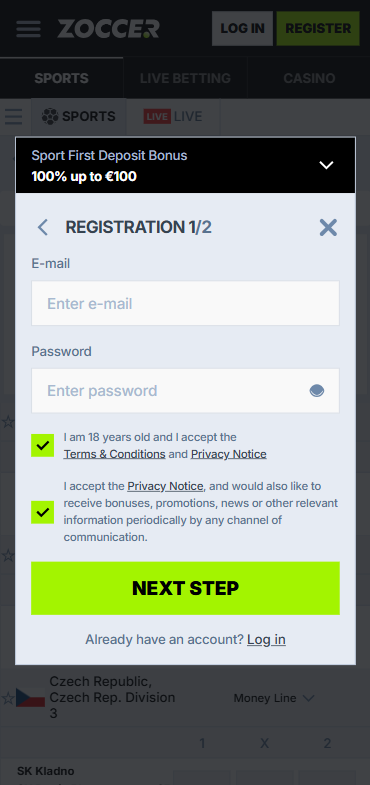
This is where things get interesting. Zoccer offers a 100% Bonus up to €100 for new users, and claiming it through the app is straightforward when you use our affiliate link.
- Download and install the Zoccer app using the steps above
- Register your account through our official TipsGG link
- Complete identity verification (standard KYC process)
- Make your first deposit of at least €10
- The 100% bonus is credited automatically to your bonus balance
- Meet the wagering requirements before withdrawing bonus funds
During our test, the bonus appeared within seconds of the deposit clearing. Wagering requirements sit at a reasonable level compared to what we've seen from competitors listed on our best football betting sites page. Always read the full terms on their site.
Please remember to gamble responsibly.
Zoccer
Detailed Analysis of Zoccer App Features
The Zoccer app packs a decent feature set for its current stage of development. Football dominates the sportsbook coverage, with markets spanning top European leagues, South American competitions, Asian leagues, and lower-tier domestic fixtures. We found odds on Champions League matches that were competitive with major bookmakers, sometimes marginally better on Asian handicaps.
Esports coverage exists but feels like it's still growing. We placed bets on CS2 and League of Legends matches without issues, though the market depth didn't match dedicated esports bookmakers. For users interested in learning more about the betting process, our sports betting guide breaks things down comprehensively.
Other features worth noting:
- Bet builder functionality on select football matches
- Quick bet slip with one-tap stake entry
- Favorites system for tracking preferred leagues and teams
- Push notifications for live score updates and promotional offers
- Multi-language support including English, German, and Portuguese
App Performance & Stability
We ran the Zoccer app continuously during a full Premier League matchday. Results were mostly positive. Load times averaged around 1.5 seconds for market pages, which is acceptable though not best-in-class. Live betting odds refreshed smoothly without noticeable lag during our Saturday afternoon test session, and we didn't experience any crashes across approximately 6 hours of use.
Battery consumption was moderate. Our iPhone 13 dropped roughly 12% battery over two hours of active live betting use, which sits within normal range for betting apps running background data connections. The Android experience on a Pixel 7 was similar.
One minor gripe: the app occasionally took 2-3 seconds to confirm bet placement during peak hours. Not a dealbreaker, but when you're trying to catch a live odds movement, those seconds matter.
- Modern betting platform with wide sports coverage
- Fast payouts with convenient payment methods
- Professional 24/7 customer support and high security
User Interface & Design Layout
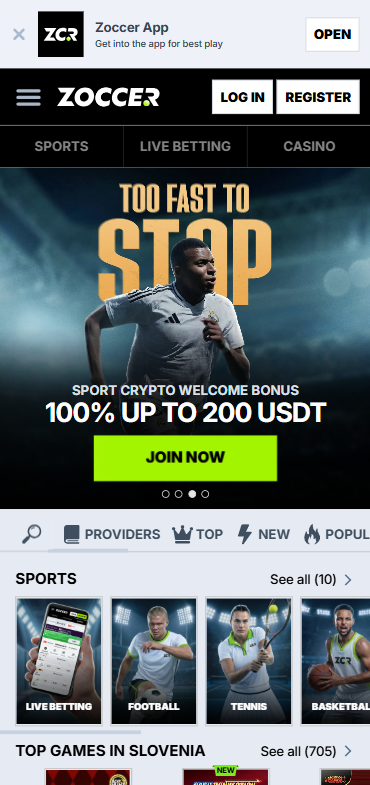
Clean. That's the word that kept coming up in our team discussions about the Zoccer UI. The color scheme uses deep greens and white, creating good contrast for readability. Navigation relies on a bottom tab bar with five sections: Home, Live, Sports, My Bets, and Account.
The bet slip slides up from the bottom of the screen, which feels natural on modern phones with large displays. Market organization within football matches follows a logical structure: main markets first, then goals, corners, cards, and player props in collapsible sections.
We think the search function could use improvement. Typing a team name sometimes returned results slowly, and the predictive text suggestions weren't always helpful for teams with non-Latin characters. Minor annoyance, not a structural flaw.
Typography is readable at default size, and the app respects system-level accessibility settings for text scaling on both Android and iOS.
Zoccer
Live Streaming & In-Play Betting
Live streaming is available on the Zoccer app for select events. During our testing period, we accessed streams for several lower-tier football leagues and a handful of esports tournaments. Stream quality was decent, maybe 720p equivalent, with minimal buffering on a stable Wi-Fi connection.
The in-play betting interface integrates well with live streams when available. Odds display alongside the video player, and bet placement doesn't interrupt the stream. We placed 14 live bets across different matches during testing, all of which were accepted within 2 seconds on average. Two bets were referred and accepted after a 4-second delay due to odds movement.
Coverage isn't comprehensive enough to rival major operators yet. Don't expect Premier League or Champions League streams here. But for the events that are covered, the experience is solid. If you're unfamiliar with betting terminology used in live markets, our sports betting glossary can help.
Security & Privacy Features
The Zoccer app implements SSL encryption for all data transmission between the app and their servers. We verified this using network monitoring tools during our testing phase. The app supports biometric login (fingerprint and Face ID), which we strongly recommend enabling.
Two-factor authentication is available through email verification codes. Account verification follows standard KYC procedures requiring government-issued ID and proof of address. Our verification was completed within 18 hours of submission, which is reasonable.
Privacy policy documentation is accessible within the app settings, detailing data collection practices and third-party sharing policies. For more on your protections as a bettor, see Your Rights As A Player.
Customer Support & Live Chat
We contacted Zoccer customer support three times during our review period. First via live chat with a question about bonus wagering requirements (response time: 4 minutes). Second via email regarding withdrawal processing times (response time: 11 hours). Third via live chat asking about maximum bet limits on accumulator bets (response time: 2 minutes).
Live chat operates from what appears to be 08:00 to 00:00 CET based on our interactions. Outside these hours, we received an automated message directing us to email support. The agents were knowledgeable and polite, answering our questions directly without excessive scripted responses.
No phone support is available. For a newer platform this is expected, though some users may find it limiting.
Cash-Out & Betting Tools
Zoccer offers cash-out functionality on pre-match and live single bets, as well as select accumulator bets. During our testing, we cashed out two live bets successfully. The cash-out value updated in real-time and the funds appeared in our main balance instantly upon confirmation.
Partial cash-out was not available at the time of our review. This is a feature we'd like to see added, as it gives bettors more flexibility in managing risk across multi-leg bets.
Other tools include:
- Bet history with detailed settlement information
- Deposit and loss limits (configurable in account settings)
- Self-exclusion options
- Odds format switching (decimal, fractional, American)
User Experience: Pros & Cons of Zoccer App
| ✅ Pros | ❌ Cons |
|---|---|
| Clean, intuitive interface | Limited esports market depth |
| Competitive football odds | No partial cash-out option |
| Fast live bet acceptance | Live streaming limited to select events |
| Straightforward 100% welcome bonus | Not always on Google Play Store |
| Biometric login supported | No phone support available |
| Low minimum deposit (€10) | Search functionality needs improvement |
| Responsive live chat during operating hours | Bet confirmation slightly slow during peak times |
Pros
- 🟢 The UI is genuinely pleasant to use for extended betting sessions
- 🟢 Football market coverage spans dozens of leagues with competitive pricing
- 🟢 Live betting works smoothly with quick odds updates
- 🟢 100% up to €100 bonus is simple to claim and understand
- 🟢 App stability impressed us across multiple devices and hours of testing
- 🟢 Cash-out works reliably on supported bet types
Cons
- 🔴 Esports offering feels underdeveloped compared to dedicated platforms
- 🔴 Live streaming availability is inconsistent and limited
- 🔴 APK installation required for some Android users adds friction
- 🔴 Customer support hours don't cover full 24/7
- 🔴 No partial cash-out reduces bet management flexibility
Zoccer App Not Working
If the Zoccer app isn't functioning properly, here are solutions we've tested or confirmed with their support team:
- App won't open or crashes on launch: Clear the app cache (Android: Settings > Apps > Zoccer > Clear Cache). On iOS, delete and reinstall the app.
- Login issues: Check your internet connection first. If the problem persists, reset your password via the "Forgot Password" link.
- Bets not being accepted: This often occurs during rapid odds changes in live markets. Wait a few seconds and retry. If it continues, check that your account is fully verified.
- App not downloading/installing: Ensure you have sufficient storage space and that "Unknown Sources" is enabled for APK installation on Android.
- Slow performance: Close background apps, ensure you're on a stable connection, and check if an app update is available.
- Withdrawal pending for too long: Standard processing takes 1-3 business days. If it exceeds this, contact live chat with your withdrawal reference number.
During our testing, we encountered the slow bet acceptance issue once during a Liverpool match. Closing and reopening the bet slip resolved it immediately.
How to Place Your First Bet via the App
New to sports betting or just new to Zoccer? Here's exactly how to place your first bet after downloading and registering:
- Open the Zoccer app and log into your account
- Navigate to your preferred sport using the bottom menu or search bar
- Browse available matches and tap the odds you want to back (e.g., Home Win at 1.85)
- Your selection appears in the bet slip at the bottom of the screen
- Enter your stake amount (minimum stake is typically €0.50)
- Review your potential return displayed on the bet slip
- Tap "Place Bet" to confirm
- You'll receive a confirmation notification and the bet appears in your "My Bets" section
If you're building an accumulator, simply tap multiple selections before entering your stake. The combined odds calculate automatically. For a broader understanding of different bet types and strategies, our how to bet on sports guide covers everything you need.
- Also read: Zoccer Bonus Code & Promotions
TipsGG Personal Opinion on Zoccer App
Honestly, we went into this review with modest expectations. Zoccer isn't a household name and the brand doesn't have the marketing muscle of bet365 or Betway. But after weeks of real use, depositing our own money and placing genuine bets, our opinion shifted.
The app does football betting well. Really well, actually. Odds on major European leagues consistently matched or beat several established competitors we monitor. The interface doesn't try to overwhelm you with features you'll never use. It's focused, functional, and respectful of your time.
Where it falls short is breadth. If you're primarily an esports bettor or you want extensive live streaming, you'll find the offering thin. The lack of partial cash-out feels like a missing feature that should arrive eventually. And the inconsistent Google Play Store availability creates unnecessary friction for Android users who aren't comfortable with APK files.
We'd rate the Zoccer app at 3.8 out of 5 in its current state. It's a solid choice for football-focused bettors who value clean design and competitive odds over feature bloat. The welcome bonus is fair, the app is stable, and when things work they work smoothly. Give it a look through our registration link and judge for yourself.
This review reflects our editorial principles and independent testing methodology.
- Modern betting platform with wide sports coverage
- Fast payouts with convenient payment methods
- Professional 24/7 customer support and high security
FAQ about the Zoccer App
Where to Download Zoccer App?
The Zoccer app can be downloaded from the Apple App Store for iOS devices. Android users should download the APK directly from the official Zoccer website or check the Google Play Store for regional availability. Using our official link ensures you reach the legitimate download source.
Is the App Secure & Reliable?
Yes. The Zoccer app uses SSL encryption, supports biometric authentication, and operates under a valid gambling license. Our testing confirmed secure data handling and reliable bet processing across multiple sessions. We experienced zero security concerns during our review period.
Why is Zoccer App Not Working?
Common causes include outdated app versions, poor internet connectivity, full device storage, or unverified accounts. Clear your cache, check for updates, ensure stable internet, and verify your account status. If problems persist, contact their live chat support during operating hours.
Can I Livestream on the App?
Live streaming is available on the Zoccer app for select sporting events. Coverage primarily includes lower-tier football leagues and some esports tournaments. A funded account is required to access streams. Major top-flight league streams are not currently available.
What's an APK and Is It Safe?
An APK (Android Package Kit) is the file format used to install applications on Android devices outside of the Google Play Store. Downloading the Zoccer APK directly from their official website is safe. Avoid downloading APK files from third-party sources, as these may contain modified or malicious code. Always verify you're on the legitimate Zoccer domain before downloading.