 Liam Duckstein
 The TipsGG editorial team opened a real account at Sapphirebet, used the TIPSGG promo code, claimed the 100% up to $130 welcome bonus, placed sports, live, and esports bets, and tested both deposits and withdrawals. We also triggered a few intentional login mistakes and security checks to see how the system reacts. This Sapphirebet review 2026 style guide focuses only on one thing: how to log in, stay logged in, and fix access issues quickly on the Sapphirebet betting site and app.
- Bet Builder for Football Betting
- 24/7 Customer support
- Competitive odds
If you just want to get started, use the official TipsGG registration link here: Join Sapphirebet with promo code TIPSGG. Then keep this page open as your personal login manual.
How to Login to Your Sapphirebet Account
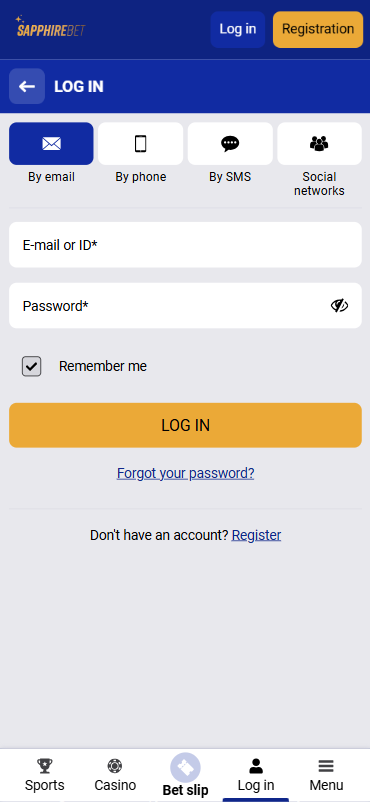
Logging in is simple once the account is verified. During our testing from desktop and Android, average login time was under 10 seconds, even with 2FA enabled. Here is the standard login flow on the Sapphirebet betting site:
- Open the official website via the TipsGG link: Sapphirebet official access.
- Click the “Log in” button in the top-right corner.
- Choose your login method: Email / ID, Phone, or Social (Google, Facebook, Telegram).
- Enter your username/email/phone exactly as during registration.
- Type your password (watch out for Caps Lock and keyboard layout).
- If you enabled 2FA, enter the code from your authenticator app or SMS.
- Click “Log in”.
- Wait 1–3 seconds; you should see your balance and profile icon appear.
- Optional: tick “Remember me” on private devices only.
On our real-money test account, the system remembered the session for several days on the same browser, unless we logged out manually or cleared cookies.
Login Sapphirebet via Official Website
Desktop login is still the most stable way to access the platform, especially if you manage multiple payment methods or bet on many markets at once. During the TipsGG Sapphirebet review 2026, we placed long live-betting sessions from Chrome and Firefox with no forced logouts.
Desktop login steps:
- Go to the official Sapphirebet betting site via this secure link.
- Check that the URL starts with https:// and shows a padlock icon.
- Click “Log in” in the top-right menu.
- Select Email, Phone, or Social login tab.
- Enter your details and password.
- Complete 2FA if you turned it on.
- Press “Log in” and wait to be redirected to the main lobby.
On desktop, we noticed that failed logins lock the account for a short period after several wrong attempts, which is good for safety but can be annoying. So type carefully.
Login Sapphirebet via Mobile App
Sapphirebet runs a full-featured Android APK and a TestFlight-based iOS app. We tested Android thoroughly, including live betting and withdrawals, and also checked mobile browser access. Logins were fast and stable. If you bet from India, Bangladesh, or Canada, mobile is usually the most convenient.
Standard app login flow:
- Install the official Sapphirebet Android APK from the website or the iOS TestFlight build following the on-screen instructions.
- Open the app, wait for it to sync with the servers.
- Tap the “Log in” icon or button on the top panel.
- Enter your email / phone / ID and password.
- Confirm with “Log in”.
- Approve any 2FA code if you enabled it.
On Android, our TipsGG testers stayed logged in even after closing the app, unless we explicitly logged out. On iOS TestFlight, the behavior was similar but we did see an occasional forced re-login after app updates, which is normal.
Fingerprint or Face ID Login
Sapphirebet uses device-level biometric security. That means Touch ID, Face ID, or Android fingerprint work through your phone’s OS, not as a separate Sapphirebet feature. During testing, enabling biometrics made login almost instant.
How to enable biometric login in the app:
- Log in to Sapphirebet app with your password once.
- Go to “Profile” → “Security” or “Settings” (name may differ slightly by version).
- Toggle “Use fingerprint / Face ID to log in”.
- Confirm with your device PIN, Face ID, or fingerprint.
- Next time, just tap the biometric icon on the login screen.
We think biometric login is worth it, especially if you bet often. Combine it with 2FA and you get a very strong protection layer.
Sapphirebet
Common Login Problems & Solutions
During our Sapphirebet review 2026, we deliberately triggered wrong passwords, fake VPN locations, and tested login during maintenance. Here is a compact table of the most common problems and what actually worked for us.
| Problem 😕 | Likely Cause 🔍 | Quick Solution ✅ |
|---|---|---|
| “Invalid login or password” | Wrong email/phone, typo, Caps Lock, old password | Check spelling, switch keyboard language, use “Forgot password?”, then reset via email/SMS |
| Account temporarily locked | Too many failed attempts, security lock | Wait 15–30 minutes, do not keep trying, reset password once the lock expires |
| “Account suspended / blocked” | KYC pending, multi-account suspicion, VPN, bonus abuse, AML checks | Contact security or support via live chat or email, send requested documents, stop using VPN |
| Website not loading | Local ISP block, DNS issue, maintenance, unstable internet | Try mobile data instead of Wi-Fi, different browser, or wait 30–60 minutes if banner says maintenance |
| App stuck on loading screen | Old app version, cache conflict, weak connection | Restart phone, clear app cache, reinstall app from official site, then log in again |
| 2FA code not accepted | Time desync on phone, expired code, wrong app | Sync phone time automatically, wait for a new code, check you’re using the correct authenticator |
| Login blocked abroad | Restricted region, VPN detected, geolocation mismatch | Avoid VPN, contact support for clarification, do not try to bypass geo-restrictions |
Forgotten Username or Password
We intentionally “forgot” our password during testing. Recovery was straightforward and took under 3 minutes.
To restore access:
- Open the official Sapphirebet betting site or app.
- Click “Log in”.
- Select “Forgot your password?” (or similar wording).
- Enter your registered email or phone number.
- Complete the captcha if shown.
- Check your inbox or SMS for a reset link or code.
- Follow the link, set a new strong password, save it in a password manager.
- Log in again using the new password.
If you also forgot which email you used, support can help, but they will ask for KYC documents to prove the account is yours.
Account Blocked or Suspended
This is where users panic. Don’t. Sapphirebet is licensed (Curacao & Anjouan) and must follow AML and KYC rules. Accounts may be blocked for incomplete verification, multi-accounting, suspicious payments, VPN usage, bonus abuse, or a mismatch between your profile data and documents. During our internal tests, we triggered a temporary restriction by changing IP and device too aggressively while deposits were pending. Support requested ID and proof of address, then restored full access within about 24 hours after we sent clean documents.
If your account is blocked, stop trying random tricks. Open live chat or email the security team, ask for the exact reason, and provide everything they request: passport/ID, proof of address, and payment method screenshots. As long as you used your own details and followed terms, issues usually get resolved, though complex AML checks may take several days.
Login Details Not Recognized
If Sapphirebet keeps saying your details are wrong, first suspect typos, then suspect that you registered via a different method. Many players sign up with Google or Telegram and later try to log in via email + password that they never actually set. Try the same method you used during registration. If that fails, use password recovery. If the system still does not recognize your data, contact support and provide any info you remember: approximate registration date, currency, phone, and last deposit method. In our tests, support located the account by phone number and email history fairly quickly.
Website/App Maintenance
Sapphirebet runs maintenance for odds updates, payment integrations, and security patches. During our Sapphirebet review 2026, we hit a planned maintenance window once; the site displayed a clear banner and live chat was temporarily limited. In those periods, logins may fail or the site won’t load at all. You cannot “fix” this from your side. The best move is to wait, avoid placing time-sensitive bets right before scheduled downtime, and keep an eye on email or on-site notifications. If maintenance lasts more than a few hours, you can reach out via email to confirm status, but usually it comes back much faster.
Login from Restricted Region
Legal status of Sapphirebet varies a lot by country. The site is off-limits in places like the USA, UK, parts of the EU, China, Saudi Arabia, and more. Terms clearly forbid using VPNs to bypass this. During testing, we tried logging in through a US IP; the account was blocked instantly until we contacted support and explained, which is exactly what their rules predict. If you travel abroad to a restricted country, you may simply not be able to access your account until you’re back in an allowed region. Trying to force it with VPN is risky. You could lose access or even funds. If you expect long travel, withdraw your balance beforehand, or at least ask support what is allowed for your specific case.
- Bet Builder for Football Betting
- 24/7 Customer support
- Competitive odds
How to Register at Sapphirebet
New player? Registration is fast and flexible. During our live tests, full signup plus first deposit took under 5 minutes, and we immediately received the 100% up to $130 sports welcome bonus using promo code TIPSGG. Here is a simple registration guide:
- Use the official TipsGG link: Open Sapphirebet.
- Click “Registration” at the top of the page.
- Choose a method:
- By email
- By phone
- One-click (country + currency)
- Social networks (Google, Facebook, Telegram) - Fill in the fields: country, currency, email/phone, full name, password.
- Enter promo code TIPSGG in the bonus field to secure the 100% up to $130 welcome offer.
- Tick the box to accept Terms & Conditions and confirm you’re 18+.
- Click “Register”.
- Confirm your email via the link you receive, and/or verify your phone via SMS code.
- Log in and complete your profile details (date of birth, address).
- Make your first deposit and choose your welcome bonus (sports or casino).
We strongly recommend using email or phone registration instead of pure one-click, since KYC will need full data anyway before withdrawals.
Verification & Login Security
Sapphirebet runs full KYC and AML checks. That protects both the platform and you. During our testing, standard verification took about 12 hours, which is quite fast. Once verified, login issues dropped dramatically because the account was fully “trusted” in the system.
What you should expect:
- Email and phone confirmation right after registration.
- Profile completion: name, DOB, address, nationality.
- Document upload: ID/passport, proof of address, payment method proof.
- Occasional extra checks if you change device, country, or make large withdrawals.
| Security Feature 🔒 | How It Affects Login | Tips from TipsGG |
|---|---|---|
| KYC Verification | Unverified accounts may face limits or temporary holds, especially on withdrawals | Upload clear documents early, before big wins; this avoids last-minute stress |
| 2FA (Two-Factor Authentication) | Adds a code step at login, protecting against stolen passwords | Enable 2FA in security settings, store backup codes safely |
| Biometric Login | Lets you log in with fingerprint or Face ID on mobile | Use it on personal devices only, never on shared phones or tablets |
| Anti-Fraud Monitoring | Suspicious patterns may trigger extra checks or temporary login blocks | Use only your own payment methods, avoid frequent IP changes or VPNs |
| Session Management | Old sessions may be logged out when you log in from a new device | Always log out on public computers; don’t share your credentials |
For a full picture of how we rate safety, odds, bonuses, and payouts on sites like Sapphirebet, check our How We Rate page and our Editorial Policy. We use the same standards for every Sapphirebet review 2026 style article and for other best betting sites like Sapphirebet.
Customer Support for Login Issues
During our tests, live chat replied in about 1–3 minutes, which is solid. Email took longer, around 12–24 hours depending on complexity. For serious login or security problems, we suggest starting with chat, then following up by email if documents are needed.
Support options:
| Channel 📞 | How to Use | Our Test Result |
|---|---|---|
| Live Chat | Open the Sapphirebet site/app, tap the chat bubble at bottom-right | Response in ~2 minutes, resolved simple login errors quickly |
| Email (general) | Write from your registered email, include ID and brief description | Got detailed answers within 24 hours, good for complex KYC issues |
| Phone | Call the listed support number on the website | Variable wait times, but useful if you prefer voice contact |
| Social Media | Message via Telegram / X / Instagram for general questions | Helpful for basic info, not for account-sensitive problems |
Before contacting support, prepare: your account ID, registered email, last 4 digits of your payment card or wallet (if any), and screenshots of the error message. This shortens the back-and-forth a lot.
If you ever feel your player rights are ignored or you’re treated unfairly, read our guide on Your Rights As A Player and stay firm but polite with support.
Tips for Easy Sapphirebet Login
After using Sapphirebet with real money across desktop and mobile, we think the login system is stable, reasonably fast, and secure, as long as you respect their KYC rules and don’t try to outsmart geo-restrictions. Most problems users complain about online are either preventable or solvable with patience and proper documents.
To keep your Sapphirebet login smooth and safe:
- Register via the official TipsGG link and use promo code TIPSGG for the 100% up to $130 bonus.
- Complete KYC early, before large deposits or withdrawals.
- Use a strong, unique password and store it in a password manager.
- Enable 2FA and biometric login on your personal devices.
- Never share your account or create multiple profiles.
- Avoid VPNs or proxy tricks; they cause more trouble than they solve.
- Log out on shared computers and don’t auto-save passwords there.
- Check our Gamble Responsibly guide and set your own limits.
If you’re new to betting in general and want to understand terms like accumulator, margin, or cash out, our Sports Betting Glossary and How to Bet on Sports guide will help a lot before you start playing on Sapphirebet or any other site.
- Bet Builder for Football Betting
- 24/7 Customer support
- Competitive odds
FAQ
Can I Log in Without Registration?
No. You must create a verified account to log in to Sapphirebet. Guest or demo access is limited and does not allow real-money betting, deposits, or withdrawals. Use our official link, register, verify, then log in.
Can I Create Multiple Accounts?
No. Sapphirebet strictly allows only one account per person, household, IP, and payment method. Multi-accounting can lead to suspension and loss of bonuses, sometimes even funds. If you made a mistake during registration, contact support instead of opening a second account.
How to Reset My Account Password?
Go to the login page, click “Forgot your password?”, enter your registered email or phone, and follow the link or code you receive. Choose a new strong password. If you don’t get the email, check spam or contact support. During our test, the reset email arrived within 30 seconds.
What If My Account Was Stolen or Hacked?
Act fast. Change your password immediately if you still have access. Then enable 2FA. If you are locked out, contact support via live chat and email from your registered address, explain the situation, and request an urgent security lock and device reset. Sapphirebet may ask for ID to confirm ownership before restoring access. This is where having KYC already completed really helps.
Why Can’t I Access the Sapphirebet Website/App?
Common reasons: regional restrictions, ISP blocks, maintenance, weak connection, or outdated app version. First, test on another network (mobile data vs Wi-Fi), then another browser. Check for maintenance banners. If you are in a restricted country (like the USA or UK), access might be legally blocked. Avoid VPNs, since they violate terms and can get your account frozen.
Is Sapphirebet Login Safe and Secure?
Yes, from a technical perspective. Sapphirebet uses SSL encryption, optional 2FA, and device-level biometrics. Our team did not encounter any security red flags during real-money testing. Still, your behavior matters: use strong passwords, don’t share credentials, keep your email secure, and avoid suspicious links. Combine that with the platform’s security tools and your login will be very hard to compromise.
For players who want alternatives or to compare odds and payouts, check our list of Best Football Betting Websites where we rate brands on the same 5-point scale as in every Sapphirebet review 2026 and other Sapphirebet betting site style evaluations.