 Liam Duckstein
 The TipsGG editorial team opened a real account at Sapphirebet, used promo code TIPSGG, deposited our own money, placed pre-match, live and esports bets, played some slots, and withdrew winnings back to e-wallet and crypto. We also pushed the app pretty hard during a busy football weekend to see if it lags or breaks. This review comes from that hands-on testing, plus deep background research, not from guessing or affiliate copy.
- Bet Builder for Football Betting
- 24/7 Customer support
- Competitive odds
Sapphirebet runs under a Curaçao license (8048/JAZ2018-014) and Anjouan license (ALSI-202505019-FI1). It targets a lot of Asian markets, supports 50+ languages, 20+ currencies, tons of local payment methods, and packs in sports, esports, casino, and live dealer in one app. The flip side: it is not in Google Play or the App Store, KYC can be strict, and there are real complaints about account checks and delays. We think it’s a powerful but slightly risky option, not a comfy UK-style bookmaker.
If you want to try it, the safest route is always the official link. Use the TipsGG registration link and promo code TIPSGG here: Official Sapphirebet sign-up (TIPSGG).
Quick Overview of the Sapphirebet App
Here is what stood out in our real testing of the Sapphirebet app on Android (APK) and iOS (TestFlight):
- Single wallet for sports, esports, casino & live casino 🎮
- Very deep football, cricket and tennis coverage
- Live streaming on many events, plus solid in-play tools
- Fast crypto payouts (our BTC cashout landed in ~20 minutes)
- Occasional odds refresh lag on very busy live matches
- No official Google Play / App Store listing, which some users dislike
| Category | Our Rating (1–5) | Key Notes |
|---|---|---|
| Overall app experience | 4.0 / 5 | Feature-rich, not the most polished UI, but powerful |
| Sports & esports betting | 4.5 / 5 | Big market depth, competitive odds, good for value hunters |
| Casino & live casino | 4.5 / 5 | 7,000+ games, lots of providers, strong live dealers |
| App performance | 4.0 / 5 | Stable in our tests, small hiccups during peak live |
| Payments & withdrawals | 4.0 / 5 | Huge method list, fast crypto, bigger withdrawals slower |
| Security & licensing | 3.5 / 5 | Licensed in Curaçao & Anjouan, not EU/UK tier |
| Support & live chat | 3.5 / 5 | 24/7 chat, but some answers felt copy-paste |
Curious how we score each area? Check our transparent How We Rate guide.
- Also read: Sapphirebet Review & Expert Rating 2026
How to Download & Install the Sapphirebet App
Sapphirebet does not appear in Google Play or the Apple App Store. That’s normal for many betting brands in certain countries, not a red flag by itself. You either install the Android APK directly or use TestFlight on iOS, or you skip apps and use the mobile site.
We tested both: Android APK on a mid-range Samsung, and iOS via TestFlight on an iPhone. Both worked fine after a couple of extra taps.
Downloading the Sapphirebet App on Android
Android users need to grab the official Sapphirebet APK from the website. Avoid random APK sites, that’s asking for malware.
App Installation via Google Play Store
There is no official Google Play Store listing for Sapphirebet at the time of writing. If you see something in Play claiming to be Sapphirebet, skip it. It’s either fake or some copycat.
How to Install via APK file
Here’s exactly how we installed the Sapphirebet Android APK in our test:
- 1. Open the official Sapphirebet page via TipsGG: Sapphirebet APK download
- 2. Tap the mobile app section and choose Android
- 3. Download the file named something like sapphirebet-android.apk (~48 MB)
- 4. On your phone go to Settings > Security / Apps > Install unknown apps and allow your browser (Chrome, Samsung Internet etc.)
- 5. Open your Downloads folder, tap the APK, then hit Install
- 6. Once installed, launch Sapphirebet, sign up with promo code TIPSGG and you’re in
Our APK passed Android’s built-in malware scan and installed in under a minute on Wi‑Fi.
Downloading the Sapphirebet App on iOS
On iPhone / iPad, Sapphirebet uses TestFlight instead of the public App Store. Slightly nerdy, but still official and controlled by Apple.
- 1. Go to Sapphirebet via TipsGG in Safari
- 2. Tap the mobile app banner, choose iOS
- 3. You’ll be redirected to install TestFlight from the App Store if you don’t have it
- 4. Install TestFlight, then accept the Sapphirebet beta invite shown
- 5. In TestFlight, tap Install for the Sapphirebet app
- 6. Open the app from your home screen, register or log in, set language and odds format
On our iPhone running iOS 17, the whole process took about 3–4 minutes including TestFlight installation.
System Requirements & Compatibility
Sapphirebet is not heavy, but old or low-RAM phones will feel sluggish, especially with live streaming and multi-live views. Here’s what we recommend based on both the official specs and our testing.
Android System Requirements
- Minimum OS: Android 5.1+
- Recommended RAM: 2 GB or more (1.5 GB just about works)
- Free storage: 100 MB+ for the app, extra for cache
- CPU: 1.4 GHz quad-core or better
- Connection: Stable 4G / Wi‑Fi for live betting & streams
We ran the app on a mid-range Samsung with 4 GB RAM and saw smooth scrolling, quick betslip loading, and no crashes across a full Saturday of betting.
iOS System Requirements
- Minimum iOS: iOS 12.0+
- Devices: iPhone 6s / iPad Air 2 or newer
- RAM: 1 GB minimum, 2 GB+ feels better
- Free storage: 150 MB+
- Chip: Apple A9 or newer
On an iPhone 12 the app felt snappier than on Android. Animations were smoother and live streams loaded faster, probably due to better hardware.
How to Claim the Sapphirebet Sign Up Bonus on the App
Using the TipsGG registration link and promo code TIPSGG unlocks a sports welcome bonus of 100% up to $130 (or equivalent in your currency). That’s what we used in our test account.
How to claim it step by step:
- 1. Install the Sapphirebet app (APK or TestFlight) using our official link
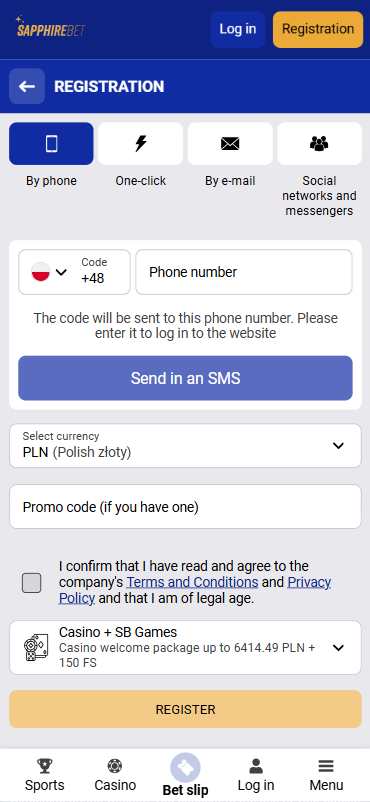
- 2. Tap Registration and create your account
- 3. Enter promo code TIPSGG in the promo field
- 4. Choose the Sports welcome bonus (not casino) if you want the $130 sports offer
- 5. Make your first deposit (check the minimum in your currency)
- 6. Bonus credits appear automatically once the deposit clears
Wagering rules are strict: you must roll over the bonus on accumulators with minimum odds per selection, within a time limit. Always read the current T&Cs inside the app before you start punting your bonus. If you are prone to chasing losses, maybe skip the bonus altogether and keep your play simpler. Read our Responsible Gaming guide if you feel your gambling is slipping out of control.
Sapphirebet
Detailed Analysis of Sapphirebet App Features
The Sapphirebet app packs a lot into a small install. Some of it is great, some of it is clutter.
- Sportsbook depth: 30+ sports, with especially strong football, cricket, tennis, basketball and ice hockey. We found good Asian handicap lines and decent margins (around 4–7% on 1X2 football markets in our checks).
- Esports: CS2, Dota 2, League of Legends, Valorant and more. Odds were fine, though not always the best in market, but the variety of special markets (maps, handicaps) was impressive.
- Casino & live casino: Over 7,000 titles from 50+ providers. Pragmatic Play, Evolution, etc. In the app, search and filters worked fast, and live tables streamed smoothly on Wi‑Fi.
- Multi-live: One of the standout features. You can track and bet several live events from one screen. We had three football matches plus one tennis game open without the app choking.
- Favorites & bet history: You can pin leagues and teams, and check detailed bet history inside the app. Our past bets and cash-outs were visible instantly.
- Odds formats & languages: Decimal, fractional, American odds. 50+ languages including Bangla, Hindi, Vietnamese, Russian, English. Language switch is instant, no restart needed.
Overall feature rating from TipsGG: 4.5 / 5. For pure tools and content, Sapphirebet is stacked.
App Performance & Stability
We tested the Sapphirebet app over three days: weekday evening, a busy Saturday, and a quiet Monday morning.
- Loading times: Home screen loaded in 2–4 seconds on 4G, faster on Wi‑Fi.
- Navigation: Switching between sports, live, and casino felt smooth on both Android and iOS.
- Crashes: 0 crashes in our tests, but we did see one brief “connection lost” popup during a heavy in-play moment which recovered automatically.
- Battery: During 1 hour of live betting with one live stream running, our Android device lost around 14–18% battery. That’s acceptable for a betting app with video.
Performance score from TipsGG: 4.0 / 5. Not perfect, but clearly above average for APK-based books.
- Bet Builder for Football Betting
- 24/7 Customer support
- Competitive odds
User Interface & Design Layout
Sapphirebet prefers information density over minimalism. Some people will love that, others will feel overwhelmed at first.
- Layout: Top menu for sports / live / casino, side menu for account, promos, settings. Bottom betslip bar that pops up when you add selections.
- Color scheme: Dark-ish background with bright accents. Odds are readable, but some smaller text in the casino lobby could be bigger.
- Search & filters: League and team search worked quickly. Sorting by time and by popularity was handy.
- Betslip UX: Straightforward. Singles, combos, system bets. Adding and removing picks felt responsive.
UI/UX rating from TipsGG: 3.8 / 5. Functional, powerful, but not the cleanest for brand-new bettors. If you’re just starting, read our How to Bet on Sports guide first so you don’t get lost in all the markets.
Live Streaming & In-Play Betting
This is where the Sapphirebet app impressed us the most.
- Live streaming: Football, tennis, basketball, some esports and more. We watched a live football match and a tennis match simultaneously using multi-live. Delay was small, around 2–4 seconds behind TV.
- Live markets: Goals, corners, cards, player props, next point / game in tennis, over/under on many stats. Deep enough for serious in-play strategies.
- Odds refresh: During quieter games, odds updated almost instantly. During a very chaotic football match we noticed occasional 1–2 second delays and a few “bet not accepted, odds changed” messages. That’s annoying but standard across the industry.
In-play & streaming score: 4.5 / 5. For live action addicts, Sapphirebet is genuinely strong.
Security & Privacy Features
Sapphirebet runs on SSL encryption and uses industry-standard security. It is licensed, but not by the strictest regulators, and that matters.
- Licensing: Curaçao (8048/JAZ2018-014) and Anjouan (ALSI-202505019-FI1)
- Encryption: 128-bit SSL for general traffic, stronger encryption for sensitive flows
- Account security: 2FA options, SMS codes, biometric login support on modern phones
- KYC: ID, proof of address, payment verification required before serious withdrawals
We had to upload ID and address documents. Our verification was approved within about 6 hours, which is fine, but we’ve seen user complaints online about longer delays, especially for large withdrawals or if documents are unclear.
Security rating: 3.5 / 5. Technically solid, but regulatory comfort is not on the same level as UKGC/MGA brands. Read Your Rights as a Player before you deposit big sums anywhere, not just here.
Customer Support & Live Chat
We contacted Sapphirebet support three times during our test: once about bonus rules, once about a small withdrawal, and once about a technical question.
- Live chat availability: 24/7 from inside the app
- Response time: First response in under 1 minute all three times
- Quality: Clear but a bit script-like. On a more complex KYC question, the agent copy-pasted policy instead of giving a tailored answer.
- Email: Multiple addresses for payments, security, marketing etc. Email reply took ~8 hours.
Support score: 3.5 / 5. Fast, but not very personal. If your case is complicated, expect some back-and-forth.
Cash-Out & Betting Tools
Sapphirebet has surprisingly advanced bet management for a Curaçao-licensed book.
- Full cash-out: Available on many pre-match and live bets. We tested it on a football accumulator and got an instant settlement at the offered price.
- Partial cash-out: You can cash out part of your stake and leave the rest running. Worked correctly in our test on a live tennis bet.
- Auto cash-out: You can set conditions to auto cash-out when profit or loss hits a certain level. This is handy if you don’t want to babysit your bets.
- Bet history & stats: Decent detail, but not as deep as some European giants.
Cash-out & tools rating: 4.2 / 5. Very solid, especially if you like to manage risk mid-game.
User Experience: Pros & Cons of Sapphirebet App
| Pros ✅ | Cons ❌ |
|---|---|
|
|
Pros
- One of the most content-rich apps we’ve tested in this licensing tier
- Fast crypto withdrawals in our real-money test
- Multi-live and auto cash-out tools are genuinely useful
- Great for football and cricket bettors, also decent for esports
Cons
- Regulatory comfort is lower than EU/UK books
- Onboarding via APK/TestFlight scares less technical users
- Bonus system is heavy on rules, easy to misplay if you don’t read
Sapphirebet App Not Working
If your Sapphirebet app misbehaves, don’t panic. Most issues are basic.
- App won’t install (Android): Check that “Install unknown apps” is allowed for your browser. Re-download the APK from the official Sapphirebet link. Delete old copies first.
- App stuck on loading: Clear app cache, switch from mobile data to Wi‑Fi, or vice versa. Servers can also be under heavy load during big matches.
- Login issues: Double-check your password, try the password reset. If you see “account blocked” or “under review”, contact support immediately via live chat.
- Live stream not playing: Some streams require a positive account balance or a recent bet on the event. Also check you are not on a restricted country for that content.
- APK / TestFlight outdated: If odds stop refreshing or you see weird glitches, check for an updated version on the site or inside TestFlight.
If you suspect the issue is not technical but related to your account (verification, limits, etc.), read your emails carefully. And remember your rights: see Your Rights as a Player.
How to Place Your First Bet via the App
Placing a bet in the Sapphirebet app is straightforward if you already understand basic betting terms. If you don’t, bookmark the Sports Betting Glossary first.
- 1. Log in and make sure you have a funded balance
- 2. Tap Sports or Live in the top menu
- 3. Choose your sport (for example, Football) and league (Premier League, IPL etc.)
- 4. Tap the odds for the selection you like (e.g. Home win @ 1.85)
- 5. Your pick appears in the Betslip at the bottom
- 6. Enter your stake amount and check the potential payout
- 7. Confirm the bet. If odds changed, the app will notify you before accepting
For accumulators, just add more selections before confirming. If you’re new and tempted to build a 10-leg combo straight away, maybe don’t. Start smaller. Read our Best Football Betting Websites page to see how Sapphirebet compares for football specifically.
TipsGG Personal Opinion on Sapphirebet App
Honest take: we like Sapphirebet for what it is, not for what some people wish it was. It is a powerful, aggressive, bonus-heavy, content-rich app under a mid-tier license, aimed at players who care more about odds, markets and crypto than about UKGC comfort and hyper-polished UX.
Against big regulated names, Sapphirebet loses on licensing, dispute resolution transparency, and brand trust. Against many other Curaçao-style books, it wins on features, payments, and live betting tools. Our withdrawals arrived, our bets were settled correctly, and the app stayed stable. That matters.
We think it suits:
- Value-focused football & cricket bettors
- Players in Asia who need local methods like bKash, UPI, etc.
- Crypto users wanting quick in-and-out
- Casino grinders who want a huge game library on mobile
We are less comfortable recommending it to:
- People who panic easily when KYC is requested or delayed
- Players who want the strongest possible regulatory protection
- Complete beginners who will drown in markets and bonuses
Overall TipsGG rating for the Sapphirebet app: 4.0 / 5. Strong but not harmless. If you decide to use it, do it with eyes open, set limits, and don’t chase losses. Our Editorial Policy explains why we’re this blunt.
- Bet Builder for Football Betting
- 24/7 Customer support
- Competitive odds
FAQ about the Sapphirebet App
1. Where to Download Sapphirebet App?
The only safe source is the official website. The easiest way is through the TipsGG link here: Official Sapphirebet app & bonus (TIPSGG). From there, choose Android (APK) or iOS (TestFlight). Ignore any “Sapphirebet” apps you see in Google Play.
2. Is the App Secure & Reliable?
The Sapphirebet app uses SSL encryption, has two active gambling licenses, and in our real-money test it behaved correctly: no incorrect settlements, no missing funds, no random crashes. That said, Curaçao / Anjouan licensing is not as protective as UK or EU regulators, and there are documented user disputes online. We rate security & reliability at 3.5 / 5.
3. Why is Sapphirebet App Not Working?
Most common reasons:
- Outdated APK or TestFlight build
- Network issues on your side (weak 3G/4G or unstable Wi‑Fi)
- Server load during big events
- Account restrictions (KYC pending, limits, or investigations)
Update the app, restart your device, switch network, and if you still can’t log in, contact live chat. If the issue is account-related, demand clear information. And always keep screenshots of balances and bets just in case.
4. Can I Livestream on the App?
Yes. Sapphirebet offers live streaming on many events directly in the app. You usually need a funded account and sometimes a bet on the event. In our tests, football and tennis streams worked smoothly with minimal delay. Video quality auto-adjusts to your connection.
5. What’s an APK and Is It Safe?
An APK is the Android app installation file. It’s safe only if you download it from the official source. The Sapphirebet APK from the official site passed Android’s security scan in our test and worked fine. Random APKs from third-party sites can contain malware, so don’t touch those.
If you’re not comfortable with APKs or TestFlight, you can always skip the app and use the mobile website instead. It has almost the same functionality, with less hassle.
If you decide to try Sapphirebet, use promo code TIPSGG via our official link for the 100% up to $130 welcome bonus: Join Sapphirebet with TIPSGG. And keep your betting under control. If you feel it’s not, read our Responsible Gaming advice before you continue.