 Arjun Menon
 The Leon betting site keeps its login process straightforward, which is something we appreciated during our hands-on testing at TipsGG. We opened a real account, deposited funds, placed bets across pre-match and live markets, and went through the full withdrawal cycle. Getting in and out of the account was never a headache.
- Cryptocurrencies accepted
- Android app
- Live chat
How to Login to Your Leon Account
Here's exactly how to do it yourself.
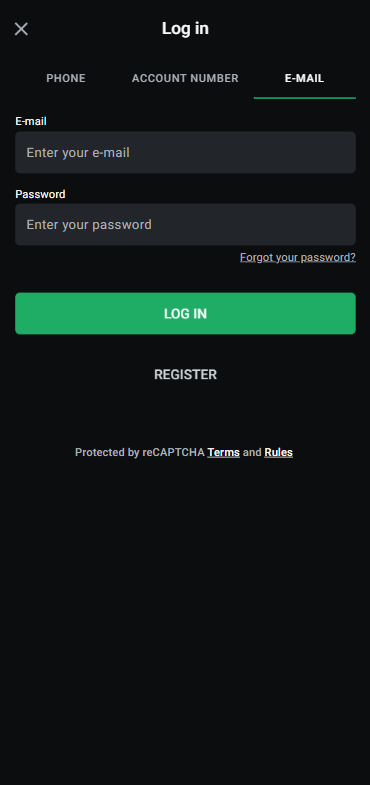
- Open the Leon website or launch the mobile app.
- Locate the "Login" button, typically found in the upper-right corner of the screen.
- Enter your registered email address (or username) and your password.
- Click "Log In" to access your account dashboard.
- If you've enabled two-factor authentication, enter the code sent to your phone or email when prompted.
That's it. Once inside, you'll have immediate access to your balance, open bets, deposit options, and everything else. If you don't have an account yet, we cover the registration process further down this page.
Login Leon via Official Website
Desktop login is the most familiar route for many users. Navigate to the official Leon website using any modern browser, whether that's Chrome, Firefox, Safari, or Edge. The login fields sit prominently on the homepage. Type your credentials, hit enter, and you're in. During our Leon review 2026 testing, page load times were consistently fast and the login form rendered without issues across all browsers we tried.
One thing worth mentioning: always double-check you're on the correct URL. Phishing sites occasionally mimic popular betting brands, so bookmarking the real Leon official site is a smart move. If you're unsure about a link, type the address manually.
Login Leon via Mobile App
Leon offers a mobile app for both Android and iOS users. The login screen mirrors the desktop version: email or username field, password field, and a login button. On Android, the app may be available as a direct APK download from the Leon website if it isn't listed on Google Play in your region. iOS users can grab it from the App Store where available, or use the mobile-optimized web version as an alternative.
We tested the mobile experience extensively. Placing live bets, checking cashier options, uploading verification documents... all of it worked without feature gaps compared to desktop. The app felt responsive and the login was instant once credentials were entered.
Fingerprint or Face ID Login
If you're using the Leon mobile app on a device that supports biometrics, you can enable Face ID or fingerprint login for quicker access. After your first successful login, the app will typically prompt you to activate biometric authentication. Accept it, and from that point on, a quick scan replaces the need to type your password every time.
This feature works through your device's native security APIs. Leon's app never stores your actual biometric data; it simply receives a confirmation from your phone's operating system that the scan matched. You can disable this anytime in the app's settings and revert to manual password entry. If your device doesn't support app-level biometric prompts, your phone's password manager (like iCloud Keychain) can still autofill your Leon credentials after a biometric check at the system level.
Leon
Common Login Problems & Solutions
Nobody wants to be locked out of their account, especially when there's a match about to start. Here are the most frequent login issues Leon users encounter and how to fix them fast.
| Problem | Likely Cause | Quick Fix |
|---|---|---|
| 🔑 Forgotten password | Memory lapse or changed password recently | Use the "Forgot Password" link on the login page |
| 🚫 Account blocked/suspended | Verification pending, policy violation, or security flag | Contact Leon support directly via live chat or email |
| ❌ Credentials not recognized | Typo, caps lock on, or wrong email used | Re-enter details carefully; try alternative email if you have multiple |
| 🔧 Site under maintenance | Scheduled update or unexpected technical issue | Wait and retry after 15-30 minutes; check Leon's social channels for updates |
| 🌍 Restricted region | Accessing from a country where Leon doesn't operate | Log in when you return to a permitted region; contact support for balance concerns |
Forgotten Username or Password
It happens to everyone. If you've forgotten your password, click the "Forgot Password" link on the Leon login page. You'll be asked to enter your registered email address. Leon will send a password reset link to that email, usually within a minute or two. Click the link, set a new password that meets the strength requirements, and you're back in.
If you also can't remember which email you used to register, things get slightly more complicated. You'll need to reach out to Leon's customer support team with whatever identifying information you can provide, such as your name, date of birth, or details of previous deposits. They'll verify your identity and help you recover access. For a broader understanding of how betting accounts work, check out our sports betting guide.
Account Blocked or Suspended
A blocked account can feel alarming, but there's usually a clear reason behind it. The most common causes include incomplete identity verification, suspected multi-accounting, misuse of bonus offers, or activity flagged by Leon's security systems. Sometimes a temporary hold is placed simply because the platform needs additional documents from you before allowing further transactions.
If your account has been suspended, don't panic. Contact Leon's support team and ask for the specific reason. In many cases, providing the requested documents or clarifying a misunderstanding resolves the situation within a day or two. For serious violations of terms and conditions, the suspension may be permanent, though Leon is generally obligated to return any remaining balance that isn't connected to fraudulent activity. Familiarize yourself with your rights as a player so you know where you stand.
Login Details Not Recognized
You're sure you typed everything correctly, but the system keeps rejecting your credentials. First, check the obvious things: is caps lock on? Are you entering the right email? Did you perhaps register with a phone number instead of an email, or vice versa? Try copying and pasting your password from a password manager to eliminate typos.
If none of that works, it's possible your account was created on a different regional version of the Leon platform. Some betting brands operate multiple domains for different markets. Make sure you're logging into the correct version. When all else fails, the password reset flow is your best friend.
Website/App Maintenance
Scheduled maintenance is a normal part of running any online platform. Leon occasionally takes its services offline briefly to deploy updates, improve security, or optimize performance. When this happens, you'll typically see a branded maintenance page explaining that the site will be back shortly. Your funds, open bets, and account data remain safe during these windows.
Unscheduled outages are rarer but do occur. If you encounter a 502 or 503 error unexpectedly, give it some time. Refreshing aggressively won't help. Check Leon's social media accounts or community channels for status updates. If you had a pending live bet or withdrawal, contact support once the platform is back online to confirm everything processed correctly.
Login from Restricted Region
If you're traveling abroad and suddenly can't access your Leon account, you may be in a country where the platform doesn't hold a license to operate. Leon restricts access from certain jurisdictions to comply with local gambling laws, and attempting to bypass these restrictions using a VPN is generally against their terms of service.
The safest approach is to wait until you return to a region where Leon is available. If you have urgent concerns about your balance or pending withdrawals, reach out to customer support via email. They can often assist with account-related matters even if you can't access the main platform from your current location. For more context on how different betting sites handle regional access, our best football betting websites page compares several operators.
- Cryptocurrencies accepted
- Android app
- Live chat
How to Register at Leon
New to the platform? Registration on Leon takes just a couple of minutes. Here's the process we went through when setting up our test account for this Leon review 2026.
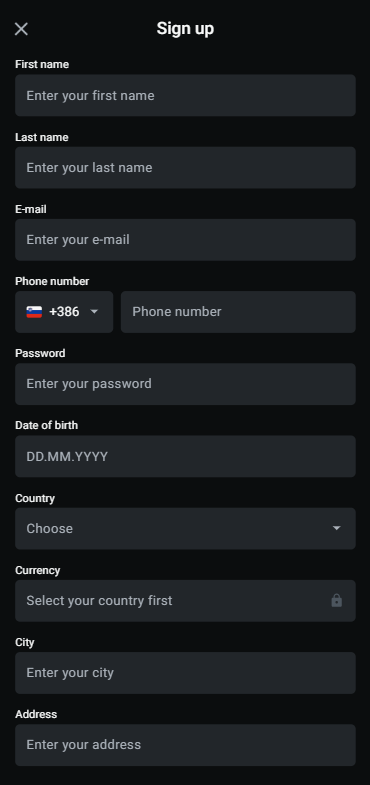
- Visit the Leon official website or open the mobile app.
- Click the "Register" or "Sign Up" button.
- Choose your preferred registration method: email or phone number.
- Fill in the required fields: name, date of birth, email/phone, and create a password.
- Select your preferred currency.
- Agree to the terms and conditions and confirm you are of legal gambling age.
- Submit the form and verify your email or phone via the confirmation link/code sent to you.
- Log in with your new credentials and make your first deposit.
New users who sign up through our link can deposit €10 and get a $15 free bet as a welcome offer. It's a low barrier to entry and a decent way to test the waters before committing more. We think that's a fair deal for anyone just getting started. Remember to gamble responsibly from the very beginning.
Leon
Verification & Login Security
After registration, Leon will require you to complete identity verification (KYC) before you can make withdrawals. This is standard across all licensed betting sites and exists to prevent fraud, money laundering, and underage gambling. The process is not difficult, but it does require a bit of preparation.
During our testing, we uploaded documents and had our account verified within roughly 24 hours. Some users report faster turnaround, others a bit longer depending on the volume of requests the compliance team is handling.
| Verification Step | What's Needed | Typical Timeframe |
|---|---|---|
| 📄 Identity Verification | Passport, national ID card, or driver's license | 12–48 hours |
| 🏠 Address Verification | Recent utility bill, bank statement, or official letter (within last 3 months) | 12–48 hours |
| 💳 Payment Verification | Photo of bank card used for deposit (middle digits obscured) | 12–48 hours |
Once verified, your login security is bolstered. We strongly recommend enabling two-factor authentication if Leon offers it, and using a unique, strong password that you don't reuse on other sites. These small steps make a big difference. For more on how we evaluate security and other aspects of betting platforms, see our how we rate page.
- Also read: Leon Bonus Code & Promotions
Customer Support for Login Issues
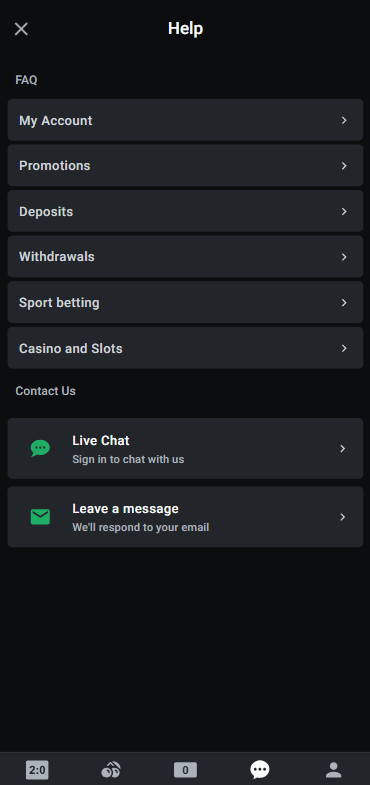
When you're stuck and self-help isn't cutting it, Leon's customer support team is your next stop. We contacted them during our testing phase to ask about withdrawal processing and got a live chat response in under five minutes, which honestly impressed us. Email took longer, closer to the 12-hour mark, but the reply was detailed and actually addressed our question rather than sending a generic template.
| Contact Method | Availability | Best For |
|---|---|---|
| 💬 Live Chat | Typically 24/7 or extended hours | Urgent login issues, quick questions |
| 📧 Email Support | 24/7 (response within 12-48 hours) | Detailed issues, document submissions, formal complaints |
| ❓ FAQ / Help Center | Always accessible on the site | Self-service answers to common problems |
For login-specific problems, live chat is almost always the fastest route. Explain your issue clearly, have your registered email address ready, and be prepared to answer a couple of security questions so the agent can verify your identity before making any changes to your account. Our editorial policy ensures we only recommend brands with responsive support channels.
Leon
Tips for Easy Leon Login
Keeping your Leon login smooth and secure doesn't require much effort, just a few good habits. After spending weeks testing the Leon betting site for this review, here's what we'd tell any new user.
- Bookmark the official Leon URL to avoid phishing sites and save yourself time.
- Use a password manager so you never forget your credentials and always have strong, unique passwords.
- Enable biometric login on your mobile device for faster, more secure access.
- Complete KYC verification early, before you actually need to withdraw, so there's no delay when the time comes.
- Turn on two-factor authentication if available. It adds seconds to your login but massively reduces the risk of unauthorized access.
- Keep your registered email accessible since it's the primary recovery channel for your account.
- Don't share your login details with anyone. Leon's support team will never ask for your full password.
Ready to get started? Visit Leon, deposit €10, and claim your $15 free bet. For a deeper look at betting terminology you might encounter on the platform, our sports betting glossary is a handy reference.
- Cryptocurrencies accepted
- Android app
- Live chat
FAQ
Can I Log in Without Registration?
No. You need a registered account to log in to Leon. Registration is free and takes only a couple of minutes. You'll need to provide basic personal details and verify your email or phone number before you can access the platform's features.
Can I Create Multiple Accounts?
No. Leon's terms of service allow only one account per person. Creating multiple accounts is considered a violation and can result in all accounts being suspended and any associated bonuses voided. Different members of the same household may each hold their own account, but promotional offers are often limited to one per household or IP address.
How to Reset My Account Password?
Click "Forgot Password" on the Leon login page, enter your registered email, and follow the reset link sent to your inbox. Choose a new strong password and confirm it. If you don't receive the email within a few minutes, check your spam folder or contact support for assistance.
What If My Account Was Stolen or Hacked?
Act immediately. If you can still access your account, change your password right away. If you can't, contact Leon's customer support via live chat or email and request an emergency account freeze. The security team will investigate recent activity, verify your identity, and help you regain access. Report any unauthorized transactions during this process.
Why Can't I Access the Leon Website/App?
Several things could be going on. The site might be undergoing maintenance, your internet connection might be unstable, or you could be accessing from a restricted region. Try a different browser or device first. If the problem persists, check Leon's social media for service status updates or contact support via email.
Is Leon Login Safe and Secure?
Yes. Leon uses HTTPS encryption to protect data transmitted between your device and its servers. The platform supports strong password requirements, optional two-factor authentication, and biometric login on mobile devices. As with any online service, your personal security habits matter too. Use unique passwords, don't log in on public Wi-Fi without a VPN, and keep your device software up to date.