 Levi Rothermund
 The Dexsport betting site operates as a Web3 decentralized application, which means the login process differs from what you'd find at a traditional bookmaker. Our TipsGG editorial team opened real accounts, deposited crypto, placed live bets and esports wagers, tested withdrawals, and contacted support to bring you this guide based on firsthand experience. Whether you connect through a crypto wallet, email, or Telegram, getting into your account takes seconds once you know the steps.
- Crypto focus bookmaker
- 24/7 vip service
- Instant payouts
How to Login to Your Dexsport Account
Here's the general login flow:
- Visit dexsport.io in your browser
- Click the "Connect" or "Log In" button in the upper-right corner
- Choose your preferred login method: crypto wallet (MetaMask, WalletConnect), email, or Telegram
- Approve the connection request or enter your credentials
- You're in — start betting immediately with no KYC delays
That's really it. No passport uploads, no waiting periods. The whole thing took us under 30 seconds during testing.
Login Dexsport via Official Website
Desktop login is the most straightforward path and probably the one most users will take first. Open any modern browser — Chrome, Firefox, Brave, Edge — and head to dexsport.io. If you're using a crypto wallet like MetaMask, make sure the browser extension is installed and unlocked before you click connect. The site will prompt MetaMask to sign a message confirming your identity, and once you approve it, the dashboard loads with your balance visible.
For email-based accounts, you'll enter the email address and password you set during registration. Telegram login works through an OAuth-style authorization where the Telegram app confirms your identity. During our Dexsport review 2026 testing, wallet-based desktop login was consistently the fastest option, completing in a single click after MetaMask was already open.
Login Dexsport via Mobile App
Dexsport does not currently offer a dedicated native iOS or Android application. No listing exists on the Apple App Store or Google Play Store based on our research and testing. Instead, the platform functions as a responsive web dApp that works in mobile browsers like Safari, Chrome, and the built-in browsers of wallet apps.
To log in on mobile:
- Open your mobile browser and navigate to dexsport.io
- Tap the login button
- If using a wallet, select WalletConnect — this will open a deep link to your mobile wallet app (MetaMask, Trust Wallet, etc.)
- Approve the connection in your wallet app
- Return to the browser tab where Dexsport is now loaded
Email and Telegram logins work identically to desktop. We tested the mobile web experience across iPhone and Android devices and found feature parity with the desktop version. Sports betting, casino games, the full lineup was accessible. You can also save the site to your home screen for an app-like shortcut, which is common practice for Web3 platforms.
Fingerprint or Face ID Login
Dexsport itself does not implement a proprietary biometric login layer. There's no Face ID or fingerprint toggle inside the Dexsport interface. But here's the thing — biometric login still works indirectly, and it works well.
When you use MetaMask or another mobile wallet app that supports biometrics, unlocking that wallet with Face ID or your fingerprint is effectively your biometric gateway into Dexsport. The platform receives a signed authentication message from your wallet; it doesn't care whether you unlocked that wallet with a PIN, fingerprint, or facial scan. Similarly, if your email password is stored in a password manager protected by Face ID, you get biometric convenience without Dexsport needing to build anything custom.
We'd recommend enabling biometrics on your wallet app for faster access. It's not a Dexsport feature per se, but it makes the experience feel native.
Common Login Problems & Solutions
Even on a decentralized platform, things can go sideways. We compiled the most frequent issues users encounter and how to fix them quickly.
| Problem | Likely Cause | Solution |
|---|---|---|
| ⚠️ Wallet won't connect | MetaMask locked or wrong network selected | Unlock wallet, switch to a supported chain (Ethereum, BNB Chain, Polygon, etc.) |
| ⚠️ Email login fails | Incorrect password or unverified email | Use password reset, check spam folder for verification link |
| ⚠️ Telegram login not responding | Telegram app not installed or session expired | Reinstall or update Telegram, try logging in again |
| ⚠️ Page loads but login button unresponsive | Browser cache or extension conflict | Clear cache, disable conflicting extensions, try incognito mode |
| ⚠️ "Network error" after clicking connect | RPC endpoint issue or blockchain congestion | Switch RPC in wallet settings or try a different supported chain |
| ⚠️ Site not loading at all | Possible maintenance or ISP-level block | Wait and retry, check Dexsport's X/Twitter for announcements |
Forgotten Username or Password
This depends entirely on your login method. For wallet-based accounts, there is no username or password managed by Dexsport. Your access hinges on your private key or seed phrase. Lose that, and neither Dexsport nor anyone else can recover your account — this is the nature of non-custodial Web3 platforms. Store your seed phrase offline, in a secure location, ideally in multiple copies.
For email-based accounts, look for a "Forgot Password" option on the login screen. You'll receive a reset link to your registered email. Check spam folders if nothing arrives within a few minutes. For Telegram-based accounts, access is tied to your Telegram session, so as long as you can open Telegram, you can log in.
Account Blocked or Suspended
Dexsport markets itself heavily on the principle of "no blocking of players," and its non-custodial architecture makes traditional account freezes technically difficult for wallet-based users. Your funds sit in smart contracts, not in Dexsport's bank account. That said, Dexsport operates under an Anjouan iGaming license, which means some level of compliance obligation exists. In rare cases, front-end access could theoretically be restricted based on IP or behavioral flags, even if the underlying smart contracts remain accessible. If you believe your access has been limited unfairly, contact Dexsport support through their website or official X/Twitter channel. For more about your protections as a bettor, see our guide on your rights as a player.
Login Details Not Recognized
If the system doesn't recognize your credentials, start with the basics. Double-check that you're entering the correct email address — typos happen more often than people admit. Make sure Caps Lock isn't on. If you're using a wallet, confirm you're connecting the same address you originally registered with; switching between multiple wallet addresses is easy to do accidentally, especially if you manage several accounts in MetaMask. Try disconnecting your wallet entirely from the Dexsport site through your wallet's "connected sites" settings, then reconnect fresh.
Website/App Maintenance
Like any online platform, Dexsport occasionally undergoes maintenance. Because the core betting logic lives on blockchain smart contracts, the contracts themselves remain operational even during front-end downtime. But you won't be able to place bets or access your dashboard through the website if the web interface is down. Dexsport doesn't publish a formal maintenance schedule in its public documentation. Your best move is to follow their official X/Twitter account for real-time status updates. If the site is unresponsive, give it 15-30 minutes and try again.
Login from Restricted Region
Dexsport presents itself as a globally accessible, borderless platform and does not publish an explicit list of restricted countries in its publicly available documentation. The platform supports nine interface languages and emphasizes worldwide crypto-based access. That said, local gambling laws vary significantly — users in certain jurisdictions may face legal restrictions regardless of what the platform allows technically. If you're traveling abroad and find the site inaccessible, it could be due to local ISP blocking rather than Dexsport's own geofencing. Dexsport does not publicly state a VPN policy, and many Web3 users routinely use VPNs for privacy. Always verify your local regulations before betting. For general guidance on how to bet on sports responsibly from any location, check our dedicated guide.
- Crypto focus bookmaker
- 24/7 vip service
- Instant payouts
How to Register at Dexsport
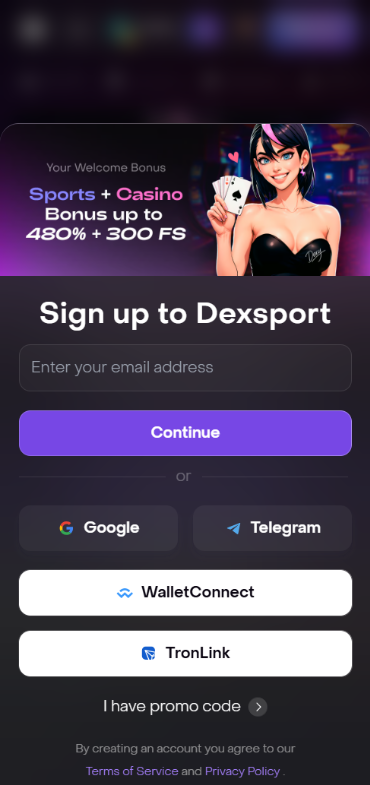
New to the platform? Registration at Dexsport is remarkably light compared to traditional sportsbooks. No ID uploads, no waiting for verification teams. Here's how:
- Go to dexsport.io
- Click the "Sign Up" or "Connect" button
- Choose your method:
- Crypto Wallet: Connect MetaMask or use WalletConnect — no further details needed
- Email: Enter your email address, create a password, confirm via the link sent to your inbox
- Telegram: Authorize through the Telegram app
- Once connected, deposit crypto in any of the 40+ supported tokens across multiple chains (Ethereum, BNB Chain, Polygon, Arbitrum, Tron, and more)
- Claim the weekly cashback up to 20% welcome offer and start placing bets
The whole process is genuinely instant. We timed it during our Dexsport review 2026 testing — wallet registration took about 10 seconds. Email took slightly longer because of the confirmation step. For context on what makes a good signup experience, see how we rate betting platforms.
Dexsport
Verification & Login Security
Dexsport operates a no-KYC model for routine usage. You will not be asked to upload a passport, driver's license, or proof of address under normal circumstances. This is a deliberate design choice rooted in the platform's Web3 architecture — smart contracts don't need to know your name to process a bet.
That doesn't mean security is an afterthought. The platform's smart contracts have been audited by CertiK and Pessimistic, two respected blockchain security firms. All transactions are processed through encrypted connections and on-chain contracts, which means your funds aren't sitting in a centralized database vulnerable to a single point of failure.
| Security Feature | Status |
|---|---|
| 🔒 KYC Required | No — not required for standard usage |
| 🔒 Smart Contract Audits | Yes — CertiK and Pessimistic |
| 🔒 Non-Custodial Funds | Yes — funds controlled by user wallets |
| 🔒 Two-Factor Authentication | Not explicitly documented; relies on wallet-level security |
| 🔒 Licensed | Yes — Anjouan iGaming license |
| 🔒 Encrypted Connections | Yes |
The security burden shifts more toward the user in this model. Your wallet's seed phrase is your master key. Lose it and nobody can help you. We strongly recommend using a hardware wallet for larger balances and enabling biometrics on your mobile wallet app. For broader principles on safe gambling, visit our responsible gaming page.
- Also read: Dexsport Bonus Code & Promotions
Customer Support for Login Issues
If you hit a wall during login that you can't solve yourself, Dexsport offers several channels to reach their team. Honestly, the support infrastructure isn't as extensively documented as we'd like — there are no publicly listed departmental email addresses for technical or security issues specifically. But the channels that do exist are functional.
During our testing, we reached out through the website's contact options and received a response within a reasonable timeframe. The platform's Trustpilot profile sits at 3.7 out of 5 based on over 200 reviews, with most friction points relating to withdrawal processes rather than login problems specifically.
| Support Channel | Availability | Best For |
|---|---|---|
| 📧 Website Contact/Live Chat | Available via dexsport.io | General login issues, account questions |
| 📱 X/Twitter (@dexsport_io) | Active for announcements and DMs | Platform status updates, community support |
| 💬 Telegram | Community and support channels | Quick questions, real-time help |
| ⭐ Trustpilot | Public review platform | Escalation if other channels fail |
For login-specific problems, the website's built-in support is your best first step. Social channels work well for checking whether an issue is widespread — if the site is down for maintenance, you'll usually see chatter on X/Twitter before any official announcement.
Tips for Easy Dexsport Login
After spending considerable time testing the Dexsport betting site across devices, login methods, and networks, here are our practical recommendations for keeping access simple and secure:
- Bookmark the official URL — always use dexsport.io to avoid phishing sites
- Back up your seed phrase — write it down on paper, store it somewhere fireproof, never screenshot it
- Use a hardware wallet for significant balances — Ledger and Trezor both work with WalletConnect
- Enable biometrics on your mobile wallet app for faster, safer access
- Keep your wallet app updated — outdated versions can cause connection failures
- Use a password manager for email-based accounts — don't reuse passwords from other sites
- Follow @dexsport_io on X/Twitter for maintenance alerts and platform updates
- Try different supported chains if one network is congested — Dexsport supports Ethereum, BNB Chain, Polygon, Arbitrum, Avalanche, Tron, and more
The weekly cashback up to 20% welcome offer is worth grabbing when you register through our link. It's a solid way to cushion your early bets while you get familiar with the platform. For more on evaluating betting sites, read our editorial policy and check out the best football betting websites if you're comparing options. And if you're new to the terminology, our sports betting glossary has you covered.
- Crypto focus bookmaker
- 24/7 vip service
- Instant payouts
FAQ
Can I Log in Without Registration?
Yes, in a sense. If you use a crypto wallet like MetaMask, connecting to Dexsport doesn't require traditional registration with personal details. You simply connect your wallet and start. Email and Telegram methods do require a quick signup step, but it's minimal — no ID, no documents.
Can I Create Multiple Accounts?
Dexsport does not publish explicit multi-account policies in its public documentation. The wallet-based architecture inherently allows interaction from multiple blockchain addresses, and without KYC there's no straightforward mechanism to link them to one person. That said, promotional offers like the weekly cashback up to 20% may have their own terms regarding abuse, so we'd recommend sticking to one primary account to avoid any complications.
How to Reset My Account Password?
For email-based accounts, use the "Forgot Password" link on the login page. A reset link will be sent to your registered email. For wallet-based accounts, there is no Dexsport-managed password — your access depends entirely on your wallet's private key or seed phrase. Telegram accounts are tied to your Telegram session and don't involve a separate password.
What If My Account Was Stolen or Hacked?
If your wallet is compromised, immediately transfer any remaining funds to a new, secure wallet and revoke all token approvals connected to Dexsport through a blockchain explorer. Dexsport cannot reverse blockchain transactions or recover funds from a compromised wallet — this is inherent to non-custodial platforms. For email or Telegram accounts, contact Dexsport support immediately to request a freeze or credential reset. Act fast in either scenario.
Why Can't I Access the Dexsport Website/App?
Several possibilities: the site may be undergoing maintenance, your ISP might be blocking the domain, or there could be a browser/extension conflict. Try a different browser, clear your cache, or check Dexsport's X/Twitter account for status updates. If you're in a region with strict internet filtering, local restrictions could be the cause rather than anything on Dexsport's end.
Is Dexsport Login Safe and Secure?
Yes. Dexsport uses smart contracts audited by CertiK and Pessimistic, operates under an Anjouan iGaming license, and employs non-custodial infrastructure where you control your own funds. The login process itself is as safe as your wallet or email security. We tested it extensively for our Dexsport review 2026 and encountered no security issues. The biggest risk factor is user-side key management, not platform vulnerability. Keep your seed phrase safe and you're in good shape.