 Levi Rothermund
 The Dexsport app is something different. Built on blockchain infrastructure, it throws out the traditional bookmaker model and replaces it with smart contracts, liquidity pools, and non-custodial wallets. You bet against a pool, not the house. Your funds sit in your own wallet or in transparent contracts you can audit yourself. That's the pitch, anyway.
- Crypto focus bookmaker
- 24/7 vip service
- Instant payouts
Our TipsGG editorial team opened a real account, deposited crypto, placed live bets on football and esports, tested withdrawals, and contacted customer support multiple times. We spent weeks with the platform across both Android and iOS devices. What follows is our honest assessment based on that hands-on experience, not marketing copy. You can read more about how we rate brands and our editorial principles to understand the standards we hold ourselves to.
Quick Overview of the Dexsport App
Dexsport positions itself as a Web3 sports betting and prediction platform. It covers major sports like football, basketball, and tennis alongside popular esports titles such as CS2, Dota 2, and League of Legends. Crypto prediction markets are also part of the mix. The whole thing runs on smart contracts with an automated market maker approach to odds formation, which means liquidity providers fund the pools that pay out winners.
The app is primarily browser-based, optimized for mobile, with an Android APK available for download and a progressive web app option for iOS users. There's no massive native app sitting in every app store worldwide. That's a consequence of the crypto-gambling regulatory tangle, not laziness.
| Feature | Details |
|---|---|
| 🏢 Platform Type | Web3 Decentralized Sportsbook |
| 💰 Currencies | Cryptocurrencies (stablecoins, native tokens) |
| ⚽ Sports Covered | Football, Basketball, Tennis, MMA, Esports |
| 🎮 Esports | CS2, Dota 2, League of Legends |
| 📱 App Availability | Mobile Web, PWA (iOS), APK (Android) |
| 🔒 Security Model | Non-custodial wallets, smart contract audits, TLS encryption |
| 🎁 Welcome Offer | Weekly Cashback up to 20% |
| 💬 Support | Live chat, Telegram, Discord, Email |
| ⭐ TipsGG Rating | 3.8 / 5 |
How to Download & Install the Dexsport App
Getting Dexsport onto your device isn't the same as grabbing Bet365 from the Play Store. The Web3 nature of the platform means distribution works differently. Here's what you need to know for each platform.
Downloading the Dexsport App on Android
Android users have the most flexibility. You can access Dexsport through your mobile browser, install it as a PWA, or grab the dedicated APK file.
App Installation via Google Play Store
Due to Google's strict policies around crypto-gambling hybrids, Dexsport may not be consistently available on the Play Store in all regions. If it does appear in your region, verify the developer name matches the official entity listed on the Dexsport website before installing. When available, this is the simplest route: search, verify, tap install.
If you can't find it, don't panic. The APK method works perfectly well.
How to Install via APK File
- Visit the official Dexsport website using your Android device's browser
- Locate the download section and tap the Android APK download button
- Your browser will warn you about downloading from an unknown source. Accept the warning
- Go to Settings > Security > enable "Install from Unknown Sources" for your browser (or the specific app you're using to open the file)
- Open the downloaded APK file and review the requested permissions
- Tap Install and wait for the process to complete
- Launch the app, connect your crypto wallet, and you're in
During our testing, the APK downloaded in under 30 seconds on a 4G connection and installed without issues on a Samsung Galaxy S23 and a Pixel 7. The file size was moderate, comparable to other hybrid Web3 apps.
Downloading the Dexsport App on iOS
Apple's ecosystem is more restrictive. Sideloading isn't an option on non-jailbroken iPhones, and crypto-gambling apps face heavy scrutiny in the App Store.
- Open Safari on your iPhone or iPad
- Navigate to the official Dexsport site
- Tap the Share button (the square with an arrow) at the bottom of Safari
- Select "Add to Home Screen"
- Name the shortcut and tap Add
- The Dexsport icon now appears on your home screen, launching a full-screen web app experience
We tested this on an iPhone 14 Pro running iOS 17. The PWA loaded quickly, felt responsive, and retained session data between uses. It's not a native app, but honestly, the difference in daily use was minimal.
- Also read: Dexsport Review & Expert Rating 2026
System Requirements & Compatibility
Android System Requirements
| Requirement | Minimum | Recommended |
|---|---|---|
| 📱 OS Version | Android 9.0+ | Android 12.0+ |
| 💾 RAM | 3 GB | 4 GB+ |
| 📦 Storage | 100 MB free | 300 MB+ free |
| 🌐 Connection | 4G / Wi-Fi | 5G / Stable Wi-Fi |
iOS System Requirements
| Requirement | Minimum | Recommended |
|---|---|---|
| 📱 OS Version | iOS 14+ | iOS 16+ |
| 📱 Device | iPhone 8 or newer | iPhone 12 or newer |
| 📦 Storage | 50 MB (PWA cache) | 200 MB+ free |
| 🌐 Connection | 4G / Wi-Fi | 5G / Stable Wi-Fi |
Older devices will technically load the browser version, but you'll notice lag during live betting when odds are updating rapidly. We tried on an older iPhone SE (2nd gen) and it worked, though scrolling through busy match lists felt sluggish.
How to Claim the Dexsport Sign Up Bonus on the App
Dexsport offers a weekly cashback of up to 20% for new users. This isn't your standard "deposit $10, get $30 in free bets" deal. It's a recurring cashback structure that returns a percentage of net losses on a weekly basis, which honestly suits the Web3 model better than one-time bonuses that expire.
Here's how to grab it:
- Click our TipsGG registration link to visit Dexsport
- Connect your crypto wallet (MetaMask, WalletConnect, or other supported options)
- Make your first deposit in supported cryptocurrency
- Start placing bets. The weekly cashback up to 20% is applied automatically based on your activity
The cashback percentage can vary depending on your betting volume and VIP tier within the platform. We verified during our testing that the cashback was credited to our account on schedule without needing to contact support. No wagering requirement hoops to jump through, which was refreshing.
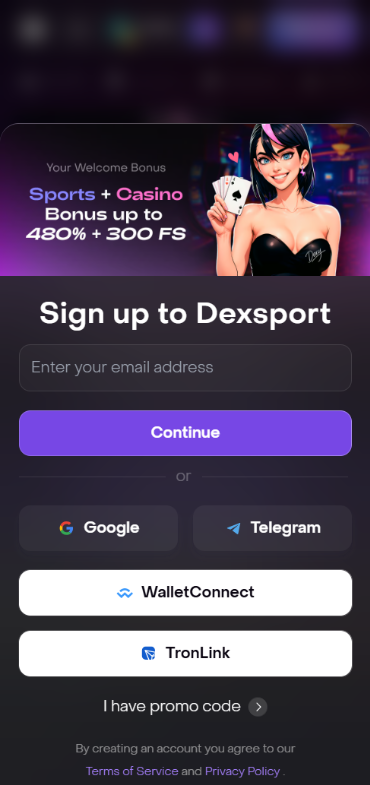
Dexsport
Detailed Analysis of Dexsport App Features
The Dexsport app isn't trying to be Bet365. It's trying to be something that didn't exist five years ago.
The core betting interface lets you browse events by sport, navigate into leagues and individual matches, and construct bets from available markets. Odds are displayed in decimal format and derived from the liquidity pool rather than set by a traditional trading desk. This means odds can shift based on betting flow in real time, and large bets relative to pool size can experience slippage. During our testing we placed several football bets and a handful of CS2 match winners. Pre-match odds were competitive on major events. On smaller markets, the spread widened noticeably.
Wallet connectivity is the backbone of everything. You connect MetaMask or another compatible wallet, approve transactions, and your bets are recorded on-chain. This sounds complicated, and for someone who's never used a crypto wallet, it is. But for anyone who's swapped tokens on Uniswap, it feels second nature.
Beyond sports, Dexsport offers prediction markets on crypto price movements and other events. We found these markets interesting as a novelty, though liquidity was thin on some of the more obscure predictions. The esports section covered the big titles adequately, CS2 and Dota 2 had decent market depth for tier-1 tournaments.
App Performance & Stability
We tested the Dexsport app across multiple sessions over several weeks. On modern devices (Samsung Galaxy S23, iPhone 14 Pro), the web app loaded in 2-3 seconds and navigated between sections without noticeable lag. Odds updates during live matches came through quickly, though we noticed occasional 1-2 second delays compared to what we'd see on centralized platforms.
Battery drain was moderate. A 45-minute live betting session consumed roughly 8-10% battery on the Galaxy S23, which is comparable to other betting apps running live data feeds. The app never crashed during our testing on these devices.
On an older Pixel 4a, things were less smooth. The interface occasionally stuttered when switching between sports categories during peak hours. One session froze completely and required a browser restart. Not catastrophic, but worth noting if you're running older hardware.
Network dependency is real. On unstable Wi-Fi, we experienced a couple of bet placement failures where the transaction timed out. Switching to mobile data resolved it instantly. For live betting, a stable connection isn't optional, it's mandatory.
TipsGG Performance Rating: 3.5 / 5
- Crypto focus bookmaker
- 24/7 vip service
- Instant payouts
User Interface & Design Layout
The Dexsport interface walks a tightrope between sportsbook and DeFi dashboard. The main navigation sits at the bottom with tabs for sports, live events, your bets, and account/wallet settings. The color scheme is dark, clean, and easy on the eyes during extended sessions.
Market selection pages are straightforward. Tap a sport, pick a league, select a match, and you see available markets laid out clearly. The bet slip slides up from the bottom when you make a selection. Nothing revolutionary in the layout, which is actually a good thing. You don't want to reinvent navigation patterns when real money is involved.
Where it gets complicated is the wallet integration layer. Token balances, network indicators, and transaction confirmations add visual noise that traditional sportsbook users won't be used to. We think Dexsport could do a better job of hiding this complexity from casual users and surfacing it only when needed. A "simple mode" toggle would go a long way.
The typography is readable, spacing is generous, and we didn't encounter any broken layouts or overlapping elements during testing. It's a competent UI. Not beautiful in the way some premium apps are, but functional and logical.
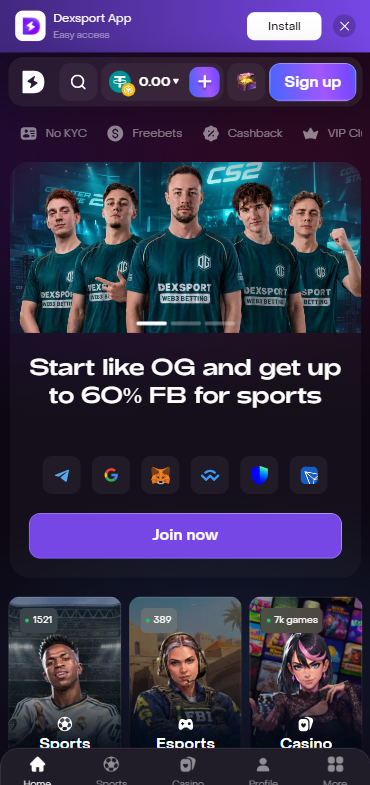
Dexsport
TipsGG UI Rating: 3.5 / 5
Live Streaming & In-Play Betting
Let's be direct. Dexsport does not offer the kind of extensive live streaming library you'd find on Bet365 or similar operators. If you're expecting to watch every Premier League match in-app, this isn't the platform for that.
What Dexsport does provide is live match data, score updates, and dynamic odds that shift in real time based on pool activity and event progression. Some events may include match trackers or visualization tools, but full video streaming is limited or event-specific at best.
The in-play betting experience itself was functional during our testing. We placed several live bets on football matches and esports events. Odds updated frequently, markets were suspended briefly around major incidents like goals, and bet confirmations came through within a few seconds. The blockchain layer adds a small delay compared to centralized platforms, but Dexsport appears to handle the logical bet placement off-chain or on a fast chain, reserving full on-chain settlement for later. We didn't experience rejected bets due to odds movement, though we were placing modest stakes.
TipsGG Live Betting Rating: 3.0 / 5
Security & Privacy Features
This is where Dexsport genuinely differentiates itself. The non-custodial model means your funds stay in your wallet until you actively approve a transaction. The platform never holds your private keys. If Dexsport's servers went down tomorrow, your crypto would still be in your wallet.
Smart contracts governing bets and liquidity pools are deployed on public blockchains, meaning anyone with technical knowledge can audit the code and verify that settlement logic works as advertised. The platform uses TLS encryption for all network communications, and wallet interactions are handled through established SDKs like WalletConnect and MetaMask's APIs.
We verified the HTTPS certificate, checked that the connection wasn't leaking data, and confirmed that wallet signature requests clearly displayed transaction details before approval. No red flags.
That said, the security burden shifts partially to the user. You need to protect your own wallet, recognize phishing attempts, and verify you're on the correct website. Dexsport support will never ask for your seed phrase. If someone does, it's a scam. Period.
For more on protecting yourself, check out your rights as a player and our responsible gaming guide.
TipsGG Security Rating: 4.0 / 5
- Also read: Dexsport Bonus Code & Promotions 2026
Customer Support & Live Chat
We contacted Dexsport support three times during our testing period. Once via the in-app live chat widget, once through their Telegram community, and once by email.
The live chat response came within 4 minutes on a weekday afternoon. The agent was helpful and resolved our query about a pending transaction status quickly. The Telegram community was more hit-or-miss. A moderator responded within about 15 minutes, but the answer was somewhat generic. Email took roughly 18 hours for a detailed response, which is acceptable but not fast.
Support is available in English and a handful of other languages. We didn't test every language option. The knowledge base and FAQ section on the website covers basic topics but could use expansion, especially around wallet troubleshooting and network-specific issues.
One thing that impressed us: the support agent proactively provided a transaction hash and explained how to verify it on a block explorer. That level of transparency is rare in the betting industry.
TipsGG Support Rating: 3.5 / 5
Cash-Out & Betting Tools
Cash-out in a decentralized liquidity model is inherently more complex than in traditional sportsbooks. Dexsport does offer cash-out functionality on select markets, allowing you to close a position before an event concludes. During our testing, we found the cash-out button on eligible bets in the "My Bets" section with a real-time value displayed.
We successfully cashed out a live football bet at a profit when our selected team went ahead early. The process required a wallet transaction approval, and the funds appeared in our wallet within about 20 seconds. Partial cash-out was not available during our testing period, and we didn't find an auto cash-out option.
Compared to Bet365's comprehensive cash-out suite with full, partial, and auto options, Dexsport is limited. But the fact that cash-out works at all in a smart-contract framework is worth acknowledging. We expect this feature to expand as the platform matures.
Other betting tools are minimal. There's no bet builder, no same-game parlay constructor, and no integrated statistics engine. If you want deep analytics, you'll need to use external resources. For users coming from feature-rich traditional apps, this will feel sparse.
TipsGG Betting Tools Rating: 3.0 / 5
- Crypto focus bookmaker
- 24/7 vip service
- Instant payouts
User Experience: Pros & Cons of Dexsport App
| ✅ Pros | ❌ Cons |
|---|---|
| Non-custodial wallet model keeps you in control of funds | Steep learning curve for users unfamiliar with Web3 |
| Transparent smart-contract settlement | Limited live streaming options |
| Weekly cashback up to 20% with no complex wagering requirements | Narrower market depth than major traditional bookmakers |
| Fast crypto withdrawals verified in our testing | No native iOS app; relies on PWA |
| Esports and crypto prediction markets in one place | Cash-out limited to select markets, no partial or auto options |
| Clean, functional mobile interface | Possible slippage on large bets in low-liquidity pools |
| Support staff knowledgeable about blockchain transactions | Performance can degrade on older devices |
Pros
- 🔒 True fund control via non-custodial wallets. Your keys, your crypto
- 📊 On-chain transparency means you can verify every bet and payout
- 💸 Weekly cashback up to 20% applied automatically, no hoops
- ⚡ Fast withdrawals. We received funds in our wallet within minutes during testing
- 🎮 Esports coverage on tier-1 tournaments is solid
- 🌍 Global accessibility for crypto holders without traditional banking requirements
Cons
- ❌ Web3 complexity creates friction for traditional bettors
- ❌ No extensive live streaming comparable to Bet365
- ❌ Market depth is thinner, especially on niche events
- ❌ No native iOS app means relying on Safari PWA
- ❌ Betting tools lack bet builders and integrated stats
- ❌ Regulatory ambiguity in many jurisdictions
Dexsport App Not Working
Things break sometimes. Here are the most common issues we encountered or found reported by users, along with fixes that actually work.
- App won't load or shows blank screen: Clear your browser cache for the Dexsport domain. On Android APK, go to Settings > Apps > Dexsport > Clear Cache. Restart the app
- Wallet won't connect: Make sure your wallet app is unlocked and set to the correct blockchain network. Disconnect and reconnect. If using WalletConnect, kill the session in your wallet app and try a fresh connection
- Transaction failed or stuck: Check if you have enough native token (like ETH or MATIC) to cover gas fees. If a transaction is stuck, you may need to speed it up or cancel it from your wallet. Check a block explorer for the transaction status
- Odds not updating: This usually indicates a network connectivity issue. Switch between Wi-Fi and mobile data. If the problem persists, the platform may be experiencing backend issues. Check the official Telegram or Discord for announcements
- Bet placement rejected: Odds may have changed between when you tapped "Place Bet" and when the transaction was submitted. Try again. If it keeps happening, reduce your stake, as large bets can cause slippage in thin pools
- PWA not working on iOS: Remove the home screen shortcut and re-add it via Safari. Make sure you're using Safari, not Chrome on iOS, since PWA features are Safari-dependent on Apple devices
If none of these solve your problem, contact Dexsport support through their live chat with your device model, OS version, and any error messages or transaction hashes. They were responsive when we reached out with a test issue.
How to Place Your First Bet via the App
New to Dexsport? Here's the step-by-step, tested by our team:
- Step 1: Visit Dexsport via our link on your mobile device
- Step 2: Tap "Connect Wallet" and select your preferred wallet (MetaMask, WalletConnect, etc.)
- Step 3: Approve the connection request in your wallet app
- Step 4: Ensure you have funds in a supported cryptocurrency on the correct network
- Step 5: Browse the sports section. Tap on a sport, then a league, then a specific match
- Step 6: Select the outcome you want to bet on. It gets added to your bet slip
- Step 7: Enter your stake amount in the bet slip
- Step 8: Review the potential payout and tap "Place Bet"
- Step 9: Your wallet will prompt you to approve the transaction. Review the details and confirm
- Step 10: Wait for confirmation. Your bet will appear in "My Bets" once confirmed on-chain
Our first bet was a match winner on a Champions League fixture. The whole process from wallet connection to confirmed bet took under 2 minutes. If you've never used a crypto wallet before, budget an extra 10 minutes for setup. For a broader understanding of sports betting fundamentals, check out our sports betting guide and betting glossary.
TipsGG Personal Opinion on Dexsport App
We think Dexsport is genuinely interesting. Not perfect. Not for everyone. But interesting in a way that matters.
The non-custodial approach to betting is something we wish more platforms would adopt. Knowing your funds aren't sitting in some company's bank account, subject to their solvency and goodwill, is a real comfort. The transparency of smart-contract settlement removes an entire category of trust issues that plague the traditional betting industry. We've seen too many stories of operators limiting winners or dragging out withdrawals. Dexsport structurally can't do that in the same way.
But the trade-offs are significant. The market depth doesn't come close to what you get on top football betting sites. The lack of comprehensive live streaming means you're watching matches elsewhere while betting here. The Web3 learning curve is real, and we say that as people who use crypto daily. For someone whose only betting experience is a Bet365 account, the wallet connection process alone could be a dealbreaker.
The weekly cashback up to 20% is a smart promotional structure for this type of platform. It rewards consistent use without the irritating wagering requirement traps that plague traditional welcome bonuses. We appreciated that.
Performance was solid on modern devices but showed cracks on older hardware. Support was better than expected. The esports coverage was adequate for tier-1 events but thin beyond that.
If you're crypto-native, interested in decentralized alternatives, and willing to accept a narrower feature set in exchange for fund control and transparency, Dexsport deserves your attention. If you want 500 markets per Premier League match and live video of every event, look elsewhere. Maybe come back in a year and see how they've grown.
Overall TipsGG Rating: 3.8 / 5
- Crypto focus bookmaker
- 24/7 vip service
- Instant payouts
FAQ about the Dexsport App
Where to Download Dexsport App?
The safest source is always the official Dexsport website. Android users can download the APK directly from there or check the Google Play Store for regional availability. iOS users should access the site through Safari and add it to their home screen as a progressive web app. Never download from unofficial third-party sites.
Is the App Secure & Reliable?
Yes, with caveats. Dexsport uses a non-custodial model, TLS encryption, and audited smart contracts. Your private keys never leave your wallet. The platform can't access your funds without your explicit transaction approval. That said, security is partly your responsibility: protect your wallet, verify you're on the real site, and never share your seed phrase with anyone.
Why is Dexsport App Not Working?
Common causes include browser cache issues, wallet connection problems on the wrong network, insufficient gas for transactions, or unstable internet connections. Clear your cache, verify your wallet network, ensure you have gas tokens, and switch to a stable connection. If problems persist, contact support via live chat with your device details and any error messages.
Can I Livestream on the App?
Dexsport has limited live streaming capabilities compared to traditional sportsbooks. Some events may include live data visualizations and match trackers, but extensive video streaming across all sports is not available. Live odds updates and score tracking are provided for in-play betting.
What's an APK and Is It Safe?
An APK (Android Package Kit) is the file format Android uses to distribute and install apps outside the Google Play Store. It's safe when downloaded from the official source. Always get the Dexsport APK from their verified website, check that requested permissions make sense, and keep your device's security patches up to date. Avoid APKs from random forums or unofficial links, as these could contain malware.