 Patryk Stachowiak
 The TipsGG editorial team has a real-money account at BeonBet. We deposited, claimed the 100% up to €500 welcome bonus via our official link, placed pre-match, live and esports bets, and tested withdrawals. This BeonBet 2026 guide focuses on one thing: making your BeonBet login and access flow simple, fast and safe, even if you hit problems like blocked accounts, forgotten passwords or region issues.
- Generous welcome bonuses & free spins
- Mobile-friendly betting platform
- Fast deposits & withdrawals
Everything below comes from hands-on testing plus deep research of the BeonBet betting site infrastructure, security and support. If you are brand new, you will also find a short registration and verification walkthrough, so you can go from zero to logged in and betting in a few minutes.
How to Login to Your BeonBet Account
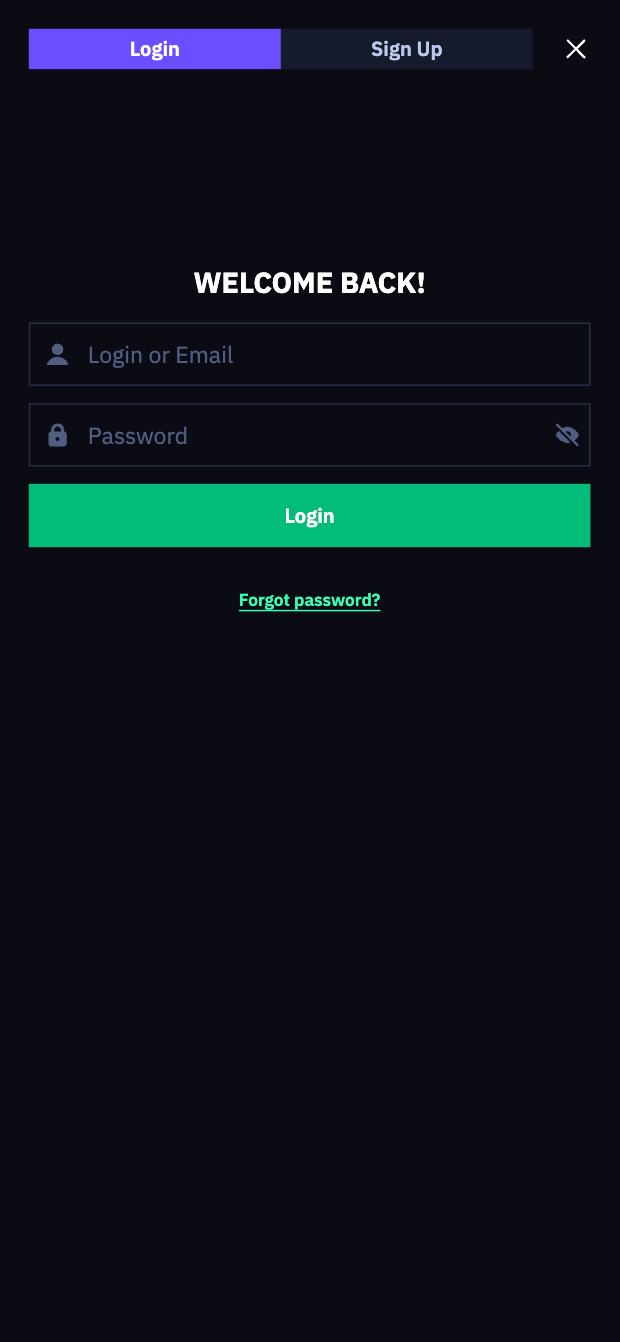
Logging in at the BeonBet betting site is quick, since there is no native app and everything runs in the browser. Here is the basic flow we used during testing:
- Go to the official BeonBet website using the secure TipsGG link: Open BeonBet
- Click the “Log in” button in the top-right corner
- Enter your registered email or username
- Type your password exactly as created (case-sensitive)
- Optionally tick “Remember me” on your personal device only
- Click “Log in” to access your account dashboard
- If the login fails, check for typos, then use “Forgot password?” if needed
On both desktop and mobile browsers, the steps are identical. No extra app, no APK, no App Store hoops.
BeonBet
Login BeonBet via Official Website
Desktop login is the cleanest way to manage your bankroll and documents. Our team used Chrome and Firefox on Windows and macOS; both worked smoothly.
Step-by-step on desktop:
- Open your browser and go through the official TipsGG link: BeonBet official access
- Confirm you see the dark green BeonBet layout and HTTPS padlock in the URL bar
- Click “Log in” (top-right)
- Type your email / username and password
- Click “Log in”
On desktop, we also found it easier to complete KYC uploads and check detailed odds and payouts, especially for multi-leg slips and live betting markets.
Login BeonBet via Mobile App
There is no native BeonBet mobile app for iOS or Android. Everything works through a mobile browser (Chrome, Safari, etc.) as a progressive web app. During our mobile testing (Android & iPhone), the login process was identical to desktop.
How to log in on mobile:
- Open your mobile browser
- Tap our secure link: BeonBet mobile
- Tap the menu icon (☰) if the login button is collapsed
- Choose “Log in”
- Enter your email/username and password
- Tap “Log in” to confirm
We recommend adding BeonBet to your home screen from your browser options. That mimics an app icon and speeds up future logins.
Also read: BeonBet Review & Expert Rating
Fingerprint or Face ID Login
BeonBet does not offer built-in Face ID or fingerprint login. There is no in-site biometric toggle. Still, you can use your device’s biometrics through password managers, which is what we did during testing.
How to get a “pseudo” biometric login:
- Save your BeonBet credentials in your device’s password manager (iCloud Keychain, Google Password Manager, 1Password, etc.)
- Enable Face ID / Touch ID / fingerprint to unlock the password manager
- On the BeonBet login page, tap the autofill prompt
- Confirm with Face ID or fingerprint, your credentials auto-fill
- Tap “Log in”
So biometrics live at the device level, not inside the BeonBet betting site. Security is still solid thanks to 256-bit SSL and optional 2FA inside your account.
Common Login Problems & Solutions
During our BeonBet 2026 tests we forced errors: wrong passwords, VPN use, maintenance windows. Most issues were easy to fix if you know where to look. Use this quick table as a first-aid kit.
| Problem 😕 | Likely Cause 🔍 | Quick Fix ✅ |
|---|---|---|
| Wrong password / “Invalid credentials” | Typos, caps lock, old password stored in browser | Re-type slowly, turn off caps lock, then use “Forgot password?” if it still fails |
| Forgotten email or username | Multiple emails used, old registration | Search your email inbox for “BeonBet”, or contact support with KYC docs |
| Account blocked / suspended | KYC pending, multi-account, VPN, bonus abuse flags | Stop trying to log in, contact support via live chat or email, send requested documents |
| “Service unavailable” / 502 errors | Website maintenance, server update | Wait 15–30 minutes, clear cache, try again or switch device/network |
| Login works at home, fails abroad | Geo-restrictions or blocked country | Check if your current country is restricted, do not use VPN to bypass, talk to support |
| 2FA code not accepted | Wrong time on device, expired code | Sync device time, request new code, or disable/reset 2FA with support help |
Forgotten Username or Password
We intentionally “forgot” our password during testing to see how fast we could restore access. The reset email arrived in under a minute.
To reset your password:
- Go to the BeonBet login page
- Click or tap “Forgot password?” (green link below the form)
- Enter the email address linked to your account
- Check your inbox (and spam) for the reset email from BeonBet
- Click the secure reset link inside that email
- Set a new, strong password and confirm
- Go back to the site and log in with the new password
If you forgot which email you used, search for “BeonBet” in all your inboxes. No luck? You will need to contact support and verify your identity.
Account Blocked or Suspended
This is where some users get nervous. BeonBet can temporarily or permanently block accounts for reasons like:
- Suspected multi-accounting from the same person/household
- Use of VPN from restricted regions
- Bonus abuse patterns or irregular betting
- Unfinished or failed KYC verification
- Payment disputes, chargebacks, or suspected fraud
On the site you usually see a generic message, not a detailed reason. From our testing and community reports, the only effective move is direct contact:
- Stop trying random logins; it does nothing
- Open live chat from the homepage if you can, or email [email protected]
- Explain the issue calmly, include your username, date of birth, and registered email
- If they request documents, send clear photos/scans to [email protected]
We think response speed is decent on chat, slower by email, especially for KYC. Just stay polite and persistent.
Login Details Not Recognized
If you are sure your details are correct but the system keeps rejecting them, work through this quick checklist:
First, check for basic input errors: wrong keyboard layout, auto-correct changing your email, or a password manager filling an old password. Try typing both email and password manually once. If that fails, reset your password using the “Forgot password?” link and set a brand new one that you have never used on BeonBet before.
If even the reset does not work, there is a chance your account is locked, closed, or tied to a different email than you remember. At that point, contact customer support, confirm your personal details, and ask them to check which email is attached to your profile.
- Also read: BeonBet Bonus Code & Promotions
Website/App Maintenance
Sometimes you do everything right and still cannot log in. During our BeonBet 2026 tests we hit a short maintenance window once: the site returned a 502 error for around 10 minutes.
Maintenance usually means server updates, new features, or security patches. During that time:
- Do not keep hammering the login button, it will not speed anything up
- Wait 10–30 minutes, then refresh
- Try a different browser or device if the error persists
- Check BeonBet live chat if available, they sometimes confirm maintenance in chat
If you see only a white page or strange layout, clear your cache and cookies for the site, then reload.
Login from Restricted Region
BeonBet blocks access from several countries (like the USA, parts of France and many others). If you travel to one of these regions, your login might fail or the site will not load at all.
Important: do not try to bypass this with a VPN. That can violate terms and get your account closed, including confiscation of winnings in the worst case. Instead, you have two real options: wait until you are back in an allowed country, or contact support to ask if temporary access from your current location is possible. For most restricted states, the answer will be no. For players from Canada, Germany, Finland, India, etc., access is normally fine, as long as you are physically in a permitted jurisdiction.
- Generous welcome bonuses & free spins
- Mobile-friendly betting platform
- Fast deposits & withdrawals
How to Register at BeonBet
If you are new and still trying to figure out how to log in, you probably need to register first. Registration is simple, we timed it at under two minutes.
- Visit the official BeonBet betting site via TipsGG: Claim 100% up to €500
- Click the green “Sign Up” button (top-right)
- Enter your email address
- Choose a unique username
- Create a strong password
- Select your preferred currency (EUR, CAD, NOK, BRL, etc.)
- Confirm you are 18+ and accept terms & privacy policy
- Click “Create an account”
- You are logged in immediately, no email code required
- Make your first deposit to trigger the 100% up to €500 welcome bonus via our link
There is no phone or social login option yet. Just a standard email-based sign up, which we found clean and fast.

BeonBet
Verification & Login Security
KYC is where some players hit friction. We had our test account verified in around 24 hours, which is acceptable, but there are reports of longer waits, especially during busy periods. Verification is mandatory before larger withdrawals and can also affect login if your account is flagged.
Typical documents requested:
- Photo ID – passport, national ID, or driver’s license
- Proof of address – recent utility bill or bank statement (last 3 months)
- Payment method proof – screenshot or photo of card/e-wallet/crypto wallet
- Sometimes a liveness selfie or video to match your ID
After KYC, your login becomes more stable: fewer random checks, smoother withdrawals, and less risk of sudden blocks.
| Security Feature 🔐 | How It Affects Login | Our Rating (1–5) |
|---|---|---|
| 256-bit SSL encryption | Protects your credentials and banking data in transit | 5/5 |
| KYC verification | Required for withdrawals, may trigger temporary login checks | 3/5 (secure, but sometimes slow) |
| Two-Factor Authentication (2FA) | Adds a one-time code on login, strong protection vs account theft | 4/5 |
| Device / IP monitoring | Suspicious locations can lead to login challenges or blocks | 4/5 |
We strongly suggest enabling 2FA in your profile settings once you are verified. A stolen password is bad, a stolen password with 2FA is usually useless to attackers.
Customer Support for Login Issues
We tested support with real login and KYC questions. Live chat responded within a couple of minutes, email took around 24–36 hours. For serious account blocks or region issues, you will probably need email + documents.
Available contact methods for BeonBet login problems:
| Channel ☎️ | How to Use It | Best For |
|---|---|---|
| Live Chat | Open the BeonBet site > chat icon (bottom-right) | Quick checks, password issues, basic blocks |
| Email – [email protected] | Send a detailed message with username, DOB, and issue | Complex login errors, region problems, suspected hacks |
| Email – [email protected] | Attach ID, proof of address, payment docs | KYC-related login blocks or verification holds |
| On-site FAQ | Scroll to footer > FAQ | Basic information on accounts, payments, legal points |
We think live chat is your first stop for almost anything. For legal or serious disputes about access, also review your rights and standards using TipsGG’s Your Rights as a Player and our Editorial Policy.
Conclusion: Tips for Easy BeonBet Login
The BeonBet betting site keeps login fairly simple. No native app, just a browser interface that works on desktop and mobile. From our direct testing, login is stable once you are verified and avoid VPNs or restricted regions. Mixed user reviews usually come from KYC delays or unclear suspensions, not from the login form itself.
To keep your access smooth and your bankroll safe, follow these habits:
- Always use the official TipsGG link and check the HTTPS padlock
- Pick a strong, unique password and store it in a secure password manager
- Enable 2FA in your account settings after registration
- Complete KYC early, before your first big win or withdrawal request
- Avoid VPNs or proxies, especially from restricted countries
- Log out on shared or public devices, never tick “Remember me” there
- Use live chat quickly if you see unusual login messages or sudden blocks
If you are ready to register and log in for the first time, you can check current odds, payouts and the 100% up to €500 welcome bonus through our official TipsGG route: Go to BeonBet.
- Generous welcome bonuses & free spins
- Mobile-friendly betting platform
- Fast deposits & withdrawals
FAQ
Can I Log in Without Registration?
No. You must create a BeonBet account first. Without registration there is no personal wallet, no bets, no casino play. You can still browse some parts of the site, check sports lines and compare odds and payouts, but to place bets or claim bonuses you need to sign up and then log in.
Can I Create Multiple Accounts?
No, BeonBet allows only one account per person. Multiple accounts, even from the same household or IP, can trigger blocks or confiscation of bonuses. If more than one person in your home wants an account, each must use their own verified identity, and you should be ready to prove it if the system flags you. For clarity on fair treatment, read TipsGG’s How We Rate and Your Rights as a Player.
How to Reset My Account Password?
Use the “Forgot password?” link on the login page. Enter your registered email, then follow the reset link you receive. Choose a new password, confirm it, and log in again. If the email never arrives, check spam, then contact support to confirm your email is correct and active.
What If My Account Was Stolen or Hacked?
Act fast. First, try to reset your password using the email reset link. Second, contact live chat or email [email protected] and ask them to freeze your account. Explain exactly what happened, including suspicious bets or withdrawals you did not authorize. They may request ID to confirm you are the real owner. Enabling 2FA and using a unique password drastically reduces the risk of this ever happening.
Why Can’t I Access the BeonBet Website/App?
Most often it is one of four things: maintenance, your internet connection, regional restrictions, or browser cache issues. Try a different device, a different browser, or mobile data instead of Wi-Fi. If the site is still unreachable while other sites load, it might be a regional block. Do not try to “fix” that with a VPN. Ask support or check if your country is on the restricted list. For general betting education, our guides on how to bet on sports and the sports betting glossary can help once you are back in.
Is BeonBet Login Safe and Secure?
From a technical angle, yes. BeonBet uses 256-bit SSL encryption, standard password-based logins and optional 2FA. The platform is licensed in Curaçao and uses reputable providers. As always, a big part of safety is on you: protect your password, avoid sharing devices, and use responsible limits. If you ever feel your betting is getting out of hand, read TipsGG’s Gamble Responsibly guide, and consider self-exclusion tools both on BeonBet and on your device.
For players comparing options, we also review the best football betting websites and other best betting sites like BeonBet, so you can pick the platform that fits your style and risk comfort.