 Patryk Stachowiak
 The TipsGG team opened a real-money account at BeonBet, deposited in crypto and fiat, placed pre-match, live and esports bets from mobile, and tested withdrawals and support. One thing became obvious fast: there is no traditional native BeonBet app on Google Play or the App Store. Instead you get a fast progressive web app (PWA) that behaves almost like a regular app once you pin it to your home screen.
- Generous welcome bonuses & free spins
- Mobile-friendly betting platform
- Fast deposits & withdrawals
So this review is about how the BeonBet mobile site / PWA performs as an “app replacement”, how to install it, what you can and cannot do from your phone, and whether it is worth signing up via our TipsGG link for the 100% sports bonus up to €500.
We tested all of this on mid-range Android and iOS devices on 4G and Wi‑Fi, with real bets and real withdrawals, not demo mode fantasies.
Quick Overview of the BeonBet App
BeonBet runs as a mobile-optimized website with PWA support. You add it to your home screen, tap the icon, and it opens full-screen like an app, but everything still runs inside your browser engine.
From mobile you get the full package: 10,000+ casino games, big esports section, standard sports, crypto & fiat payments, VIP, shop, bonuses and cash-out. No watered-down mobile version.
| Feature | Our Rating (1–5) | Comment |
|---|---|---|
| Overall mobile experience 📱 | 4/5 | Fast and complete, but no native app or push alerts |
| Sports & esports betting | 4.5/5 | Strong esports, solid sports markets, live betting works well |
| Casino & live casino | 4.5/5 | Huge library, good providers, smooth on mobile |
| Welcome bonus on mobile | 4/5 | 100% up to €500 for sports via our link, plus separate casino paths |
| Payments (incl. crypto) 💸 | 4/5 | Instant crypto, but tight withdrawal limits for big winners |
| Support on mobile | 3.8/5 | Live chat great, email slow, no phone line |
| Security & licensing | 3.8/5 | Curaçao license, SSL, 2FA, but licensing info is buried |
If you want to try it, use the official TipsGG registration path here: Register at BeonBet & claim up to €500.
How to Download & Install the BeonBet App
There is no .apk from BeonBet, no Google Play listing, no iOS app. What you actually “install” is a browser-based shortcut using the PWA function. The upside is zero storage bloat and instant updates. The downside: no native notifications, and performance is slightly behind the best true apps.
Downloading the BeonBet App on Android
On Android, BeonBet runs inside Chrome, Firefox, Brave, Samsung Internet and similar browsers. Our real tests were mostly on Chrome and Samsung Internet; both worked fine.
App Installation via Google Play Store
There is no official BeonBet app in Google Play. If you see anything called “BeonBet” in the store, treat it as fake and avoid installing it.
So your only safe path is:
- Use our official TipsGG link: BeonBet mobile site
- Open it in your mobile browser
- Install the PWA shortcut (steps below)
How to Install via APK file
BeonBet does not offer an official APK. We strongly advise against downloading any “BeonBet.apk” from random sites. That is how you end up with malware instead of odds.
Here is what you should do instead to get an app-like icon:
- Open Chrome (or your preferred browser)
- Go to BeonBet via TipsGG
- Log in or create your account
- Tap the browser menu (⋮ in Chrome)
- Select “Add to Home screen” or “Install app”
- Confirm the name (we left it as BeonBet) and tap Add
On our Android test phones this created a full-screen icon. Launching it felt like using a lightweight app. No APK, no side-loading, no security headaches.
Downloading the BeonBet App on iOS
Same story on iPhone and iPad: no native app, just the PWA route.
- Open Safari on your iPhone or iPad
- Visit BeonBet mobile
- Log in or register a new account
- Tap the Share button in Safari
- Scroll down and tap Add to Home Screen
- Confirm the name and tap Add
After that, the BeonBet icon shows up on your home screen. When we tested on an iPhone 13, it opened full-screen, kept us logged in, and handled live betting without random logouts.
- Generous welcome bonuses & free spins
- Mobile-friendly betting platform
- Fast deposits & withdrawals
System Requirements & Compatibility
BeonBet doesn’t publish strict device lists, but because it’s HTML5 + PWA, the bar is low. If your phone is from the last 5–6 years and runs an up-to-date browser, you should be fine.
Android System Requirements
- OS: Android 7.0 or higher (we tested on Android 10 & 13)
- RAM: 2 GB works, 4 GB+ is smoother
- Browser: Latest Chrome, Firefox, Brave or Samsung Internet
- Connection: Stable 4G or Wi‑Fi; at least 2 Mbps, 5+ Mbps for live casino / streams
- Storage: Only browser cache (roughly 50–200 MB over time)
On a budget Android with 2 GB RAM we saw small lags when scrolling huge slot lists, but placing bets, cash-out and payments were still smooth.
iOS System Requirements
- OS: iOS 13.0 or higher (we used iOS 16)
- Devices: iPhone 8 and newer, iPad models from ~2018 onwards
- Browser: Safari recommended for PWA install
- Connection: Similar to Android, 2 Mbps minimum, 5+ Mbps for live content
Our iPhone test handled multiple live markets, casino, and quick crypto deposits without any freezes, even with other apps in the background.
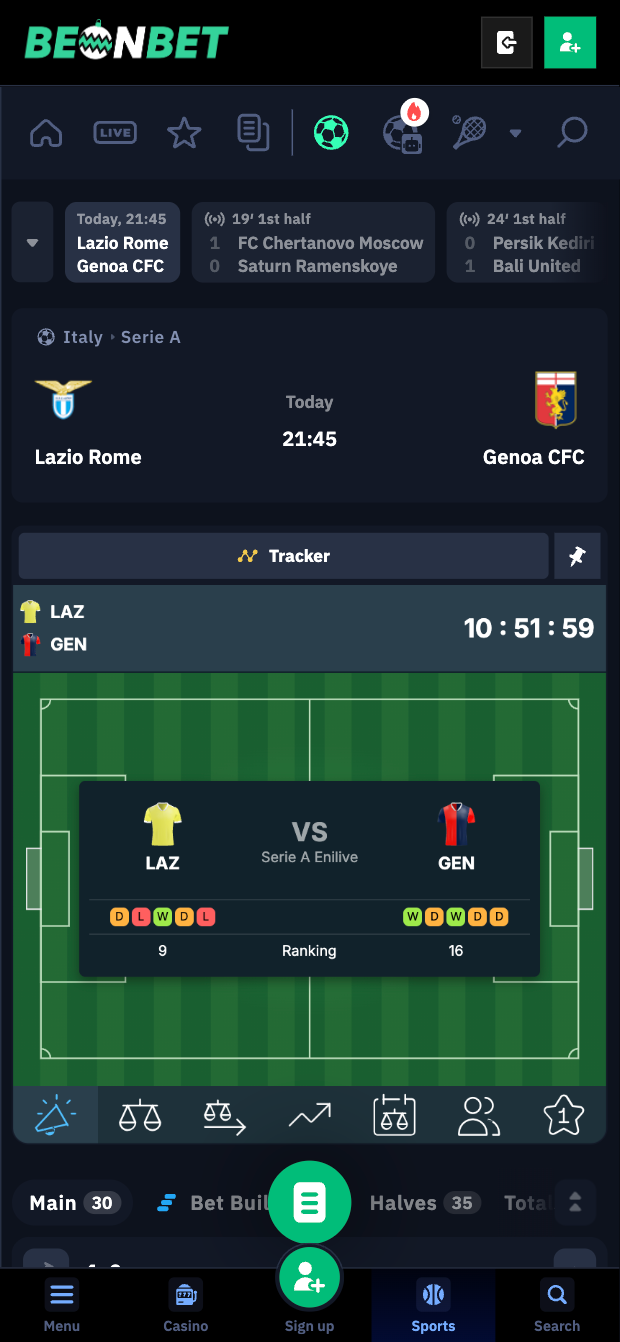
BeonBet
Detailed Analysis of BeonBet App Features
From the PWA you can access every vertical that exists on desktop:
- Sportsbook with pre-match and live markets
- Esports hub with CS2, Valorant, Dota 2, LoL, CoD, FIFA and more
- Casino with 10,000+ slots from 70+ providers
- Live casino with 800–1,200 tables and game shows
- VIP program with up to 25% cashback at the top tier
- Coin Shop where you redeem loyalty coins for bonuses, spins and free bets
- Full payments including 20+ cryptos, cards, e-wallets, Apple Pay / Google Pay
Our team tested sports, esports, casino and live casino from mobile, including claiming bonuses, requesting withdrawals and talking to live chat. No feature felt “desktop only”.
- Also read: BeonBet Review & Expert Rating
How to claim the BeonBet sign up bonus on the app
Using our official TipsGG link on mobile gives you access to the sports welcome offer: 100% bonus up to €500. On top of that you can pick separate casino bonus paths if you want more value there.
We claimed the sports bonus from Android in under 2 minutes. Funds were credited instantly after deposit.
- Tap this link: BeonBet registration
- Register a new account with correct personal data
- Verify your email right away (saves time before first withdrawal)
- Go to the Promotions section on mobile and pick the Sports 100% up to €500 bonus track
- Deposit at least the required minimum (usually €20)
- Bonus funds appear on your balance, with wagering rules shown in the promo details
Make sure you actually read the bonus terms. For detailed methodology on how we judge bonus fairness, see our TipsGG rating criteria.
App Performance & Stability
We rate BeonBet mobile performance 4/5.
- Loading speed: Home page and main sports lobby usually loaded in 1–3 seconds on 4G; live markets updated quickly without obvious delays.
- In-play betting: Odds refreshed smoothly, and our test live bets went through without “market suspended” spam, except during key match moments which is normal.
- Battery usage: Roughly in line with other betting PWAs. About 7–10% battery drop per 30 minutes of heavy use with live markets and casino.
- Crashes / freezes: We saw zero full crashes across several hours of testing on Android and iOS. Some minor UI hiccups when opening game filters too fast, but nothing serious.
Native apps from big brands still feel a bit snappier, especially when you jump between sections quickly. But BeonBet is absolutely usable for daily betting.
User Interface & Design Layout
We give the UI a 4/5. It is functional, but a little busy for complete beginners.
- Navigation: Bottom or side menus for Sports, Esports, Casino, Live, Promotions, Profile. Easy enough to learn.
- Bet slip: Pops from the bottom on mobile. You can edit stakes, combine selections, and use cash-out from the same area.
- Search & filters: Casino search works well, but with 10,000+ games you really need provider and feature filters, which are present but slightly cramped on small screens.
- Readability: Odds and markets are clear, but the amount of information on one screen can feel dense, especially in live football.
Our testers with betting experience adapted quickly. One novice tester felt overwhelmed for the first 20 minutes. A short guided tour or onboarding on mobile would help a lot.
Live Streaming & In-Play Betting
This is where BeonBet splits in two worlds.
- Esports streaming: Very good. You can watch many esports events directly inside the mobile interface, with the video at the top and live odds below. Our test streams on Dota 2 and CS2 ran without buffering on 20 Mbps Wi‑Fi.
- Traditional sports streaming: Very limited. You mostly get live match trackers and stats, not real video streams.
In-play betting itself is solid. We placed multiple live bets on football and basketball from mobile, and the slip accepted them in time, with clear odds changes prompts. Live betting gets a 4.5/5, live streaming a 3/5 due to the lack of regular sports video.
Security & Privacy Features
BeonBet is operated by Fortuna Games N.V. under Curaçao license OGL/2024/112/0974. The site uses 256-bit SSL encryption, and you can enable two-factor authentication for extra login safety.
- Data protection: All sensitive traffic is SSL-encrypted. We saw no mixed-content warnings or shady redirects during testing.
- 2FA: Optional, but we strongly recommend turning it on from your profile on mobile.
- Fairness: Games come from known providers (Evolution, Pragmatic, NetEnt, etc.), which rely on audited RNGs, but the fairness certificates are not very prominent on the mobile site.
We think security is acceptable for a Curaçao-licensed crypto-friendly book, but not at the same transparency level as UKGC giants. If you want to know more about your protections in general, read Your Rights as a Player.
Customer Support & Live Chat
Support from mobile is a mixed bag, so we rate it 3.5/5.
- Live chat: Accessible via the floating icon. In our tests, first response came within 1–2 minutes every time, 24/7. Agents were clear about bonus rules and KYC status.
- Email: Slow. Our verification-related email took 5 days to get a meaningful reply. This matches external user reports of 5–10 business days for some KYC cases.
- Phone support: None.
For anything urgent, use live chat from your phone. For document issues, prepare to wait and be patient. We are not thrilled about that.
Cash-Out & Betting Tools
On mobile, BeonBet offers standard tools:
- Cash-out: Available on many pre-match and live markets. During our tests, early cash-outs executed instantly and the new balance updated without delay.
- Bet builder: You can combine selections within a single match (especially football) for custom multi-bets.
- History & tracking: Bet history is accessible in a separate tab, but filtering could be better on small screens.
Functionally, this is good. It is not overloaded with exotic tools, but the basics are there and work reliably.
- Generous welcome bonuses & free spins
- Mobile-friendly betting platform
- Fast deposits & withdrawals
User Experience: Pros & Cons of BeonBet App
Here is how the mobile / PWA experience looks after our full real-money test.
| Pros ✅ | Cons ❌ |
|---|---|
|
|
Pros
- Very easy to “install” and use on any modern phone
- Strong esports and casino experience on mobile, not just desktop
- Crypto-first payments that actually feel instant
- Generous multi-vertical bonuses, especially if you play both sports and casino
Cons
- No real app, which will annoy users used to Play Store / App Store
- Withdrawal caps that make big wins painful to cash out
BeonBet app not working
Since everything is browser-based, most “app not working” issues on BeonBet are actually browser or connection problems. During testing we forced a few errors to see what happens.
- Site not loading at all
Check if other sites load. If not, your internet is the culprit. Switch from mobile data to Wi‑Fi or vice versa. - Endless loading spinner
Clear your browser cache for BeonBet, close all tabs, reopen and log in again. This fixed a stuck lobby on our Android phone. - Game won’t open
Some providers can be blocked by your region or by VPN. Turn off VPN, refresh, or try another game from a different provider. - Bet slip error / market suspended
In live betting this is normal during key match moments. Wait a few seconds, refresh odds, and try again. - Login loop
If you keep getting logged out, check for time/date mismatch on your device and disable aggressive ad-blockers for this site.
If none of this helps, use the mobile live chat. They usually respond within 2 minutes and can see if there is maintenance or account-specific restriction.
How to Place Your First Bet via the App
Our testers placed their first real bet from mobile in under 3 minutes. Here is the process you can copy:
- Open BeonBet on your phone
- Register and verify email
- Go to Cashier and deposit (we used both Visa and USDT; both were instant)
- Claim the 100% up to €500 sports bonus if you want it
- Tap Sports or Esports in the menu
- Select a competition (for example, football Premier League or CS2 tournament)
- Tap the odds for your selection; it appears in the bet slip
- Enter your stake and choose single / multi
- Confirm the bet; you get a confirmation message instantly
If you are new to betting, our How to Bet on Sports guide and the Sports Betting Glossary will help you understand odds, markets and terminology before you risk serious money.
Tips GG Personal Opinion on BeonBet App
We think the BeonBet mobile experience is good for what it is: a crypto-friendly PWA with full feature parity to desktop. No nonsense with half-broken mini sites. You can do everything from your phone: register, verify, deposit, bet, play casino, cash out, talk to support.
The missing native app will bother some users, especially those who love push notifications for goals and cash-out changes. But the bigger problem in our eyes is not the “app” itself, it is the operator-side stuff: restrictive withdrawal limits, sometimes slow KYC, and responsible gambling tools that lag behind the best European standards.
Against giants like Bet365 or William Hill, BeonBet wins on crypto and esports, loses on regulation strength, streaming breadth and app polish. If you are a casual or mid-stakes player who wants esports, casino variety and fast crypto payments on mobile, BeonBet is a legit option. If you are a high-roller or extremely risk-averse, we would be more cautious.
Whatever you choose, set limits, stick to them, and read our guide on gambling responsibly. This matters more than any bonus or fancy interface.
- Also read: BeonBet Bonus Code & Promotions
- Generous welcome bonuses & free spins
- Mobile-friendly betting platform
- Fast deposits & withdrawals
FAQ about the BeonBet App
1. Where to Download BeonBet App?
You cannot download a native BeonBet app from Google Play or the App Store. The only official way is to use the mobile website and add it to your home screen as a PWA. Use the safe TipsGG link here: Official BeonBet mobile access.
2. Is the App Secure & Reliable?
The mobile version uses the same security as desktop: Curaçao license, 256-bit SSL encryption, optional 2FA. In our tests, payments and bets worked as expected and we received our withdrawals. Reliability is fine, but it is not regulated by UKGC or MGA, so risk tolerance is personal. Our editorial policy explains how we handle these trade-offs.
3. Why is BeonBet App Not Working?
Most of the time it is either a connection issue, browser cache problem, VPN conflict or scheduled maintenance. Clear cache, disable VPN, try another browser, and if that fails, ask live chat from your phone. They can tell you if your account or region has specific restrictions.
4. Can I Livestream on the App?
On mobile, BeonBet offers integrated live streams for many esports events. Traditional sports streaming is minimal, so expect match trackers and stats instead of full video for football or tennis. If streaming is your top priority for football, check our best football betting sites list for alternatives.
5. What’s an APK and Is It Safe?
An APK is an Android application package file you can side-load outside the Play Store. BeonBet does not provide any official APK. Downloading a random “BeonBet.apk” from the internet is risky and can infect your phone. Use the official mobile site and PWA instead, it is safer and does not require side-loading.
If you want to understand how we arrived at these ratings and opinions, read our full methodology at How We Rate. And always keep your gambling under control with the help of responsible gaming tools.