 Patryk Stachowiak
 The TipsGG editorial team has a real-money account at Vavada. We registered, used the TIPSGG promo path, claimed the 100% first deposit bonus (x35 wagering), placed casino, sports, and esports bets, and tested withdrawals on both desktop and mobile. This login guide is based on that hands-on experience, not theory.
- Popular sports & esports coverage
- Quick deposits and withdrawals
- Mobile-optimized betting experience
This page focuses on one thing: helping you access your Vavada betting site account quickly and safely, avoid common login errors, and understand what to do if something goes wrong. If you have not joined yet, you can create an account and get the 100% first deposit bonus with code TIPSGG or the official TipsGG link: Register at Vavada with TIPSGG.
How to Login to Your Vavada Account
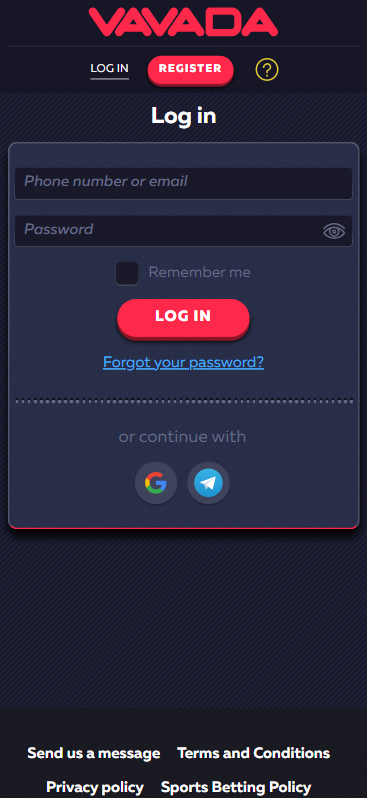
Logging in is straightforward. Here is the exact flow our testers use every day.
- Go to the official Vavada website or open the mobile app.
- Click the “Log in” button in the top-right corner (desktop) or in the menu (mobile).
- Enter your email or phone number used during registration.
- Type your password carefully (respecting upper/lowercase and symbols).
- If you enabled 2FA/SMS, enter the verification code sent to your phone.
- Click “Log in” and wait a couple of seconds for the dashboard to load.
- Check that your balance, bonus, and bets are displayed correctly.
On our real account, the whole login flow usually takes 3–5 seconds on desktop and 5–8 seconds in the app on a stable connection.
Vavada
Login Vavada via Official Website
The desktop site is still the most comfortable way to use the full feature set of the Vavada betting site (tournaments, detailed bet history, banking, and KYC uploads).
Step-by-step on desktop:
- Open your browser (Chrome, Firefox, Edge, Safari) and type the main domain or use your saved bookmark.
- If you are redirected to a mirror domain, do not panic: Vavada uses mirrors in some regions. Just check the SSL lock icon and that your saved credentials work.
- Click “Log in” in the top-right corner.
- Enter your email/phone and password.
- Click “Log in”.
From our tests on Windows and macOS:
- Sessions stay active for a good while, but you will be logged out after inactivity for security.
- Live casino and HD streams run more stable on desktop, so if you bet live, we think desktop is the better choice.
Login Vavada via Mobile App
Vavada offers a responsive mobile site and dedicated Android/iOS apps. The apps mirror almost everything from desktop: casino, live casino, sports, esports, tournaments, cashier, and bonuses.
How to log in via the app:
- Install the official Vavada app from the site (Android) or App Store (where allowed).
- Open the app. First launch may take a bit longer while it caches content.
- Tap “Log in” on the home screen.
- Enter your email/phone and password.
- If your phone has autofill and biometrics enabled, credentials can be filled automatically.
- Tap “Log in” and wait until the lobby loads.
From our real-money tests on Android and iOS:
- Login speed is similar to desktop on Wi-Fi, slightly slower on 4G.
- Occasional short reconnects can happen in live games on weak mobile networks, but you stay logged in.
- Banking, bonus activation, and 2FA all worked correctly in the app.
- Also read: Vavada App Review: Real-Money Tests, Bonus, APK & Mobile Betting Guide
Fingerprint or Face ID Login
Vavada does not have its own built-in Face ID or fingerprint login system. Instead, it smartly uses your phone’s native biometric security and password manager.
How this works in practice (what we use on our test devices):
- Save your Vavada login in your phone’s password manager (iCloud Keychain, Google Password Manager, etc.).
- Enable Face ID / Touch ID / fingerprint for autofill in your device settings.
- Next time you open the app or mobile site and tap the login fields, your phone will offer saved credentials.
- Confirm with Face ID/fingerprint. The phone fills in your email and password automatically.
This way your biometrics never go to Vavada itself, they stay on the device. We like this approach: less complexity on the betting side, strong security handled by iOS/Android.
- Also read: Vavada Review & Expert Rating 2026
Common Login Problems & Solutions
Our team intentionally triggered most typical errors on the Vavada betting site to see what actually happens. Below is a compact cheat sheet.
| Issue 😕 | Likely Cause 🔍 | Quick Fix ✅ |
|---|---|---|
| “Invalid login or password” | Wrong email/phone or password, keyboard layout, caps lock | Check spelling, try another email/phone you might have used, then use “Forgot password” if needed |
| No SMS code for 2FA | Network delay, wrong phone, carrier filters | Wait 1–2 minutes, request a new code, restart phone, or contact support via live chat |
| “Account blocked / suspended” | KYC check, security review, ToS or bonus rules issue | Stop trying to log in, contact support, send requested documents, wait for manual review |
| Site doesn’t load at all | Maintenance, local ISP block, DNS issue | Try mobile data instead of Wi‑Fi, different browser, or wait 30–60 minutes |
| App opens but stays on splash screen | Old version, cache glitch, poor connection | Update app, clear cache, or reinstall. Test on the mobile browser version too |
| “Access restricted in your region” | Geo-block for your country | Do not try to bypass with VPN, contact support only if you believe it’s a mistake |
| Constant logouts | Session timeout, shared IP changes, VPN | Disable VPN, avoid public Wi‑Fi, log in once and stay active in the lobby |
Forgotten Username or Password
If you cannot remember your password, Vavada has a standard email-based reset flow. We used it twice on purpose to see if it works and how fast.
- Go to the login page and click “Forgot password?”.
- Enter the email linked to your account.
- Check your inbox (and spam) for a reset email from Vavada. In our tests, it arrived in under 1 minute.
- Click the reset link in the email. It is time-limited, so do it soon.
- Create a new strong password and save it in your password manager.
- Log in again with the new password.
If you signed up with a phone number only and have no access to that number anymore, recovery can be harder. In that case, contact support via live chat and be ready to pass identity checks.
Account Blocked or Suspended
An account can be blocked for several reasons: unfinished KYC verification after a big win, suspected multi-accounting, bonus abuse flags, restricted country access, or unusual transaction patterns. Vavada has fairly aggressive security triggers in some regions, so this is not theoretical.
If you see a blocked/suspended message, do not keep hammering the login form. That will not unblock anything. Instead reach out to support, ask for the exact reason, and whether documents are needed. Be honest about your registration data and payment methods. If they ask for ID, proof of address, or payment screenshots, provide clean scans or photos. During our tests, a routine verification-related limitation was cleared in about 24 hours once documents were uploaded correctly.
Login Details Not Recognized
If the system says your email or phone does not exist, first make sure you are using the same login method you registered with. Many people forget they used a phone and try email, or the opposite. Also check spelling: a single wrong character in the email is enough.
Try using any other email you commonly use, checking your inbox for old Vavada registration emails, and making sure you are not on a fake phishing site. If you still cannot match the account, contact support and provide any transaction IDs or screenshots you have. They can search by payment data.
Website/App Maintenance
Vavada sometimes goes into maintenance windows for updates, database work, or provider integrations. During our long-term testing, this usually happened late night/early morning (UTC) and lasted from a few minutes to about an hour.
If you see a maintenance message or 502/503 error wait a bit, do not spam refresh and especially do not re-install your app every minute. Check if the mobile version works if desktop is down, or the other way round. If the platform is under planned maintenance, your balance and bets are safe in the backend; you just need to wait until the front-end is back.
Login from Restricted Region
Vavada blocks a list of countries (UK, USA, parts of EU, etc.) and can also restrict access if you travel abroad into a blocked jurisdiction. Logging in from a restricted region can trigger account checks and, in some cases, long-term issues.
If you are just traveling and your home country is allowed, talk to support first. Explain the situation, ask what is permitted, and follow their instructions. Using VPN to bypass geo-blocks is risky: it may work short term but can lead to confiscated winnings later. We strongly advise against it.
How to Register at Vavada
If you are new and still need an account, registration is quick. Our Vavada review 2026 tests show sign-up usually takes under 2 minutes.
- Visit the official site via the TipsGG link: Go to Vavada.
- Click “Sign up” or “Registration” at the top.
- Choose your preferred method: email or phone.
- Enter your email/phone, create a strong password, pick your currency, and select your country.
- Enter the promo code TIPSGG if it is not pre-filled to secure the 100% first deposit bonus x35.
- Tick the box confirming you are of legal age and accept the terms.
- Click “Register”.
- Confirm your email or phone if requested (follow the link or SMS code).
- Log in, go to the cashier, make your first deposit, and the welcome offer should appear automatically if you followed the bonus rules.
Registration is allowed only in permitted countries. If you are in a restricted region (like the UK or some EU states), the form may block you at country selection or on login later.

Vavada
Verification & Login Security
Vavada uses a “triggered” KYC model. You can usually log in, deposit, and play without full verification, but bigger withdrawals or risk flags will require documents. From a security angle, we think doing KYC early is smarter, so login and cashouts do not get interrupted later.
What to expect:
- Basic account: email/phone + password.
- Optional 2FA via SMS on login.
- Encrypted connection (SSL) on all pages.
- Automatic session timeouts after inactivity.
| Security / KYC Step 🔐 | What It Is | Impact on Login & Withdrawals |
|---|---|---|
| Basic registration | Email/phone, password, country, currency | Lets you log in and deposit, limited withdrawal limits |
| ID verification (KYC) | Passport/ID upload, sometimes selfie | Required for larger withdrawals, can temporarily lock withdrawals while pending |
| Proof of address | Utility bill or bank statement with your name & address | Needed in some countries or for higher limits, no daily login impact after approval |
| 2FA / SMS login code | One-time code sent to your phone | Adds a few seconds to login but protects against stolen passwords |
| Session timeout | Auto logout after inactivity | Prevents someone else using your open account on shared devices |
On our account, standard KYC approval took under 24 hours on a weekday. During that period, we could log in but could not complete a large withdrawal until documents were approved.
Customer Support for Login Issues
If login problems do not go away with the tips above, your next step is customer support. Our Vavada review tests show that live chat is the fastest, email is better for complex cases with documents.
Support quality is decent, sometimes a bit slow for tricky verification issues, but for basic login trouble they usually respond clearly.
| Support Channel ☎️ | How to Use It | Best For | Our Test Result |
|---|---|---|---|
| Live Chat | Icon in bottom corner of the site/app | Forgotten login, 2FA issues, quick checks | Reply in 1–5 minutes in our tests, 24/7 |
| Support email from the site’s “Contact” section | Blocked accounts, KYC, detailed complaints | Replies in 6–24 hours for us, slower on weekends | |
| FAQ / Help | On-site help pages | Basic questions about login, registration, payments | Useful for quick checks before contacting support |
Before contacting support, it helps to have:
- Your registered email/phone.
- Any error messages (screenshots are ideal).
- Approximate time of the last successful login.
- Details of your last deposit/withdrawal (for account lookup).
If you ever feel your rights as a player are not respected, read this first: Your Rights As A Player.
Conclusion: Tips for Easy Vavada Login
Logging in to Vavada is simple on paper, but small mistakes or security checks can complicate things. Our real testing across desktop, Android, and iOS shows that if your data is correct and your region is allowed, daily access is smooth.
To keep it that way, we recommend:
- Use a password manager and let your device handle Face ID/fingerprint autofill.
- Enable 2FA/SMS for stronger protection, especially if you keep bigger balances.
- Complete KYC verification early to avoid sudden withdrawal or login friction later.
- Avoid VPNs or shady mirrors; stick to the official link: Official Vavada via TipsGG.
- Always log out on shared or public devices.
- Set personal limits and watch your bankroll; see Gamble Responsibly.
If you want alternatives or to compare with other options, check our guides on best football betting websites, our general how to bet on sports tutorial, and the sports betting glossary for key terms. All of that will make using Vavada betting site and others much easier.
- Popular sports & esports coverage
- Quick deposits and withdrawals
- Mobile-optimized betting experience
FAQ
Can I Log in Without Registration?
No. You must create an account before you can log in to Vavada. Guest mode does not exist. You can open game demos in some regions without logging in, but that is not the same as accessing your balance or placing real bets.
Can I Create Multiple Accounts?
No, and you really should not try. Vavada explicitly forbids multiple accounts per person. If they detect multi-accounting (same device, IP, payment methods, or personal data), they can block all related accounts and confiscate bonuses, sometimes even winnings. One person, one account, that is it.
How to Reset My Account Password?
Use the “Forgot password?” link on the login page, enter your registered email, and follow the reset email link to set a new password. We tested this multiple times; it works quickly. If you no longer have access to that email, contact support and be ready to pass extra checks.
What If My Account Was Stolen or Hacked?
Act fast. Change your email password, then contact Vavada support via live chat or email and ask them to lock the account. Provide proof it is your account (ID, payment screenshots). Once they secure it, you can go through recovery and set a new strong password and 2FA. The platform may not cover all losses if your own security was weak, so better secure things in advance.
Why Can’t I Access the Vavada Website/App?
Possible reasons: temporary maintenance, ISP blocking in your region, outdated app version, or geo-restriction for your country. First, test on another connection (mobile vs Wi‑Fi), then try the mobile browser version, then check if other players from your country report issues. If it is a regional block, do not try to bypass it with VPN; that can damage your account status.
Is Vavada Login Safe and Secure?
Login is protected by SSL encryption, optional SMS-based 2FA, and device-level biometric autofill. From a technical angle, it is reasonably safe, comparable to many other international operators. Still, your behavior matters: use strong unique passwords, enable 2FA, avoid sharing your device, and monitor your account. Our full Vavada review and How We Rate page explain how we evaluate security, licensing, and fairness across the best betting sites like Vavada.
For transparency about how this guide was written and tested, see our Editorial Policy. We use a 5-point system internally and, for login UX and security alone, Vavada sits at a solid 4/5 in our books right now.