 Alex MacQuoid
 TurboWins looks like a classic “download our app and start betting” brand at first glance. It is not. There is no native Android or iOS app in Google Play or the App Store. Instead, TurboWins runs as a mobile site with a Progressive Web App (PWA) shortcut you can install on your home screen.
The TipsGG editorial team opened a real-money account at TurboWins, used our own funds, claimed the 200% up to €5,000 welcome bonus, placed pre-match, live and esports bets, played slots and live casino, tested crypto and card withdrawals, and spammed support with questions to see how they react under pressure. This review is based on that testing plus external research, not marketing copy.
Short verdict: the mobile product works, feels fast, and the bonus is huge, but the lack of a real app mean we only rate the overall TurboWins mobile experience at 4.0/5.
Quick Overview of the TurboWins App
Since there is no native app, everything you do on TurboWins runs through your browser or via the PWA shortcut. The good news: feature parity between desktop and mobile is almost total.
From our tests on Android and iOS, the PWA behaved like a light app: no crashes, no weird resizing, quick loading of odds and games. It still needs a stable connection, of course.
| Feature | TurboWins Mobile Rating (1–5) | Our Notes |
|---|---|---|
| Overall mobile experience 📱 | 4.0/5 | Fast and responsive, but no native app |
| Sports betting on mobile 🏟️ | 4.5/5 | Solid market depth, decent live section, no native widgets |
| Casino & live casino on mobile 🎰 | 4.8/5 | Huge game list |
| Welcome bonus value 🎁 | 4.8/5 | 200% up to €5,000 is massive, but 7-day wagering window is tight |
| Payments & withdrawals 💳 | 3.5/5 | Great crypto options, some delay complaints on fiat |
| Security & licensing 🔐 | 3.8/5 | Anjouan + Curaçao, no Tier-1 regulators like UKGC/MGA |
| Responsible gambling ⚠️ | 3.5/5 | Very limited tools, basically self-exclusion via support |
If you want to check the official mobile site and claim the welcome bonus, use the TipsGG link here: Open TurboWins via TipsGG.
How to Download & Install the TurboWins App
Important: there is no traditional TurboWins app in Google Play or the App Store. Anything you see there using the name is either fake or a different product. The real brand runs through:
- Your mobile browser (Chrome, Safari, Firefox, etc.)
- A PWA shortcut you add to your home screen
Our team tested both Android and iOS. In both cases, the “installation” is just saving the site as an app-like icon.
Downloading the TurboWins App on Android
There is no official TurboWins APK from the operator. No official Google Play app either. What you really do is:
App Installation via Google Play Store
This part is simple: you cannot install TurboWins from Google Play, because it is not there. If you search and find something called TurboWins on Google Play, we strongly recommend avoiding it.
Use the official TipsGG link in your browser instead: TurboWins official mobile site.
How to Install via APK file
Same story here. TurboWins does not provide an official APK download on its website. Any “TurboWins.apk” found on random third-party sites is a red flag.
The safe way to get an app-like experience on Android is the PWA shortcut:
- Open Chrome (or another modern browser) on your Android device
- Go to TurboWins via TipsGG
- Log in or register a new account
- Tap the browser menu (⋮ in Chrome)
- Select “Add to Home screen” or “Install app”
- Confirm the name (we kept it as TurboWins) and tap Add
On our Android test device, this created an icon that opened in a borderless window, just like a native app. No extra permissions, no sideloading, no APK risk.
Downloading the TurboWins App on iOS
Same idea on iPhone and iPad. No official TurboWins app in the App Store, so you use Safari and the PWA install option.
- Open Safari on your iPhone or iPad
- Visit TurboWins
- Sign up or log in
- Tap the Share icon (square with arrow)
- Scroll and tap “Add to Home Screen”
- Confirm the name and tap Add
In our iOS test, the icon opened in a standalone window, without Safari’s address bar. It felt like a simple app: full casino, sportsbook, cashier, support all there.
System Requirements & Compatibility
Since TurboWins is web-based, system requirements are light. If your device can run a modern browser, it will run TurboWins. Still, some minimums help avoid lag, especially with live betting and live casino.
Android System Requirements
- OS: Android 8.0 (Oreo) or newer recommended
- Browser: Latest Chrome, Firefox, Edge or Opera
- RAM: 3 GB or more for smooth live casino
- Storage: Only a few MB for cached PWA data, no big app download
- Connection: Stable 4G/5G or Wi-Fi, especially for in-play betting and HD streams
We tested on a mid-range Android (Android 13, 4 GB RAM). Sportsbook and slots ran smoothly, live casino needed a decent connection but did not stutter once on Wi-Fi.
iOS System Requirements
- OS: iOS 13 or newer recommended
- Browser: Safari (PWA install works best here)
- Device: iPhone 8 or newer, or any recent iPad
- Connection: 4G/5G or Wi-Fi for live betting & live casino
Our iPhone test (iOS 17) handled multiple live bets, casino, and account checks without freezing. Battery drain was acceptable, similar to other betting PWAs we tested.
TurboWins
Detailed Analysis of TurboWins App Features
All the desktop features we saw during testing were available on mobile:
- Unified wallet for casino and sportsbook
- Full 200% up to €5,000 welcome bonus accessible on mobile
- 5,000+ casino games (slots, live casino, instant games)
- Pre-match & live sports, including esports
- Crypto and fiat payments, including Bitcoin, Ethereum, Visa, bank transfer
- Cash Out, combi boosts and event builder in the sportsbook
- 24/7 live chat support
The PWA is not flashy, but it does not choke under load. Odds updated quickly during our in-play tests, and the bet slip reacted instantly to stake changes.
How to claim the TurboWins sign up bonus on the app
The headline offer is strong: 200% Bonus up to €5,000 for new players, available fully on mobile. Using the TipsGG affiliate link is the safest way to land on the correct site and trigger the standard welcome offer.
Key facts from our own claim:
- Bonus: 200% up to €5,000 on your first deposit
- Minimum deposit: €20
- Wagering: 30x on bonus + free spin winnings
- Time limit: 7 days to complete wagering
- Max bet while wagering: €5 per spin/hand
- Games: slots count 100%, table games basically 0%
How we claimed it on mobile:
- Used TurboWins via TipsGG on our phone
- Registered a new account with real details (needed later for KYC)
- Went to the cashier and deposited €50 via Visa
- Bonus balance appeared automatically: €150 bonus added to our €50 cash
- Started wagering on medium-volatility slots
We did not clear the full wagering within 7 days during testing, which tells you something: this is a big, aggressive offer. Attractive, but not easy to convert. If you want a deeper understanding of how we evaluate bonus fairness, see our How We Rate page.
App Performance & Stability
Performance is one of the bright spots of TurboWins on mobile.
- Loading speed: sportsbook pages loaded in 1–2 seconds on Wi-Fi during our tests
- Live odds refresh: near-instant, no stuck prices during in-play betting
- Casino: slots opened in 3–5 seconds, live casino in 5–8 seconds
- Crashes: none observed across several sessions on both Android and iOS
- Battery use: comparable to other browser-based books; long live casino sessions will drain, as usual
We deliberately opened multiple tabs, switched between casino and sports, and spammed the bet slip. The PWA stayed stable. This part feels solid.
User Interface & Design Layout
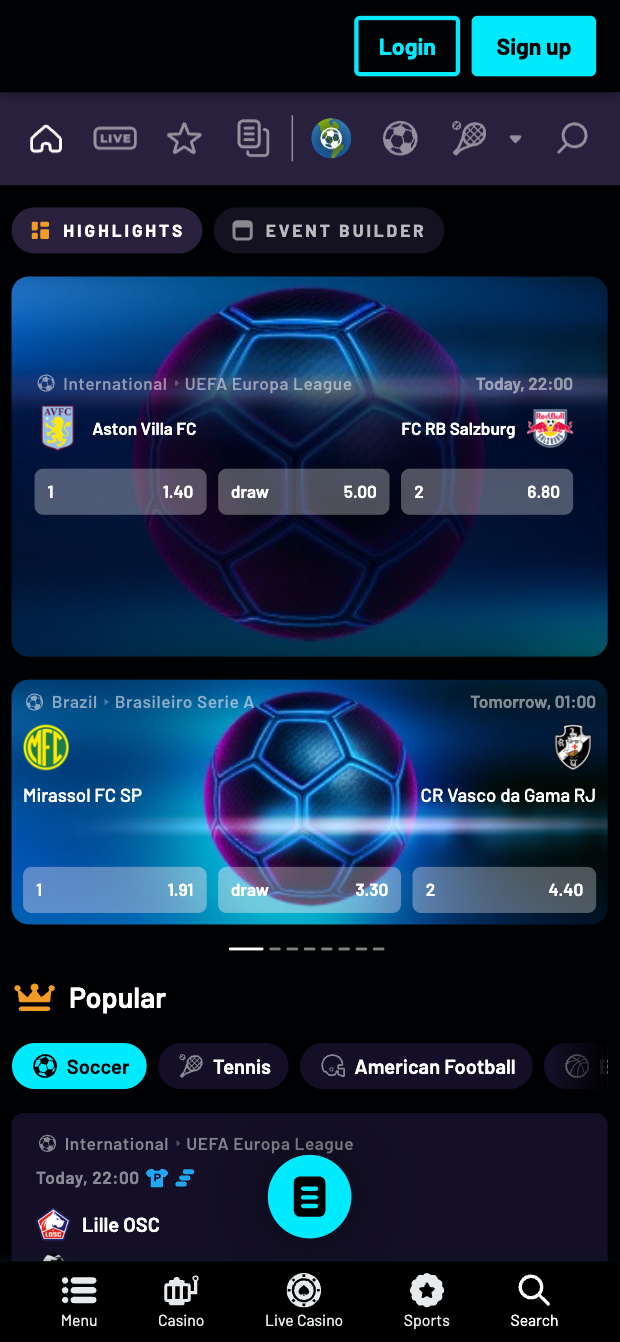
TurboWins uses a neon blue/pink theme. Some will like it, some will hate it. Functionally, it works:
- Bottom or side menus for quick jump between Sports, Casino, Live, Promotions, Profile
- Search bar in casino to find providers or specific games
- Sportsbook structure: sports list, competition list, event list, then markets
- Bet slip pinned and easy to open/close on mobile
We did notice some clutter in very long live event market lists on smaller screens. Lots of scrolling. But navigation logic is clear enough that even a new bettor can figure it out after a few minutes. If you are brand new to betting, our How to Bet On Sports guide and the Sports Betting Glossary will help with the terminology you see inside the app.
Live Streaming & In-Play Betting
TurboWins focuses more on in-play betting than streaming. During our tests:
- We did not find full-scale live video streams for the main leagues
- We saw live stats, scoreboards and visual match trackers instead
- Markets updated quickly, especially on football and tennis
- Esports live betting was available on CS2, LoL and Valorant matches
In-play experience itself was smooth. The lack of streaming is a downer compared to top-tier books, but not a deal-breaker if you mostly rely on trackers or external streams.
Security & Privacy Features
On the technical side, TurboWins uses 256-bit SSL encryption and standard KYC checks. On the regulatory side, it is licensed by the Anjouan Gaming Board and the Curaçao Gaming Authority, not by UKGC/MGA.
- Encryption: HTTPS with modern TLS, secure forms, no mixed-content warnings during our test
- KYC: we submitted ID + proof of address + selfie; verification took under 2 hours
- RNG: games from big providers (Pragmatic, Evolution, etc.) with certified RNGs
- Data: standard account data collection, no weird permissions since there is no native app
Our biggest concern is not technical security but the combination of mid-tier licensing and the number of user complaints about withdrawals. For context on your rights in these situations, read Your Rights As A Player.
Customer Support & Live Chat
We hammered support on purpose: bonus questions, KYC questions, withdrawal questions, some annoying test questions.
- Channels: 24/7 live chat, email
- Response time (live chat): 1–3 minutes to connect, usually under 5 minutes to get a clear answer
- Response time (email): we got answers within 12–24 hours
- Quality: decent, sometimes scripted, but they did not ignore detailed questions
Other players report very different experiences, especially once disputes start. During our neutral testing phase, support was responsive. During a conflict, you may not get the same level of care. That inconsistency bothers us.
Cash-Out & Betting Tools
On mobile, TurboWins offers:
- Cash Out: available on many pre-match and live markets; we used it several times and it worked instantly
- Combi Boost: extra percentage on winning accumulators with 3+ legs, min odds 1.5 each
- Event Builder: build custom multis on the same event in some sports
- RapidBet: one-tap bet placement for live markets (handy, but dangerous if you chase losses)
The tools are fine. Just remember, tools that let you bet faster also let you lose faster. If you feel your betting is slipping out of control, stop and check our Responsible Gaming guide.
User Experience: Pros & Cons of TurboWins App
Our team likes some parts of TurboWins on mobile a lot. Other parts, not at all. The split is pretty sharp.
| Pros ✅ | Cons ❌ |
|---|---|
|
|
Pros
The big positives from our testing:
- Bonus size and real-money cashback are objectively generous
- Mobile site is fast and comfortable to use for both betting and casino
- Crypto banking is smooth; our test withdrawal in USDT was processed quickly
- Game variety is broad enough that you never feel stuck with the same titles
Cons
The negatives that stopped us from giving a higher rating:
- No native app at all, just a PWA, which some users will see as “less serious”
- Regulatory profile is weaker than top-tier European books
- Complaint history around withdrawals and account management is too loud to ignore
- Responsible gambling feels like an afterthought, not a priority
TurboWins app not working
Because everything runs through a browser, most “app not working” issues are really browser or connection problems. During our tests we triggered a few errors on purpose.
- Blank screen or endless loading: clear browser cache, close all tabs, reopen via our link. Switching Wi-Fi <> mobile data often fixed it.
- Buttons not responding: this happened once on Android; a simple page refresh solved it.
- PWA icon opens but shows error: remove the icon, re-add it from the browser using “Add to Home screen”.
- Geo-block or access denied: you might be in a restricted region. No app fix for that.
- Login issues: double-check caps lock, then use password reset. If still blocked, contact live chat.
If deposits or withdrawals fail on mobile, do not keep retrying blindly. Stop, contact support, and if something feels off, withdraw what you can and step back.
How to Place Your First Bet via the App
We placed multiple bets through the PWA to see how beginner-friendly the flow is. It is fairly simple:
- Open TurboWins via TipsGG on your phone
- Log in and make sure you have funds in your account
- Tap Sports in the main menu
- Pick your sport (for example, Football)
- Select a country & league, then choose a match
- Tap the odds you want (e.g. Home win at 1.85)
- Bet slip pops up at the bottom or side
- Enter your stake (e.g. €10)
- Check potential payout, then tap Place Bet
The bet was accepted in under a second for us. For accumulators, you simply add multiple selections before confirming. If you are new to betting and feel lost with terms like “handicap” or “over/under”, keep our Glossary open in another tab.
Tips GG Personal Opinion on TurboWins App
Our team is split on TurboWins.
On one side, the mobile product is slick. The PWA is fast, casino selection is huge, the 200% up to €5,000 bonus is the kind of thing that makes bonus hunters light up. Crypto users will like the banking. Casual players who just want to spin some slots and fire a few bets on the weekend will probably be satisfied with the pure usability of the mobile site.
On the other side, we cannot ignore the licensing level, the relatively young age of the brand, and the pattern of complaints about withdrawals. This is not a disaster zone, but it is not a rock-solid old-school European book either. We think TurboWins sits in that uncomfortable middle: tempting, but not fully trustworthy yet.
Our honest stance:
- If you are a risk-tolerant player who loves big bonuses and crypto, and you accept the possibility of friction, TurboWins can be worth a shot, in small doses.
- If you are a conservative bettor who cares more about ironclad regulation and long-term reliability, you should probably look at more established brands. For football-specific betting, check our Best Football Betting Websites list instead.
We rate the mobile experience at 4.0/5. It is fun, it is fast. If you still want to try it, use the official TipsGG link, keep stakes modest, and cash out early if you run hot.
- Also read: TurboWins Review & Expert Rating
FAQ about the TurboWins App
1. Where to Download TurboWins App?
You cannot download a real TurboWins app from Google Play or the App Store. The official product is the mobile website and its PWA shortcut. To avoid clones and fake sites, use the official TipsGG link: TurboWins mobile.
2. Is the App Secure & Reliable?
Technically, yes: SSL encryption, standard KYC, reputable game providers. From a regulatory and complaint-history perspective, we are less relaxed. The Anjouan and Curaçao licenses are real, but weaker than UKGC/MGA, and there are multiple public complaints about withdrawals and account actions. We would call it “use with caution”, not “fully safe”.
3. Why is TurboWins App Not Working?
Usually because:
- Your connection is unstable
- Your browser cache is corrupted
- The PWA shortcut is outdated and needs to be re-added
- The site is doing maintenance
- You are in a restricted region
Try refreshing, clearing cache, or accessing directly via our link. If your account is blocked or you see specific error codes, contact support immediately.
4. Can I Livestream on the App?
TurboWins focuses on live stats and trackers rather than full live video streaming. During our tests we did not see top-tier live streams for major events. You can still bet in-play with dynamic odds, but you will usually need an external stream or TV for visuals.
5. What’s an APK and Is It Safe?
An APK is an Android installation file. It is only safe if it comes directly from a trusted source. TurboWins does not provide an official APK on its site, and it is not in Google Play. Any “TurboWins APK” you find on random websites is a risk for malware or phishing. Use the browser/PWA method only.
If you want to see how we judge safety, fairness and overall quality across brands, read our Editorial Policy and How We Rate. And if your gambling stops feeling fun, hit the Responsible Gaming page first, not the deposit button.