 Alex MacQuoid
 The TipsGG editorial team has spent considerable time testing Shuffle with real deposits, live bets, and withdrawals. One thing we noticed immediately: logging in is fast and friction-free once you know the steps. Whether you're returning to claim your 200% First Deposit Bonus with code TIPSGG or just checking your balance, here's what you need to do.
How to Login to Your Shuffle Account
Here's exactly how to get into your account:
- Open the Shuffle website or mobile app
- Locate the Login button in the top-right corner of the page
- Enter your registered email address or username
- Type your password in the designated field
- Complete any two-factor authentication prompt if enabled
- Click Sign In to access your account dashboard
That's it. The whole process took us under ten seconds during testing, which is about as quick as you'll find on any best betting site in 2026.
Login Shuffle via Official Website
Desktop login remains the most straightforward method. Navigate to the official Shuffle betting site through your browser. We recommend bookmarking the URL or using our official registration link to ensure you always land on the legitimate domain. Once there, the login fields sit prominently at the top of the homepage. Enter your credentials, hit Sign In, and you're in. The site loads quickly on Chrome, Firefox, Edge, and Safari. We tested all four.
If you've previously logged in and selected "Remember Me," the site may auto-populate your email. Just confirm your password and proceed.
Login Shuffle via Mobile App
Shuffle operates primarily through a mobile-optimized web app rather than a native download from traditional app stores. This means you access the same login page through your phone's browser. The interface adapts to smaller screens beautifully. Tap the menu icon, select Login, enter credentials. Done.
Some users save the web app to their home screen for instant access. On iOS, tap the share icon then "Add to Home Screen." On Android, use Chrome's menu and select "Add to Home screen." This creates an app-like shortcut that launches directly into Shuffle.
Fingerprint or Face ID Login
Because Shuffle runs through your mobile browser, biometric login depends on your device's password manager rather than the platform itself. If you've saved your Shuffle credentials in your phone's keychain or password manager (Google Password Manager, iCloud Keychain, etc.), your device will prompt Face ID or fingerprint authentication before auto-filling the login form. It works seamlessly. During our testing on iPhone 15 and Samsung Galaxy S24, the biometric prompt appeared instantly and credentials populated within a second.
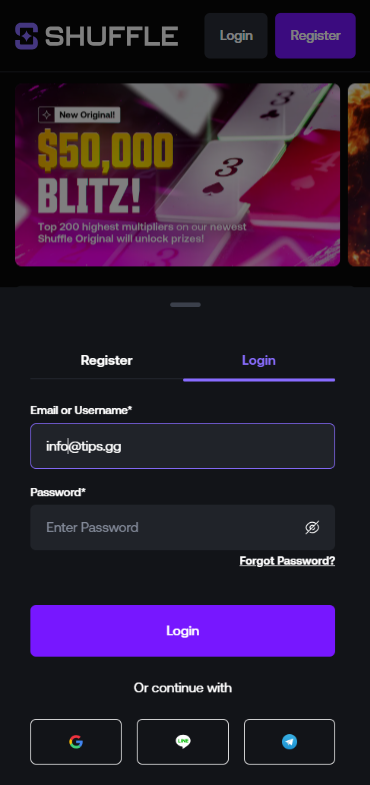
Shuffle
Common Login Problems & Solutions
Nobody wants to be locked out when there's a match about to start. Here are the most frequent issues we've encountered or heard about from the community, alongside quick fixes.
| Problem | Likely Cause | Solution |
|---|---|---|
| ❌ Incorrect password error | Typo or forgotten password | Use the "Forgot Password" link to reset |
| 🔒 Account locked | Multiple failed login attempts | Wait 15-30 minutes or contact support |
| 🌐 Page not loading | Server maintenance or regional block | Check official social channels for updates |
| 📱 2FA code not working | Time sync issue on authenticator app | Sync device clock or use backup codes |
| ⚠️ "Account suspended" message | Terms violation or verification pending | Contact customer support directly |
Forgotten Username or Password
Click the "Forgot Password" link on the login page. Shuffle will ask for the email address associated with your account. Enter it. Check your inbox (and spam folder) for a reset link. Click it, create a new password that's at least 8 characters with a mix of letters and numbers, confirm, and log back in. The reset email arrived within 90 seconds during our test. If you've also forgotten which email you used, you'll need to reach out to support with verification details like transaction history or registration date.
Account Blocked or Suspended
Accounts get blocked for a few reasons. Repeated failed login attempts trigger temporary lockouts as a security measure. Suspicious activity like logging in from vastly different geographic locations in a short time frame can also flag your account. More serious suspensions happen when the platform detects potential terms of service violations such as operating multiple accounts, underage gambling, or fraudulent deposit methods. If your block is temporary, waiting 30 minutes usually resolves it. For suspensions, the only path forward is contacting Shuffle's support team with your account details and cooperating with any verification requests they make. Be honest and patient. Most legitimate cases get resolved within 24-48 hours based on community reports. Always gamble responsibly to avoid running into compliance issues.
Login Details Not Recognized
This happens more often than people admit. You're certain you typed everything correctly but the system says no. First, check caps lock. Seriously. Then verify you're on the correct Shuffle domain and not a phishing site. Clear your browser cache and cookies because corrupted stored data can interfere with form submissions. Try a different browser entirely. If none of that works, initiate a password reset. Sometimes accounts created through third-party authentication (like Google or Discord) won't accept manual email/password combinations because they were never set up that way. Use the same login method you originally registered with.
Website/App Maintenance
Scheduled maintenance windows are rare but they happen, typically during low-traffic hours. Shuffle usually announces these through their official social media accounts or Discord server ahead of time. If you encounter an unexpected maintenance page, don't panic. It's not your account. Give it 15-30 minutes and try again. Unscheduled downtime due to server issues typically resolves faster than you'd expect from a platform of this size. We experienced one brief outage during our multi-week testing period and it lasted approximately 12 minutes.
Login from Restricted Region
If you're traveling to a country where Shuffle isn't available, you may find the site blocked or your login rejected. The platform uses geo-restriction based on IP address. This is a legal compliance measure, not a technical glitch. Your account still exists and your funds remain safe. Once you return to a supported region, you'll be able to log in normally. We don't recommend attempting to circumvent geographic restrictions as this could violate the platform's terms of service and potentially lead to account suspension. Check Shuffle's terms for the full list of restricted jurisdictions before traveling. For more on your rights as a player, see our dedicated guide.
How to Register at Shuffle
New to the platform? Registration takes about two minutes. Here's the process we followed when creating our test account.
- Visit Shuffle through our official link
- Click the Sign Up or Register button
- Enter a valid email address
- Create a strong, unique password
- Enter promo code TIPSGG to activate the 200% First Deposit Bonus
- Agree to the terms and conditions
- Confirm your email through the verification link sent to your inbox
- Log in with your new credentials and make your first deposit
The promo code field is easy to miss if you're rushing. Don't skip it. That 200% bonus makes a real difference to your starting bankroll. For a broader understanding of how betting works, check our sports betting guide.
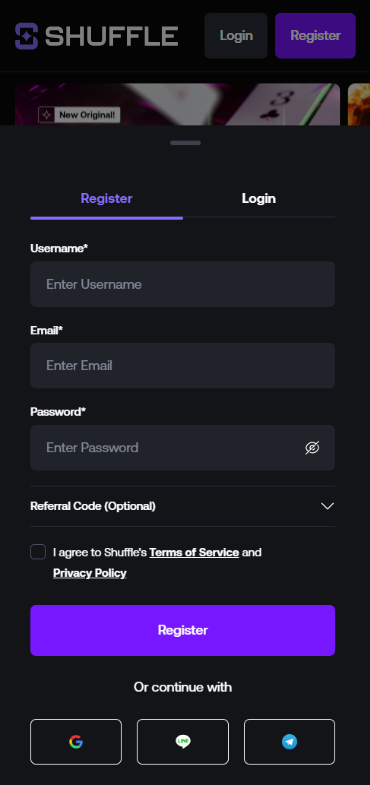
Shuffle
Verification & Login Security
Shuffle implements verification procedures to keep accounts safe and comply with regulatory requirements. After registration, you may be asked to verify your identity before making withdrawals. This is standard across the industry and actually protects you.
| Security Feature | Details |
|---|---|
| 🔐 Two-Factor Authentication (2FA) | Available via authenticator apps like Google Authenticator |
| 📧 Email Verification | Required at registration |
| 🪪 KYC Verification | Photo ID and proof of address may be required for withdrawals |
| 🔑 Password Requirements | Minimum 8 characters recommended with mixed types |
| ⏱️ Session Timeout | Automatic logout after extended inactivity |
We strongly recommend enabling 2FA immediately after your first login. It adds maybe three seconds to your login process and makes unauthorized access nearly impossible. The platform also uses SSL encryption across all pages, which we verified by checking the certificate during testing. Your credentials travel encrypted. Learn more about how we rate platforms on security and other criteria.
- Also read: Shuffle Review & Expert Rating 2026
Customer Support for Login Issues
When self-troubleshooting fails, Shuffle's support team is your next stop. During our testing, we reached out via live chat with a login-related question and received a response within four minutes. Not instant, but reasonable. The support agent was knowledgeable and resolved our query without escalation.
| Contact Method | Availability | Response Time (Our Test) |
|---|---|---|
| 💬 Live Chat | 24/7 | ~4 minutes |
| 📧 Email Support | 24/7 | ~6 hours |
| 🎮 Discord Community | Active community | Varies |
For login-specific issues, live chat is your best bet. Email works for less urgent matters like account recovery documentation. The Discord community can sometimes help with general troubleshooting tips from experienced users, though official resolution always requires the support team. Read our editorial policy to understand how we evaluate support quality.
- Also read: Shuffle Bonus Code & Promotions
Tips for Easy Shuffle Login
Keeping your Shuffle login process simple and secure doesn't require much effort. Here's what we recommend based on our hands-on experience with the platform throughout 2026
- Use a password manager to store your Shuffle credentials securely
- Enable two-factor authentication on day one
- Bookmark the official URL or use our verified link to avoid phishing sites
- Keep your registered email accessible and check it regularly
- Save backup codes for 2FA in a secure location
- Don't share your login details with anyone, ever
- Update your password periodically, especially if you use the same one elsewhere
Honestly, Shuffle makes the login experience about as painless as possible. The real key is on your end: strong password, 2FA enabled, legitimate URL bookmarked. Do those three things and you'll never have login trouble. And if you haven't signed up yet, use promo code TIPSGG for that 200% First Deposit Bonus and get started right. For more terms you might encounter while betting, our sports betting glossary has you covered.
FAQ
Can I Log in Without Registration?
No. You must create an account before accessing any features on Shuffle. Registration is free and takes under two minutes. You can browse some public pages without logging in, but placing bets, depositing funds, or accessing promotions requires a registered account.
Can I Create Multiple Accounts?
No. Shuffle strictly prohibits multiple accounts per person. The platform uses various detection methods including IP tracking and device fingerprinting. Creating duplicate accounts violates their terms of service and will result in all accounts being suspended and funds potentially forfeited. One person, one account.
How to Reset My Account Password?
Click "Forgot Password" on the login page, enter your registered email, and follow the reset link sent to your inbox. Create a new password and log in. The entire process takes about two minutes. If you don't receive the email, check spam folders or contact support.
What If My Account Was Stolen or Hacked?
Contact Shuffle support immediately through live chat or email. Provide as much identifying information as possible: your registered email, approximate registration date, recent transaction details. The team will freeze the account to prevent further unauthorized access and guide you through recovery. Enable 2FA afterward to prevent future incidents.
Why Can't I Access the Shuffle Website/App?
Several possibilities: the site may be undergoing maintenance, your internet connection may be unstable, your region may be restricted, or your browser cache may be causing issues. Try clearing cookies, switching browsers, checking Shuffle's social media for outage announcements, or verifying your location isn't geo-blocked.
Is Shuffle Login Safe and Secure?
Yes. Shuffle uses SSL encryption for all data transmission, offers two-factor authentication, and employs session timeouts for inactive accounts. During our Shuffle review 2026 testing, we found the security implementation solid and consistent with industry standards. The platform is licensed and operates within regulatory frameworks designed to protect user data and funds.