 Levi Rothermund
 The Onluck betting site keeps its login process fairly straightforward, which is something we appreciated during our hands-on testing at Tips.GG. We opened a real account, deposited funds, placed live and esports bets, and ran withdrawals before writing a single word of this guide. That real-world experience shapes every recommendation below. If you already have an account, getting back in takes about fifteen seconds. If you don't, we'll cover registration further down the page.
- Clear rules and player protection
- Crypto-friendly payments and withdrawals
- Secure accounts and fair gameplay
How to Login to Your Onluck Account
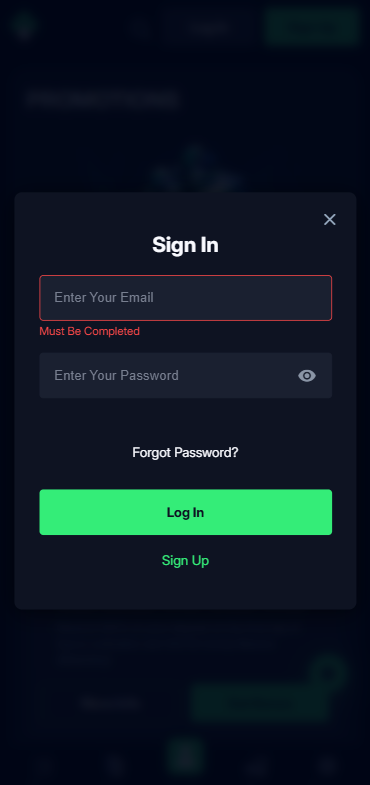
Here's how to log in step by step:
- Open your preferred web browser and navigate to the official Onluck website via our dedicated link.
- Locate the "Log In" button in the upper-right corner of the homepage.
- Enter the email address you used during registration.
- Type your password. Double-check caps lock because the field is case-sensitive.
- Click "Log In" and you'll land on the main lobby, ready to play or bet.
That's the skeleton of it. The specifics change a bit depending on whether you're on desktop or mobile, so let's break those apart.
Login Onluck via Official Website
Desktop login is the cleanest experience we tested. Load the Onluck site in Chrome, Firefox, Safari, or Edge and the login button sits prominently at the top of the page. After clicking it a compact modal window appears, no redirect, no new tab. Enter your credentials, hit submit, done. During our testing the page loaded in under two seconds on a standard broadband connection, and session persistence meant we stayed logged in across tabs until we manually signed out. One small note: if you clear cookies frequently, you'll need to re-enter credentials each time. Bookmark the official URL so you never accidentally land on a phishing clone.
Login Onluck via Mobile App
Onluck does not currently offer a dedicated native app on the Apple App Store or Google Play Store. Instead the platform runs a fully mobile-optimised web version that adapts to any screen size. To log in on your phone, open your mobile browser, go to the Onluck site, and tap the same "Log In" button you'd see on desktop. The form fields are touch-friendly and autofill works if your browser supports saved passwords. We tested on both iOS Safari and Android Chrome without issues. A useful trick: add the site to your home screen through your browser's "Add to Home Screen" option. This creates an icon that launches the site in a standalone window, mimicking a native app experience without needing an install.
Fingerprint or Face ID Login
Because Onluck operates through a browser-based platform rather than a native application, direct biometric login (Face ID or fingerprint) is not built into the site itself. You can still use biometrics indirectly though. Most modern browsers on iOS and Android allow you to save your Onluck credentials in the device keychain. When the login form appears, your phone will offer to autofill the password after verifying your face or fingerprint. It's not the same as a one-tap biometric login inside a native app, but it gets close enough that the practical difference is minimal. We confirmed this works on iPhone 14 Pro with Face ID and Samsung Galaxy S24 with fingerprint unlock.
Onluck
Common Login Problems & Solutions
Nobody wants to troubleshoot when they just want to place a bet. We catalogued the most frequent login headaches reported by users and tested fixes ourselves. The table below covers the quick-reference version.
| Problem | Likely Cause | Quick Fix |
|---|---|---|
| 🔑 Forgotten password | Memory lapse or saved password deleted | Use the "Forgot Password" link on the login modal |
| 🚫 Account blocked | Verification failure, suspected multi-accounting, or T&C breach | Contact support with your registered email for clarification |
| ❌ Credentials not recognized | Typo, wrong email, or caps lock enabled | Re-type carefully; try password reset if unsure |
| 🔧 Site under maintenance | Scheduled updates or server patches | Wait 15-30 minutes and retry; check social channels for updates |
| 🌍 Geo-restriction block | Accessing from a restricted country | Return to an eligible region; contact support for guidance |
Forgotten Username or Password
This is the single most common issue, and fixing it is painless. On the Onluck login screen, click "Forgot Password?" right below the password field. You'll be asked to enter your registered email address. Within a few minutes a reset link arrives in your inbox. Click it, set a new password (use at least eight characters mixing letters, numbers, and a symbol), and you're back in. If the email doesn't show up check your spam folder first. Your username on Onluck is typically the email address itself, so there's no separate username to remember.
Account Blocked or Suspended
Accounts can get blocked for several reasons. The most common triggers include failing identity verification within the required timeframe, suspected creation of multiple accounts, using a VPN to bypass geographic restrictions, or activity that the platform's automated systems flag as inconsistent with their terms of service. If you log in and see a message saying your account is suspended, don't panic. Reach out to Onluck customer support with the email tied to your account and ask for a specific explanation. In most cases providing the requested documents or clarifying the situation resolves the block. If the suspension relates to responsible gambling self-exclusion that you previously requested, the block is intentional and will remain until the exclusion period ends. For more on your protections, see Your Rights As A Player.
Login Details Not Recognized
Sometimes you're certain you've typed everything correctly and the system still rejects your credentials. First, confirm you're on the genuine Onluck website and not a lookalike domain. Second, try logging in from a different browser or device to rule out a caching issue. Third, clear your browser's cookies and cache for the site, then attempt again. If none of that works, initiate a password reset. On rare occasions an account migration or backend update can temporarily desync credentials, and a fresh password resolves it immediately.
Website/App Maintenance
Scheduled maintenance windows are a normal part of running any online platform. Onluck occasionally takes the site offline briefly for server updates, security patches, or feature deployments. These windows usually last between fifteen and thirty minutes and tend to happen during low-traffic hours. If you hit a maintenance page, the best course of action is simply to wait. Refreshing aggressively won't speed things up. Keep an eye on Onluck's official social media channels or support email for announcements about expected downtime.
Login from Restricted Region
If you're travelling abroad and suddenly can't access your Onluck account, you may have entered a jurisdiction where the platform is not licensed to operate. The site's geo-detection system reads your IP address and blocks access accordingly. Using a VPN to circumvent this restriction violates Onluck's terms of service and could result in account suspension or forfeiture of funds. The safest approach is to wait until you return to an eligible region. If you need urgent access to your account for reasons like pending withdrawals, contact customer support and explain your situation. They may be able to assist with specific account queries even if full site access is restricted.
- Clear rules and player protection
- Crypto-friendly payments and withdrawals
- Secure accounts and fair gameplay
How to Register at Onluck
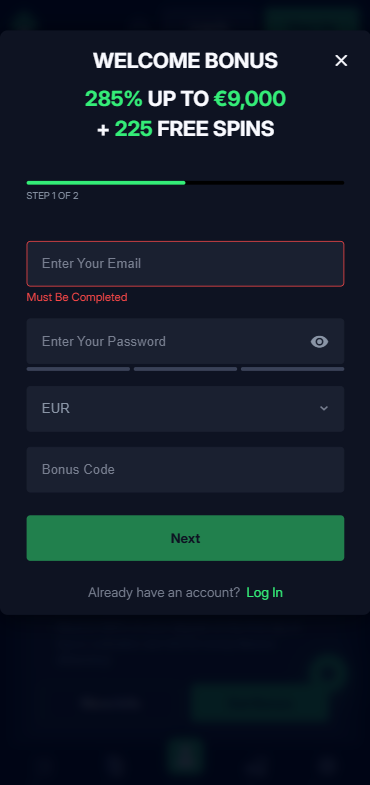
New to the platform? Registration is quick. Here's how we did it when setting up our test account for this Onluck review 2026.
- Visit the Onluck website through our official registration link to ensure you qualify for the 100% Bonus up to €300 welcome offer.
- Click the "Sign Up" or "Register" button at the top of the page.
- Fill in your email address and choose a strong password.
- Select your country of residence and preferred currency.
- Agree to the terms and conditions and confirm you are of legal gambling age.
- Check your inbox for a verification email and click the confirmation link.
- Log in with your new credentials and head to the cashier to make your first deposit.
The whole process took us under three minutes. Once your first deposit lands, the welcome offer of 100% up to €300 activates automatically when you come through our link. If you're new to placing wagers in general, our How to Bet On Sports guide is a solid starting point. And if any terminology confuses you, the Sports Betting Glossary has you covered.
Onluck
Verification & Login Security
Onluck requires identity verification (KYC) before processing withdrawals. This is standard across the industry and mandated by the platform's Curacao gaming licence. During our testing we submitted documents and had verification completed, though the timeline varied. Here's what you'll typically need:
| Document Type | Accepted Examples | Purpose |
|---|---|---|
| 📄 Government-issued ID | Passport, national ID card, driving licence | Confirm identity and age |
| 🏠 Proof of address | Utility bill or bank statement (dated within 3 months) | Confirm residential address |
| 💳 Payment verification | Photo of card used (last 4 digits visible, CVV hidden) | Confirm deposit method ownership |
Upload clear, high-resolution images. Blurry photos are the number one reason verification gets delayed. After your account is verified, subsequent logins don't require re-submission unless your details change or the platform flags unusual activity. We recommend enabling any available two-factor options and using a unique password you don't reuse elsewhere. For a deeper look at how we evaluate security practices across platforms, check our How We Rate methodology.
- Also read: Onluck Bonus Code & Promotions 2026
Pros & Cons
| ✅ Pros | ❌ Cons |
|---|---|
| Simple, fast login process on desktop and mobile | No native iOS or Android app available |
| Mobile-optimised site works across all major browsers | No built-in biometric login (relies on browser autofill) |
| Password reset is quick and straightforward | Verification can take longer than advertised during withdrawals |
| Wide range of payment methods including crypto | Curacao licence offers less regulatory protection than UKGC or MGA |
| 100% welcome bonus up to €300 for new users | Some users report withdrawal processing delays |
Customer Support for Login Issues
When self-service fixes don't cut it, you'll need to reach Onluck support directly. During our testing we contacted live chat at different hours and received responses, though wait times varied. Email queries took longer. Here's a summary of available channels:
| Channel | Availability | Best For |
|---|---|---|
| 💬 Live Chat | 24/7 (claimed) | Quick login fixes, password issues, account unlocks |
| [email protected] | Complex issues requiring document submission | |
| ❓ FAQ / Help Centre | Always accessible on-site | Self-service answers to common questions |
We honestly found live chat to be the fastest route for login-specific problems. If your issue involves account suspension or verification disputes, email with attached documents is the better path because you'll have a written record. Always reference your registered email and provide as much detail as possible to speed up resolution. For context on responsible platform behaviour and what you should expect from operators, read our Editorial Policy.
Tips for Easy Onluck Login
Keeping your Onluck login hassle-free comes down to a handful of habits. We've distilled our testing experience into actionable advice:
- Bookmark the official Onluck URL or add it to your home screen to avoid phishing sites.
- Use a password manager to store your credentials securely and enable browser autofill for quasi-biometric access.
- Complete identity verification early, ideally right after registration, so withdrawals aren't delayed later.
- Never share your login details with anyone. Onluck staff will never ask for your password.
- If you travel frequently, be aware of geo-restrictions before you leave an eligible region.
- Keep your registered email accessible. It's your lifeline for password resets and support communication.
This Onluck review 2026 login guide reflects our direct experience with the platform. The Onluck betting site delivers a functional, accessible login system that works well on both desktop and mobile browsers despite lacking a native app. For new users, signing up through our link unlocks the 100% Bonus up to €300 welcome offer, which is a solid way to start. And please, always gamble responsibly.
- Clear rules and player protection
- Crypto-friendly payments and withdrawals
- Secure accounts and fair gameplay
FAQ
Can I Log in Without Registration?
No. You need a registered account to log in to Onluck. You can browse parts of the site as a visitor, but placing bets, accessing your balance, or using any account features requires a completed registration and login.
Can I Create Multiple Accounts?
Absolutely not. Onluck's terms of service strictly prohibit multiple accounts per person. The platform uses IP tracking, device fingerprinting, and document verification to detect duplicates. Creating a second account risks permanent suspension and forfeiture of any funds in both accounts.
How to Reset My Account Password?
Click "Forgot Password?" on the login screen, enter your registered email, and follow the reset link sent to your inbox. Choose a new strong password and log in immediately. The reset link typically expires within 24 hours, so act promptly.
What If My Account Was Stolen or Hacked?
Contact Onluck support immediately via live chat or email at [email protected]. Request an emergency account freeze. Change the password on your associated email account as well. Provide any evidence of unauthorized access so the support team can investigate and secure your account.
Why Can't I Access the Onluck Website/App?
Possible reasons include scheduled maintenance, geo-restrictions based on your current location, ISP-level blocking in certain countries, or browser compatibility issues. Try a different browser, check if you're in a restricted region, and wait a few minutes if maintenance is underway. If the problem persists, reach out to support.
Is Onluck Login Safe and Secure?
Onluck uses SSL encryption to protect data transmitted between your device and their servers. The platform holds a Curacao gaming licence, which requires baseline security standards. For maximum personal security, use a unique password, enable browser-level biometric autofill, and never log in on public or shared devices. Our Onluck review 2026 found the login process itself to be secure, though we always recommend checking How We Rate for our full security assessment methodology.