 Levi Rothermund
 The Onluck mobile platform caught our attention as a relatively newer entrant in the online betting and casino space. Our TipsGG editorial team opened a real account, deposited funds, placed live bets across sports and esports markets, tested withdrawals, and timed customer support responses to give you a genuine picture of what this platform delivers. The mobile experience is browser-based rather than a standalone native app, which shapes much of what follows in this review.
- Clear rules and player protection
- Crypto-friendly payments and withdrawals
- Secure accounts and fair gameplay
Onluck operates under a Curacao license and targets players across multiple regions. The platform boasts thousands of casino games from providers like NetEnt, Evolution Gaming, and Pragmatic Play, alongside a sportsbook covering football, basketball, esports, and more. Cryptocurrency deposits are accepted. The welcome bonus of 100% up to €300 is available to new users who sign up through our link.
| Feature | Details |
|---|---|
| 📱 App Type | Mobile-optimized website (no native app) |
| 🎁 Welcome Bonus | 100% Bonus up to €300 |
| 🎮 Games Available | 5,000+ (slots, table games, live casino, sportsbook) |
| 💳 Payment Methods | Visa, Mastercard, Skrill, Neteller, Bitcoin, Ethereum, Litecoin |
| 📞 Support | 24/7 Live Chat, Email |
| 🔒 License | Curacao (365/JAZ) |
| ⚡ Min Deposit | €20 |
| 💰 Min Withdrawal | €30 |
| 🌐 Languages | English, German, Russian |
How to Download & Install the Onluck App
Here's the thing: Onluck doesn't currently offer a dedicated native app for download. Instead, the platform runs entirely through your mobile browser. That said, the mobile site is fully optimized and you can create a home screen shortcut that behaves almost like an app. We'll walk you through every option below.
Downloading the Onluck App on Android
Since there's no standalone Android application, your best bet is accessing Onluck through Chrome or any modern browser on your Android device. The site adapts to your screen size automatically.
App Installation via Google Play Store
Onluck is not available on the Google Play Store at this time. Google's policies around gambling apps can be restrictive depending on your region, which likely explains the absence. For now, the mobile website is the only Android option.
How to Install via APK file
No official APK file exists for Onluck. We strongly advise against downloading any APK claiming to be the Onluck app from third-party sources, as these could contain malware. The safest approach:
- Open Chrome on your Android phone
- Visit the official Onluck website
- Tap the three-dot menu in Chrome and select "Add to Home Screen"
- Name it whatever you like and tap "Add"
- You now have a shortcut that launches directly into the mobile site
Downloading the Onluck App on iOS
Onluck is not listed on the Apple App Store either. The process for iOS users mirrors the Android approach:
- Open Safari on your iPhone or iPad
- Navigate to the Onluck mobile site
- Tap the Share button (the square with an arrow)
- Select "Add to Home Screen"
- Confirm by tapping "Add"
This creates a web app icon on your home screen. It opens in a full-screen browser window without the Safari toolbar, which honestly makes it feel closer to a native app than you'd expect.
- Also read: Onluck Review & Expert Rating 2026
System Requirements & Compatibility
Because Onluck operates through your browser, the hardware requirements are pretty forgiving. If your phone can run a modern web browser, you're set.
Android System Requirements
- Android 6.0 (Marshmallow) or higher
- Chrome, Firefox, or Samsung Internet browser (latest version recommended)
- At least 2GB RAM for smooth performance
- Stable internet connection (4G/5G or Wi-Fi)
iOS System Requirements
- iOS 13.0 or later
- Safari browser (recommended) or Chrome for iOS
- Compatible with iPhone 8 and newer, iPad Air 2 and newer
- Minimum 2GB RAM
How to Claim the Onluck Sign Up Bonus on the App
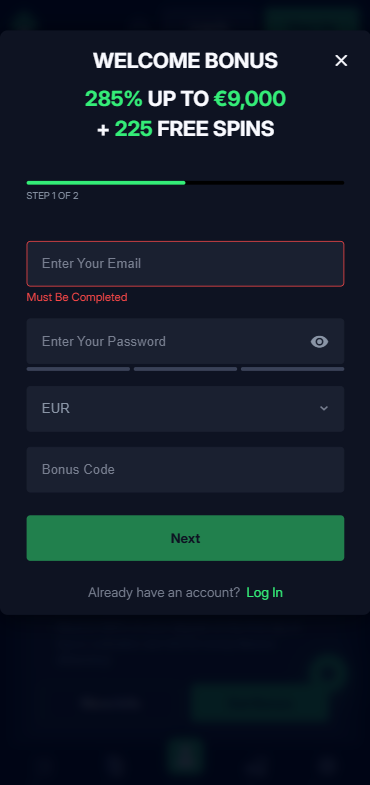
New users who register through our TipsGG affiliate link can grab a 100% bonus up to €300 on their first deposit. The process is straightforward:
- Click our registration link to visit Onluck
- Complete the sign-up form with your personal details
- Verify your email address
- Make a minimum deposit of €20
- The bonus should be credited automatically to your account
Keep in mind that wagering requirements apply. Based on our research, expect a 40x wagering requirement on the bonus amount before you can withdraw any winnings derived from it. Read the full terms on the site before depositing. We always recommend checking bonus conditions carefully, something we cover in our sports betting guide.
Onluck
Detailed Analysis of Onluck App Features
We spent considerable time testing the Onluck mobile platform across different use cases. The sportsbook covers a decent range of markets. Football, basketball, tennis, and esports are all present. We placed pre-match and live bets on Premier League matches and a couple of CS2 tournaments during our testing window.
The casino side is where Onluck really loads up. Over 5,000 games from providers including NetEnt, Microgaming, Evolution Gaming, and Pragmatic Play. Slots dominate the library, but there's a strong live casino section powered by Evolution that runs around the clock. Table game variants for blackjack, roulette, and baccarat are plentiful.
Cryptocurrency support is a notable feature. Bitcoin, Ethereum, Litecoin, and Tether are all accepted for deposits, and the platform integrates third-party conversion tools so you don't need to leave the site to swap fiat for crypto. For users who prefer traditional methods, Visa, Mastercard, Skrill, and Neteller are available.
One thing we noticed: the game filtering system works well. You can sort by provider, popularity, or category, which saves time when you're browsing a library this large on a phone screen.
- Also read: Onluck Bonus Code & Promotions 2026
App Performance & Stability
During our real-money testing sessions, the Onluck mobile site loaded consistently in about 2-3 seconds on a 5G connection. Page transitions between the sportsbook and casino sections were smooth. We didn't experience any crashes.
Battery drain was moderate. About 90 minutes of active use on a Samsung Galaxy S24 consumed roughly 15% battery, which is typical for browser-based gambling platforms. Live casino streams were the biggest drain, as expected.
We did notice occasional lag when loading the full game library page, probably due to the sheer number of thumbnails loading simultaneously. Scrolling through 5,000+ games on mobile tests any browser's rendering engine. Once you're inside an actual game, performance was solid across the slots and live dealer titles we tested.
Our rating for performance: 3.5/5. Perfectly functional, nothing spectacular.
User Interface & Design Layout
The Onluck interface uses a dark color scheme that's easy on the eyes during longer sessions. Navigation is handled through a bottom menu bar with clear icons for Home, Sports, Casino, Live Casino, and Account sections. It's intuitive enough that we didn't need to hunt for anything.
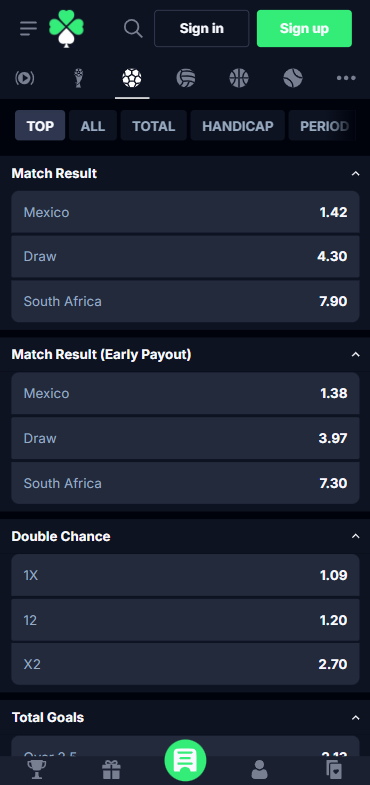
The sportsbook layout presents markets in a clean expandable format. Odds are displayed in decimal by default, with the option to switch. The bet slip slides up from the bottom of the screen, which feels natural on mobile.
Where things get a bit cluttered is the promotions page. There's a lot of information packed into small spaces, and some of the bonus terms require tapping through multiple layers to read fully. Not a dealbreaker, but it could be cleaner.
Our rating for UI/UX: 3.5/5.
Live Streaming & In-Play Betting
The live betting section on Onluck covers a reasonable selection of events. During our testing, we found live markets for football, tennis, basketball, and esports. Odds updated in real time without noticeable delay, and bet placement during live events was quick. We timed it at roughly 1-2 seconds from tap to confirmation on most bets.
Live streaming is where things get thin. We couldn't find a dedicated live streaming feature for sports events during our testing. The live casino streams through Evolution Gaming worked flawlessly, with HD video and minimal buffering, but if you're looking to watch a football match while betting on it, you'll need a separate streaming source.
The esports live betting experience was decent. Markets for CS2 and Dota 2 were available with map-by-map betting options. If you're interested in esports betting specifically, check out our best betting sites for broader comparisons.
Our rating for live betting: 3/5. Functional in-play, but the absence of sports live streaming is a gap.
Security & Privacy Features
Onluck implements 256-bit SSL encryption across the entire platform, which is the industry standard for protecting data in transit. We verified the SSL certificate was active and valid during our testing.
The platform supports biometric login on compatible devices, letting you use fingerprint or Face ID to access your account after initial setup. Two-factor authentication beyond biometrics wasn't prominently featured, which is a miss in 2025.
The Curacao license (365/JAZ) provides a baseline level of regulatory oversight, though it's worth being honest here: Curacao licensing doesn't carry the same weight as a UKGC or MGA license. The dispute resolution options are more limited, and regulatory enforcement is generally less aggressive. We think users should factor this into their decision. For more on what protections you're entitled to, see our guide on your rights as a player.
Our rating for security: 3/5.
Customer Support & Live Chat
We tested Onluck's live chat at three different times: mid-morning on a Tuesday, late evening on a Friday, and 3am on a Sunday. Response times varied. Tuesday morning got us connected to an agent in about 45 seconds. Friday evening took closer to 3 minutes. The 3am test was surprisingly fast at about 1 minute.
Agent knowledge was mixed. Basic questions about bonus terms and deposit methods got clear answers. When we asked a more specific question about withdrawal processing times for cryptocurrency, the response was vague and felt scripted. Email support is also available, though we didn't test response times for that channel.
The FAQ section exists but could use more depth. Common questions about KYC verification and bonus wagering are covered, but troubleshooting guides for specific technical issues are sparse.
Our rating for customer support: 3/5.
Cash-Out & Betting Tools
The Onluck sportsbook includes a cash-out feature on select markets. During our live betting tests, cash-out was available on most football pre-match and in-play bets. The cash-out values updated in real time, and we successfully cashed out two bets without issues.
Partial cash-out also appears to be supported based on our observations, though it wasn't available on every bet type. The feature worked as expected when it was present.
Withdrawal processing is where user feedback gets complicated. Our own test withdrawal of €50 via Skrill was processed within 18 hours, which fell within the stated timeframe. We should note that our account had already completed KYC verification before requesting the withdrawal. Multiple user reviews online report longer delays and repeated document requests, particularly for larger amounts. This is something to be aware of.
Minimum withdrawal is €30, with transaction limits of €2,000 per withdrawal, €5,000 daily, €10,000 weekly, and €30,000 monthly.
Our rating for cash-out and withdrawal tools: 3/5.
- Clear rules and player protection
- Crypto-friendly payments and withdrawals
- Secure accounts and fair gameplay
User Experience: Pros & Cons of Onluck App
| ✅ Pros | ❌ Cons |
|---|---|
| Massive game library (5,000+ titles) | No dedicated native app for Android or iOS |
| Cryptocurrency deposits accepted | No sports live streaming |
| 100% welcome bonus up to €300 | Curacao license only (limited dispute resolution) |
| 24/7 live chat available | User reports of slow withdrawal processing |
| Clean mobile UI with good navigation | 40x wagering requirement on bonus |
| Evolution Gaming live casino runs smoothly | No two-factor authentication beyond biometrics |
| Multiple payment methods including e-wallets | KYC process can be demanding |
Pros
- 🎰 Huge selection of games from top-tier providers like NetEnt, Evolution Gaming, Pragmatic Play
- ₿ Crypto-friendly with Bitcoin, Ethereum, Litecoin, and Tether support
- 📱 Mobile site is responsive and loads quickly
- 🎁 Competitive 100% bonus up to €300 for new players
- 💬 Live chat responded within minutes during all our tests
- 🎲 Live casino quality is genuinely impressive with HD streams
Cons
- ❌ No native mobile app means you miss push notifications and deeper device integration
- ❌ Curacao licensing offers weaker player protections than UKGC or MGA
- ❌ Multiple online reports of withdrawal delays and excessive document requests
- ❌ No live streaming for sports events
- ❌ Wagering requirements at 40x are on the higher side
- ❌ Sportsbook market depth doesn't match dedicated betting platforms
Onluck App Not Working
Since Onluck runs through your browser, most issues stem from browser or connection problems rather than app-specific bugs. Here are the most common fixes:
- Site won't load: Clear your browser cache and cookies. Try a different browser. Check if your internet connection is stable.
- Login issues: Use the "Forgot Password" function on the login page. Make sure you're entering the email you registered with. If biometric login fails, try manual credentials.
- Games not loading: Ensure JavaScript is enabled in your browser settings. Some ad blockers interfere with game loading, try disabling them temporarily.
- Deposit not credited: Wait 5-10 minutes and refresh. Check your payment method for the transaction. Contact live chat if the deposit doesn't appear after 15 minutes.
- Withdrawal stuck: Verify your KYC documents are fully approved before requesting a withdrawal. Check that your withdrawal method matches your deposit method. Contact support if the withdrawal has been pending beyond 48 hours.
- Geo-restriction: Onluck may not be available in your region. If the site is blocked, it likely means your country is restricted.
If none of these solutions work, reach out to their 24/7 live chat. Based on our experience, they can at least identify the issue even if resolution takes some back-and-forth.
How to Place Your First Bet via the App
Placing your first bet on Onluck is simple. Here's the step-by-step:
- Visit Onluck through our registration link and create your account
- Complete the email verification
- Deposit at least €20 using your preferred payment method
- Navigate to the Sports section using the bottom menu
- Select your sport (football, basketball, esports, etc.)
- Browse available matches and tap on the odds you want to back
- Your selection appears in the bet slip at the bottom of the screen
- Enter your stake amount
- Review the potential payout displayed
- Tap "Place Bet" to confirm
For casino games, just navigate to the Casino or Live Casino section, pick a game, and start playing. Slots are straightforward. Live dealer games will connect you to a real table with a video stream. If you're new to sports betting terminology, our betting glossary breaks down all the key terms.
Onluck
TipsGG Personal Opinion on Onluck App
We have genuinely mixed feelings about Onluck. The casino game library is massive and the live dealer experience through Evolution Gaming is legitimately good. The mobile site works well, loads fast, and the interface doesn't get in your way. For casual casino play, there's a lot to like here.
But we can't ignore the concerns. The Curacao-only licensing means your safety net is thinner than what you'd get with a UKGC or MGA-regulated operator. The withdrawal complaints we've seen across review platforms are too consistent and too numerous to dismiss. Our own small test withdrawal went through fine, but we're not confident that experience would scale to larger amounts or be consistent over time.
The sportsbook is serviceable but not where Onluck shines. If sports betting is your primary interest, you'll find better market depth and live streaming elsewhere. The platform is really a casino-first product with a sportsbook bolted on.
Compared to established operators we've reviewed, Onluck sits in a middle tier. Good game variety and crypto support earn it points. The lack of a native app, questionable regulatory strength, and withdrawal uncertainty pull it back. We'd rate the overall mobile experience at 3/5.
If you decide to give it a try, we recommend starting with a smaller deposit to test the waters yourself. Claim the 100% bonus up to €300 through our link, play through some games, and see how the withdrawal process treats you before committing larger amounts. And always gamble responsibly. You can read more about how we rate platforms to understand our evaluation criteria.
- Clear rules and player protection
- Crypto-friendly payments and withdrawals
- Secure accounts and fair gameplay
FAQ about the Onluck App
Where to Download the Onluck App?
Onluck does not have a native app available for download on Google Play or the Apple App Store. The platform is accessed through your mobile browser at the official Onluck website. You can add a shortcut to your home screen for quick access.
Is the App Secure & Reliable?
Onluck uses 256-bit SSL encryption and supports biometric login. The platform holds a Curacao license (365/JAZ), which provides baseline regulatory oversight. Security for data in transit is solid. The regulatory framework is less protective than UKGC or MGA licensing, so factor that into your decision.
Why is the Onluck App Not Working?
Common causes include browser cache issues, unstable internet connections, or ad blockers interfering with game loading. Try clearing your cache, switching browsers, or disabling extensions. If problems persist, contact Onluck's 24/7 live chat for assistance.
Can I Livestream on the App?
Live streaming for sports events is not currently available on Onluck. The live casino section does feature real-time HD video streams of dealer games powered by Evolution Gaming, which worked flawlessly during our testing.
What's an APK and Is It Safe?
An APK (Android Package Kit) is an installation file for Android apps distributed outside the Google Play Store. Onluck does not offer an official APK file. Any APK claiming to be the Onluck app from a third-party source should be treated as potentially unsafe. Stick to the mobile website accessed through your browser for a secure experience.