 Liam Duckstein
 Our TipsGG editorial team opened a real CloudBet account, deposited crypto, placed live bets on football and esports, tested withdrawals, and contacted customer support multiple times over several weeks. We know this platform inside out. So if you're looking for a straightforward, tested guide on how to log into your CloudBet account, you're in the right place.
- Original Sport/eSport Betting with Crypto
- VIP Concierge-Level Service
- Easy conversion crypto and max out in-play bets
CloudBet is a crypto-native sportsbook and casino that's been running since 2013, licensed by the Curaçao Gaming Authority (license OGL/2024/328/0599). It supports 30+ cryptocurrencies, offers sports, esports, live casino, and original games under one roof, and welcomes new users with a welcome pack up to $2500 when you sign up through our official link.
How to Login to Your CloudBet Account
Here's how to log in step by step:
- Open your browser (Chrome, Safari, Firefox, or any modern browser) on desktop or mobile
- Navigate to the official CloudBet website
- Click the "Log In" button located in the top-right corner of the page
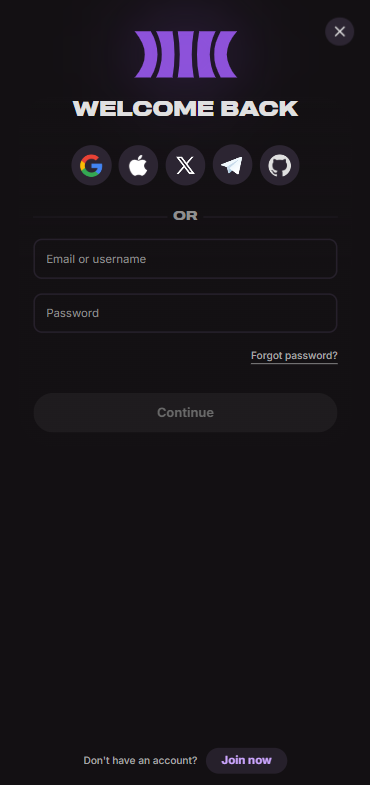
- Enter your registered email address and password, or select a federated login option (Google, Apple, GitHub, Telegram, X, or crypto wallet)
- If you have two-factor authentication (2FA) enabled, enter the time-based code from your authenticator app
- Click "Log In" to access your account dashboard, wallet, and all betting markets
That's it. The whole process takes about ten seconds if your credentials are saved. Now let's break it down by device.
Login CloudBet via Official Website
Desktop remains the reference client for CloudBet. The site is built on responsive HTML5, which means the full sportsbook, casino, live dealer lobby, Bet Builder, Pulse social feed, and Whale Mode are all accessible directly in your browser without downloading anything.
When you visit the site on desktop, you'll see the login button prominently placed in the header. Click it, and a modal window appears asking for your email and password. If you registered through Google or Apple, simply click the corresponding icon and authorize through your identity provider. After authentication, you land on the main sportsbook page with your balance displayed and full access to deposits, withdrawals, account settings, and responsible gambling tools.
We tested login on Chrome (Windows), Safari (macOS), and Firefox. No issues on any of them. Load times were fast, odds updated in real time during live betting, and the interface never felt sluggish. If you're new to sports betting in general, our how to bet on sports guide covers the basics.
Login CloudBet via Mobile App
Here's the thing: CloudBet does not have a native mobile app on iOS or Android. No App Store download, no Google Play listing, no APK distributed through official channels. Multiple independent reviews confirm this, and our own testing backs it up.
What CloudBet offers instead is a fully optimized mobile website that behaves almost identically to the desktop version. Every feature we tested on desktop worked on mobile too. Bet Builder, Pulse, cash out, live casino, esports markets, account verification, deposits, withdrawals. All there.
To make access quicker on your phone:
- Open the CloudBet website in your mobile browser
- Tap the share icon (Safari) or the three-dot menu (Chrome)
- Select "Add to Home Screen"
- A shortcut icon will appear on your home screen, giving you one-tap access
This isn't a Progressive Web App in the strictest technical sense, but it functions like one. You get instant access without app-store updates or storage bloat. We honestly found it more convenient than many native betting apps we've tested.
Fingerprint or Face ID Login
CloudBet does not offer its own built-in biometric login toggle. Because the platform runs entirely in the browser rather than through a native app, it cannot directly call iOS Face ID or Android fingerprint APIs.
That said, biometric login is still possible through your device's password manager. Here's how it works in practice:
- Save your CloudBet login credentials in your browser's built-in password manager (Chrome, Safari Keychain, etc.)
- When you visit the login page, your browser will offer to autofill credentials
- Your device prompts you for Face ID, Touch ID, or fingerprint verification before autofilling
- Once verified, the credentials populate automatically and you're logged in
This is a device-level convenience feature, not a CloudBet-specific integration. If your biometric fails, you simply type your password manually. Any issues with Face ID or fingerprint recognition should be troubleshot through your device settings, not through CloudBet support.
CloudBet
Common Login Problems & Solutions
We've compiled the most frequent login issues CloudBet users encounter, along with practical fixes. Most of these we've either experienced ourselves or seen reported across forums and review sites.
| Problem | Likely Cause | Solution |
|---|---|---|
| ❌ Incorrect password error | Typo, caps lock on, or outdated saved password | Use the "Forgot Password" link to reset via email |
| 🔒 Account locked after multiple attempts | Security lockout triggered by failed logins | Wait 15-30 minutes, then try again or reset password |
| 🌐 Site not loading | Scheduled maintenance or regional DNS issues | Clear browser cache, try a different browser, or check back later |
| 🚫 Access blocked by location | Connecting from a restricted jurisdiction | CloudBet is unavailable in certain countries; review the restricted list |
| 📱 2FA code not working | Time sync issue on authenticator app | Sync your device clock, or contact support for 2FA reset |
| ⚠️ "Account suspended" message | KYC non-compliance, self-exclusion, or T&C breach | Contact live chat or email [email protected] immediately |
| 🔄 Federated login (Google/Apple) failing | Third-party provider session expired | Re-authenticate with Google/Apple first, then retry CloudBet login |
Forgotten Username or Password
Your username on CloudBet is your email address. If you've forgotten which email you used, check your inbox across accounts for a registration confirmation from CloudBet.
For a forgotten password, follow these steps:
- Go to the CloudBet login page
- Click "Forgot Password?"
- Enter the email address linked to your account
- Check your inbox (and spam folder) for a password reset link
- Click the link and create a new, strong password
- Log in with your new credentials
If you registered through a federated provider like Google or Apple and never set a standalone password, you'll need to log in through that provider first. Once inside, navigate to account settings and add an email plus password for future direct access. If you've lost access to both your email and federated account, contact CloudBet support via live chat. They'll likely require identity verification before restoring access.
Account Blocked or Suspended
There are several reasons CloudBet might block or suspend your account. The most common include failing to complete KYC verification when requested, accessing the site from a restricted country, triggering responsible gambling self-exclusion, or breaching the Terms and Conditions through activities like multi-accounting or bonus abuse.
CloudBet reserves the right to request identity documents at any time, not just when you hit the 2,200 USD threshold. If you ignore or refuse a KYC request, your withdrawals can be frozen and your account restricted. This isn't unique to CloudBet. It's standard across Curaçao-licensed operators and frankly most legal betting sites.
Self-exclusion is another common cause. If you previously activated a cooling-off period (24 hours to 3 months) or self-exclusion (1 year to lifetime), your account will remain locked for the full duration. There's no way to reverse this early, which is by design. For more on your protections, see your rights as a player.
If your suspension feels unjustified, contact [email protected] with your account details and a clear description of the issue. Escalation to the Head of Customer Support is possible, and unresolved disputes can eventually be referred to the Curaçao Gaming Authority.
- Also read: CloudBet Bonus Code & Promotions 2026
Login Details Not Recognized
Sometimes you enter what you're certain are the right credentials and the system still rejects them. A few things to check before panicking. First, make sure you're on the real CloudBet website and not a phishing clone. Look for the correct URL in your address bar. Second, verify that your browser isn't autofilling an old or incorrect password from a previous session. Third, try logging in from a different browser or an incognito window to rule out cache or extension conflicts.
If none of that works, reset your password through the email recovery flow. And if you suspect your account may have been compromised, reach out to live chat immediately and ask them to temporarily lock the account while you regain control.
Website/App Maintenance
Like any online platform, CloudBet occasionally undergoes scheduled maintenance to update systems, deploy new features, or perform security patches. During these windows, you might see standard HTTP errors like 502 Bad Gateway or 503 Service Unavailable. These are temporary and usually resolve within minutes to a couple of hours.
Our recommendation: if the site isn't loading and you've confirmed it's not a local issue on your end, wait 15 to 30 minutes and try again. You can also check CloudBet's official X (Twitter) account @Cloudbet for announcements about planned downtime. Don't attempt to clear all your cookies or reinstall anything. Just wait it out.
Login from Restricted Region
CloudBet explicitly does not accept players from the United States, United Kingdom, Australia, Germany, France, Spain, the Netherlands, Belgium, China, Singapore, and several other jurisdictions. If you're traveling to one of these countries, you may find the site inaccessible or your login blocked based on IP geolocation.
Some users consider VPNs to bypass these restrictions. We strongly advise against this. CloudBet's Terms and Conditions reserve the right to void bets and suspend accounts if the operator believes a wager was placed from a prohibited jurisdiction. Detection methods go beyond simple IP checks and can include device fingerprinting and KYC document analysis. The risk of losing your balance entirely is real. If you're traveling temporarily, your safest option is to wait until you return to a permitted region before accessing your account.
- Original Sport/eSport Betting with Crypto
- VIP Concierge-Level Service
- Easy conversion crypto and max out in-play bets
How to Register at CloudBet
If you don't have an account yet, registration is quick. Here's the process we went through when we created our test account:
- Visit the official CloudBet website
- Click the "Join" button in the top-right corner
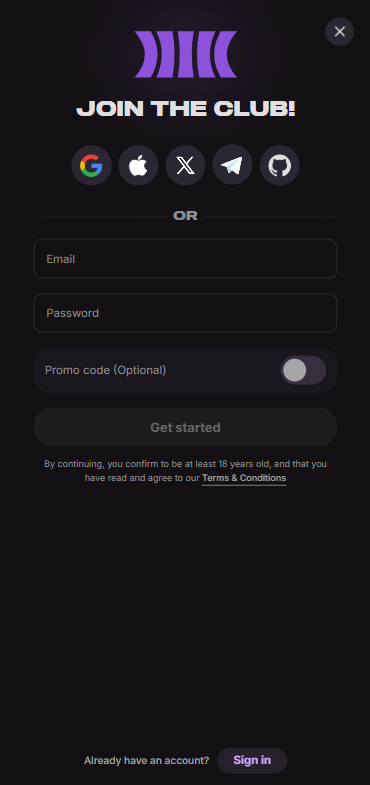
- Choose your registration method: email, Google, Apple, GitHub, Telegram, X (Twitter), or a supported crypto wallet
- If registering with email, enter your address and create a strong password
- Accept the Terms and Conditions and confirm you are 18 or older
- Verify your email if prompted (check your inbox for a confirmation link)
- Log in and navigate to the cashier to make your first crypto deposit
- Claim the welcome pack up to $2500
No ID documents are required at sign-up. You can start betting with just an email. KYC becomes necessary only when you approach the 2,200 USD cumulative deposit or daily withdrawal threshold, or if CloudBet flags your account for review. For a broader look at top platforms, check out our list of best football betting websites.
CloudBet
Verification & Login Security
CloudBet operates a tiered verification system. At the base level, you can deposit, bet, and withdraw up to approximately 2,200 USD per day without submitting any documents. Once you exceed that threshold or trigger a risk flag, full KYC is required.
Here's what each verification level looks like:
| Level | Requirements | Limits |
|---|---|---|
| Unverified | Email address only | ~2,200 USD cumulative deposits; ~2,200 USD daily withdrawals |
| Phone Verified | SMS code verification | Prerequisite for full identity verification |
| Fully Verified | Government-issued photo ID, proof of address (utility bill or bank statement dated within 3 months), face verification/selfie | No deposit or withdrawal limits |
Verification is typically processed instantly, though manual reviews can take up to 24 hours. We completed ours in under 20 minutes during testing.
For login security specifically, we recommend enabling 2FA via an authenticator app (Google Authenticator, Authy, etc.) immediately after creating your account. This adds a time-based one-time code requirement on every login, which makes unauthorized access dramatically harder even if someone obtains your password. CloudBet also uses high-security blockchain infrastructure and multi-signature cold storage to protect funds, and all RNG-based games are externally certified. You can read more about how we rate platforms on security and fairness.
- Also read: CloudBet Review & Expert Rating 2026
Customer Support for Login Issues
When we tested CloudBet's customer support, live chat responses came in under two minutes on average. That's genuinely fast. The agents were helpful, spoke clear English, and didn't try to deflect our questions with canned responses. Email took longer, roughly 6 to 12 hours for a substantive reply during our tests, which is reasonable for non-urgent matters.
CloudBet does not offer phone support. That's a minor drawback, but honestly, for a crypto-native platform, text-based support covers most scenarios efficiently.
| Channel | Contact Details | Availability | Best For |
|---|---|---|---|
| 💬 Live Chat | Icon in bottom-right corner of the website | 24/7 | Urgent login issues, account locks, quick questions |
| [email protected] | Monitored daily | Formal complaints, KYC disputes, escalation requests | |
| 🐦 X (Twitter) | @Cloudbet | Continuous | Maintenance updates, general announcements |
If live chat can't resolve your issue, ask for escalation to the Head of Customer Support via email. They have up to eight weeks to conduct an internal review and provide a final decision. Beyond that, disputes can be taken to the Curaçao Gaming Authority. For more on fair treatment standards, see our editorial policy.
Tips for Easy CloudBet Login
Keeping your CloudBet login smooth and secure doesn't require much effort, but a few smart habits go a long way. After weeks of real testing on this CloudBet betting site, here's what we recommend:
- Enable 2FA immediately after registration. It's the single most effective step you can take against unauthorized access
- Use a unique, strong password that you don't reuse on other sites
- Save credentials in a reputable password manager to enable quick biometric autofill on mobile
- Add the CloudBet site to your home screen on mobile for one-tap access
- Complete KYC verification proactively if you plan to deposit or withdraw more than 2,200 USD. Don't wait for a withdrawal block to surprise you
- Keep your registered email account secure since it's the anchor for all account recovery
- Bookmark the official URL to avoid phishing sites
- Never share your login details or 2FA codes with anyone, including people claiming to be support agents
CloudBet has been operating since 2013 and handles millions in crypto transactions. The login system is straightforward, support is responsive, and the platform works well across devices. Ready to get started? Create your CloudBet account here and claim the welcome pack up to $2500. And always remember to gamble responsibly.
- Original Sport/eSport Betting with Crypto
- VIP Concierge-Level Service
- Easy conversion crypto and max out in-play bets
FAQ
Can I Log in Without Registration?
No. You need a registered account to log into CloudBet. Registration requires only an email address or a federated login through Google, Apple, Telegram, GitHub, X, or a crypto wallet. It takes under two minutes. There's no way to browse betting markets or access account features without signing up first.
Can I Create Multiple Accounts?
No. CloudBet's Terms and Conditions allow only one account per person. Creating multiple accounts, whether to claim bonuses repeatedly or circumvent restrictions, is treated as a serious violation. Detection can result in account closure, voided bets, and forfeited balances. If you have a legitimate reason to change accounts (for example, you lost access to your original email), contact support to resolve it through proper channels.
How to Reset My Account Password?
Click "Forgot Password?" on the login page, enter your registered email, and follow the reset link sent to your inbox. Set a new strong password and log in. If you registered via Google or Apple and never set a standalone password, log in through your identity provider and add a password in your CloudBet account settings. Refer to our sports betting glossary if any terminology on the site confuses you after logging back in.
What If My Account Was Stolen or Hacked?
Act fast. If you can still log in, change your password immediately and enable or reset 2FA. If you're locked out, contact CloudBet live chat from the website (you don't need to be logged in to access it) or email [email protected] from your registered email address. Explain the situation clearly. CloudBet will likely require identity verification before restoring access, especially if the account holds a significant balance. This is standard security protocol and protects you.
Why Can't I Access the CloudBet Website/App?
The most common reasons are: you're in a restricted country (US, UK, Australia, Germany, France, and others), the site is undergoing temporary maintenance, or your ISP or network is blocking the domain. Try a different browser, clear your cache, or check CloudBet's social media for outage announcements. Remember, there is no native CloudBet app. Use the mobile browser version instead.
Is CloudBet Login Safe and Secure?
Yes. CloudBet is licensed by the Curaçao Gaming Authority, uses multi-signature cold storage for crypto funds, supports authenticator-based 2FA, and employs externally certified RNG systems. The platform has operated continuously since 2013 without a major security breach. Our TipsGG team tested the login process, deposit security, and withdrawal integrity firsthand and found the systems reliable. For a detailed breakdown of our evaluation criteria, visit our how we rate page.