

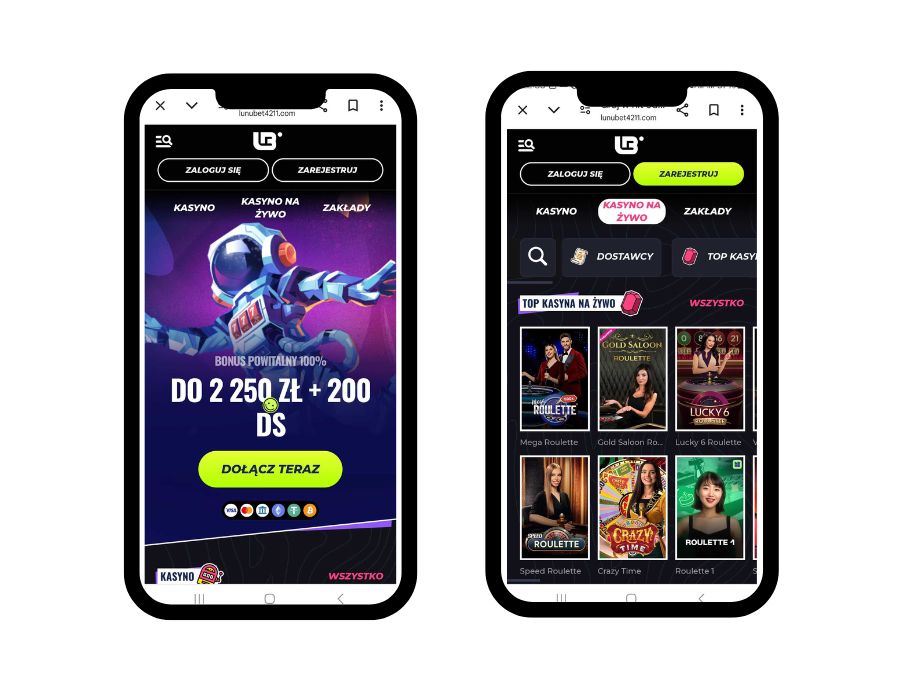
Even though Lunubet doesn’t have a native mobile app, its browser-based mobile site makes gaming easy in 2025. It works best on iOS and Android and has all the important features, like live betting and cash-outs. You can make Lunubet look like an app without downloading it by adding the “Create Shortcut” tool to your home screen. This review looks at how well Lunubet’s mobile site works, what features it has, and how to set it up so you can bet quickly while you’re out and about.
Overview of Lunubet’s Mobile Experience
The Lunubet mobile site is a strong option to a native app because it lets you quickly access live events, sports betting, and casino games. Its responsive design makes it easy to use on phones and computers, and you don’t even need to download an app. Some of the most important features are in-play betting, quick payments, and an easy-to-use interface. The table below shows how Lunubet’s mobile site stacks up against native apps:
| Feature | Lunubet Mobile Site | Typical Native App |
| Accessibility | Browser-based, no install | Requires download |
| Live Betting | Full support | Full support |
| Speed | Fast, optimized | Slightly faster |
| Updates | Automatic | Manual updates |
This setup suits bettors seeking convenience without storage demands.
How to Access Lunubet via Mobile Shortcut
Lunubet’s “Create Shortcut” feature lets you add the mobile site to your home screen, mimicking an app’s accessibility. Here’s how to set it up on iOS and Android.
- Also read: Login to Lunubet Account Guide
Creating a Shortcut on iOS
Open Safari and go to Lunubet. At the bottom, tap the Share button, which looks like a box with an arrow pointing up. Pick Add to Home Screen from the menu that’s further down. Give the link a name, like “Lunubet.” When you tap “Add,” the shortcut will show up on your home screen. This will make it easy to get to Lunubet’s mobile site to bet or play gambling games.
Creating a Shortcut on Android
Open Lunubet in Chrome. Tap the three-dot menu in the top-right corner. Scroll and select Add to Home screen. Enter a name (e.g., “Lunubet Mobile”). Tap Add, and the shortcut will be placed on your home screen. If the option doesn’t appear, try Lunubet’s provided link for direct installation. This creates an app-like icon for quick access to betting markets.
Lunubet
Features of Lunubet’s Mobile Site
With so many features, Lunubet’s mobile site is just as good as native apps. It lets you bet on live games and changes the odds in real time, so you can bet on games that are already happening. With the cash-out tool, you can quickly lock in profits or cut down on losses. The design is clean and easy to use, and it works best on smaller screens. Strong security, with SSL encryption to keep your info and transactions safe. Multiple payment methods, such as cards and e-wallets, can be used to make deposits and transfers easily. The site loads quickly and works well on all devices, but you can’t use it when you’re not online, which is a usual app feature. Unlike competing apps, Lunubet’s browser-based platform doesn’t require any storage space and updates itself instantly, so you can always use the newest features. You can bet on sports or play gambling games on Lunubet’s mobile site, which works like an app but doesn’t require you to download anything.
Pros & Cons of Lunubet’s Mobile Experience
Lunubet’s mobile site offers a practical betting solution, but it has trade-offs. The table below outlines its key advantages and drawbacks, helping you decide if it fits your betting style.
| Pros | Cons |
|---|---|
| No download needed, saving device storage. | No offline access, unlike native apps. |
| Works on any iOS or Android device with a browser. | Slightly slower load times compared to dedicated apps. |
| Full access to live betting, casino, and cash-out features. | Browser dependency may affect performance on older devices. |
| Automatic updates without manual intervention. |
This balance makes Lunubet’s mobile site ideal for users prioritizing convenience over app-specific perks.
- Also read: Lunubet Full Review and Rating
Tips GG Opinion on Lunubet’s Mobile Betting
We at Tips GG thought Lunubet’s mobile page was one of the best places to bet in 2025. Its browser-based method gets rid of the need to download apps, so it can be used on any device. The shortcut tool makes the site feel like an app, and its speed and live betting options are on par with those of the best sites in the industry. But it’s not useful when you’re not online, and slower devices may experience some browser lag. Overall, Lunubet’s mobile app is reliable and easy to use, making it perfect for players who like having options and don’t want to download another app.
FAQ about Lunubet’s Mobile Access
Is there a Lunubet app?
No, Lunubet doesn’t offer a native app, but its mobile site is optimized for betting and supports a home screen shortcut for app-like access.
How do I access Lunubet on mobile?
Visit Lunubet via your browser and use the “Create Shortcut” feature to add it to your iOS or Android home screen.
Is Lunubet’s mobile site secure?
Yes, it uses SSL encryption to protect your data and transactions.
Can I use live betting on Lunubet’s mobile site?
Absolutely, the mobile site fully supports live betting and cash-out features.