
Lunubet is raising the bar for mobile sports betting in 2025 — even without a native app. Instead of a traditional Lunubet app, the platform delivers a responsive, mobile-optimized website that performs like an app straight from your browser. With just a few taps, you can create a Lunubet shortcut on Android or iOS, offering instant access without needing to download or install anything.
It’s easy to get started with Lunubet on your phone, whether you’re a seasoned capper or just starting to bet on Valorant and Counter-Strike 2. There are fast, encrypted payment options and coverage of big sports like soccer, basketball, and tennis. The odds are updated in real time, and you can bet live on games. Even though there is no Lunubet APK or official download to be seen, the app feels like it was made for that device.
Let’s talk about why Lunubet is quickly becoming the most popular mobile betting and how to set it up.
Quick Overview of Lunubet’s Mobile Experience

Lunubet
Lunubet’s mobile site is a seamless, browser-based platform that mirrors the functionality of a native app — without the storage demands or download hassle. While there’s no official Lunubet APK or Lunubet app available on Google Play or the App Store, users on both Android and iOS can quickly create a browser shortcut that replicates the look and feel of an app icon.
The site offers a wide array of betting options, from global football matches to NBA games, Grand Slam tennis, and high-stakes eSports showdowns in titles like Valorant, League of Legends, and Counter-Strike 2. Live betting is robust, with real-time odds that update rapidly during matches, keeping adrenaline high and users engaged.
The navigation is clean and easy to use. The markets are nicely organized, and the site is mobile-friendly with features like menus that collapse and browsing that is done by swiping. Users of both Lunubet Android and Lunubet iOS will have the same high-quality experience because the style is the same on both.
- Also read: Login to Lunubet Account Guide
Here’s a snapshot of the mobile offering:
| Feature | Details |
| Platform | Mobile-optimized website (no native app) |
| Sports Covered | Soccer, Basketball, Tennis, eSports, more |
| Live Betting | Yes, with dynamic odds |
| Shortcut Compatibility | Android, iOS via browser |
| Payment Methods | Crypto, e-wallets, credit/debit cards |
| Languages | English, Spanish, German, others |
Thanks to its sleek interface and accessible format, Lunubet appeals to both pro bettors and casual users looking for a fuss-free mobile betting experience.
How to Set Up Lunubet’s Mobile Shortcut
Lunubet simplifies mobile access by offering a browser shortcut instead of a native app. Whether you’re using Android or iOS, this feature allows you to pin Lunubet directly to your home screen — mimicking a traditional app without any downloads. There’s no need for a Lunubet APK, no lengthy installation, and absolutely no storage worries.
Below are step-by-step instructions for setting up the Lunubet shortcut on both platforms, along with quick fixes for common issues.
Creating a Lunubet Shortcut on Android
- Open Chrome (or preferred browser) on your Android device.
- Navigate to the Lunubet website.
- Tap the three-dot menu icon in the top-right corner.
- Select “Add to Home screen.”
- Enter a name, e.g., “Lunubet,” then tap “Add.”
- The shortcut will now appear on your home screen like a native app icon.
Browser Compatibility: Works best with Chrome, Brave, and Samsung Internet. On older Android versions (8.0+ recommended), you may need to allow permissions for shortcut creation.
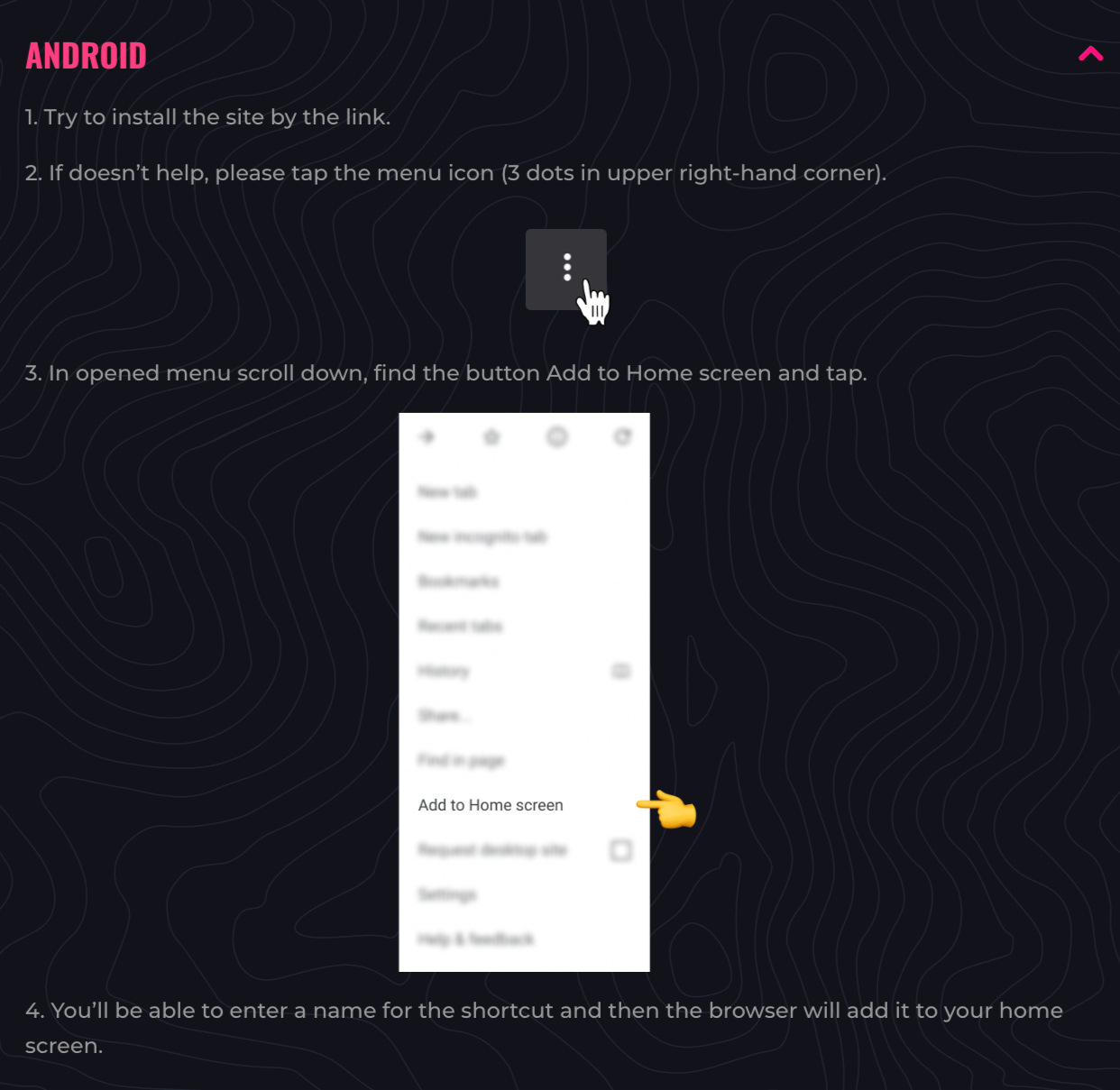
Lunubet Android
Creating a Lunubet Shortcut on iOS
- Open Safari on your iPhone or iPad.
- Go to the Lunubet mobile site.
- Tap the Share icon (square with an upward arrow).
- Scroll and select “Add to Home Screen.”
- Enter a shortcut name, then tap “Add.”
- The Lunubet icon will now appear on your iOS home screen.
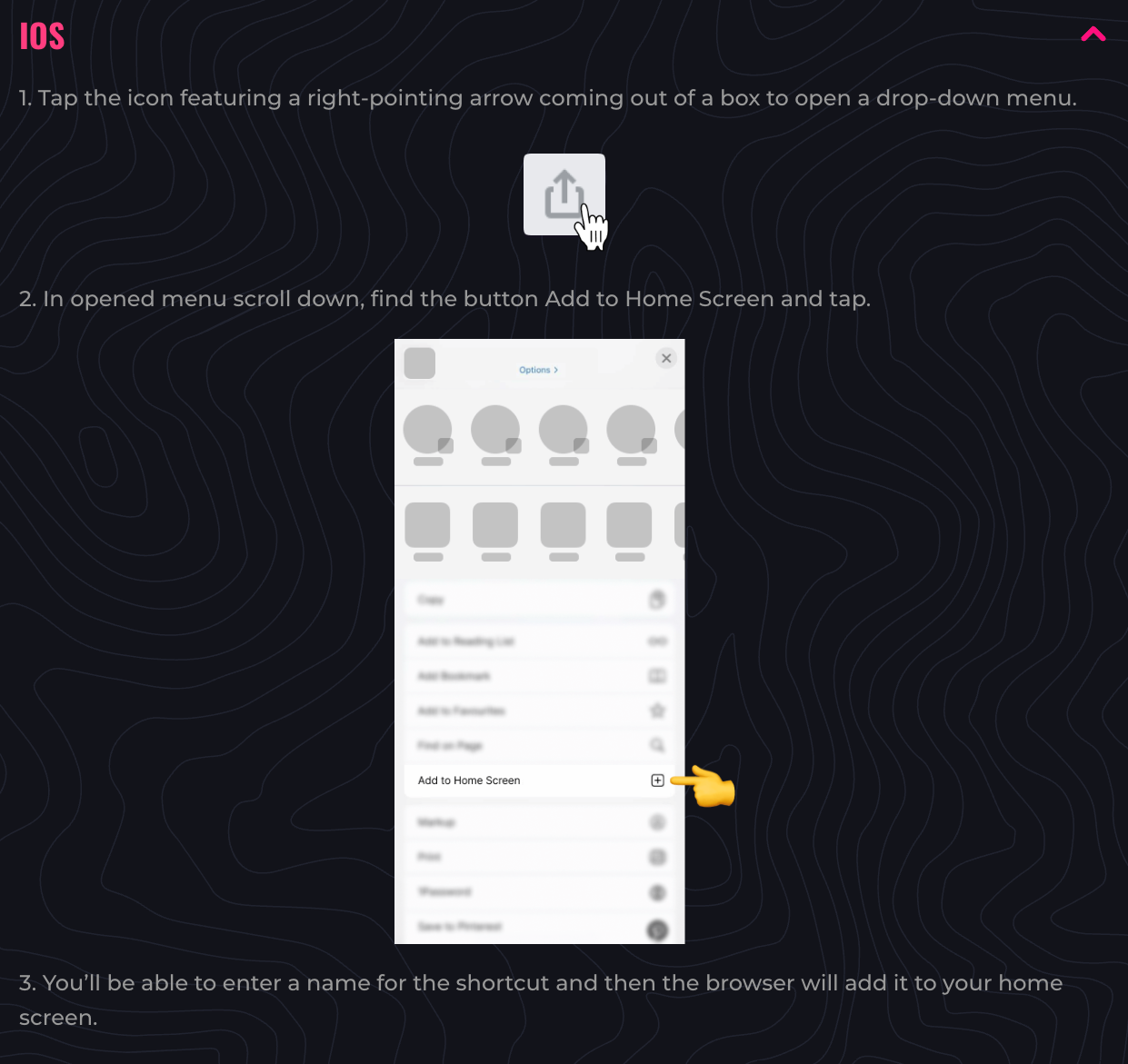
Lunubet iOS
Tip: This setup works only via Safari due to iOS restrictions — third-party browsers may not support shortcut creation.
Troubleshooting Tips:
- If the shortcut doesn’t appear, clear browser cache and try again.
- Ensure you’re using an updated browser version.
- Switch between Wi-Fi and mobile data if pages don’t load properly.
- On iOS, make sure Safari has access to “Add to Home Screen” under your device settings.
In just a minute or two, users can enjoy quick-launch access to Lunubet’s mobile platform, eliminating the need for a Lunubet app download altogether.
System Requirements & Compatibility
Because Lunubet is built as a mobile-optimized website, users aren’t tied to any strict app-based system requirements. There’s no need to install a Lunubet APK, app package, or worry about storage space. Instead, the platform runs smoothly through modern browsers like Chrome, Safari, and Firefox — delivering a fast, secure, and lightweight betting experience.
Whether you’re betting from a tablet, phone, or hybrid device, Lunubet adjusts its interface fluidly to different screen sizes and resolutions. All that’s needed is a reliable internet connection and an up-to-date browser.
Android Compatibility
Lunubet’s mobile site is fully compatible with devices running Android 8.0 and above. Most modern smartphones and tablets support all functionality — including shortcut setup, live betting, and secure payments.
Performance remains consistent across budget and flagship devices. Chrome is the recommended browser for the best shortcut integration, though Firefox and Samsung Internet also provide solid support.
iOS Compatibility
Lunubet functions optimally on iOS 12.0 and later, including recent iPhone and iPad models. The site is best accessed via Safari, especially for users wanting to create a home screen shortcut.
Because it bypasses app installation, Lunubet saves storage space and battery life. Despite the lack of a native Lunubet iOS app, the Safari shortcut delivers an app-like experience with smooth navigation and reliable performance.
Thanks to its minimal resource demands and wide browser compatibility, Lunubet remains accessible to a large user base — without compromising functionality or speed.
- Also read: Lunubet Full Review and Rating
Detailed Analysis of Lunubet’s Mobile Features
Lunubet’s mobile platform delivers a robust, app-like experience that’s packed with features aimed at both casual players and professional bettors. From traditional sports to booming eSports markets, the site covers all betting angles — without requiring a Lunubet APK or app download.
Sports Betting:
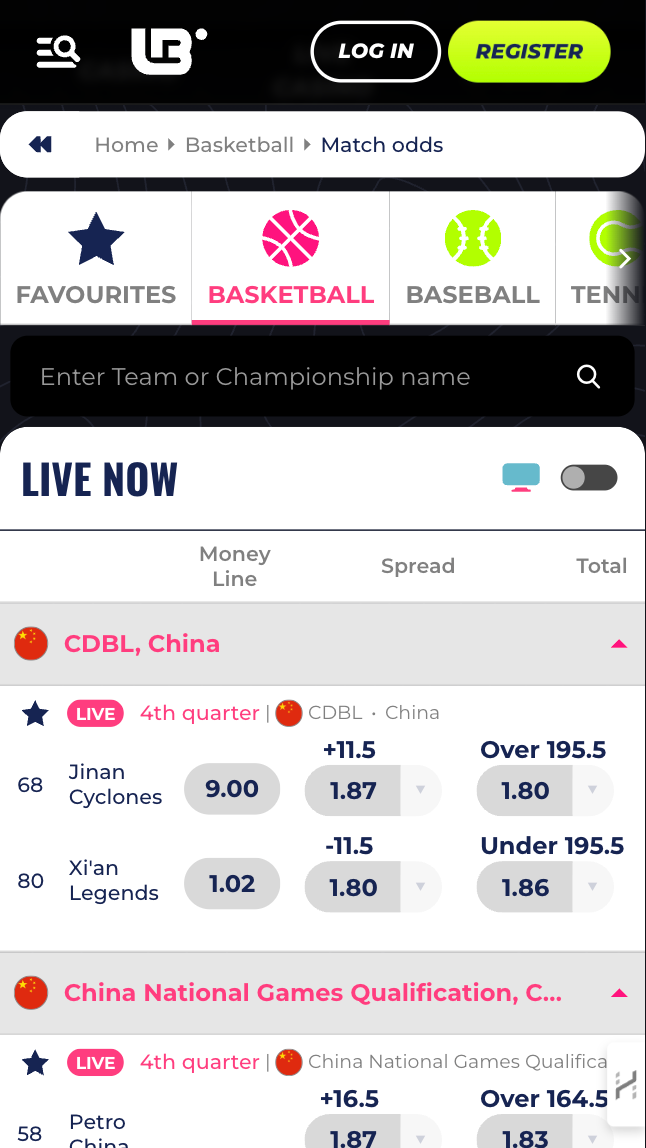
Lunubet boasts an extensive sportsbook, offering markets across top leagues and tournaments in soccer, basketball, tennis, American football, and more. Odds are competitive and refresh in real time, particularly during live events. Bettors can place pre-match wagers or jump into the action mid-game with dynamic in-play options.
eSports Betting:
Lunubet stands out in the growing eSports arena. Bettors can wager on Valorant, Counter-Strike 2, League of Legends, Dota 2, and more. Match listings include tournament info, odds breakdowns, and bet types like map winner, first blood, and total kills. The mobile site handles these complex markets with a responsive interface that avoids lag or input delays.
Live Betting:
Lunubet’s live betting section is integrated smoothly into the mobile platform. Users can browse multiple events simultaneously, view updated odds, and place bets without reloads. While there’s no live streaming (as of writing), the system remains stable during high-traffic events.
Payment Options:
A variety of secure and fast payment methods are supported on mobile, including Bitcoin, Ethereum, Tether, Skrill, Neteller, and traditional bank cards. Withdrawals are generally processed quickly, especially with crypto and e-wallets.
User Tools:
Lunubet’s mobile site includes helpful tools like bet trackers, cash-out options (where available), and odds calculators. These features are integrated within the bet slip, making it easy for users to manage wagers directly from their phone.
Performance & Visual Layout:
The mobile version mirrors the desktop layout closely but adapts navigation and visuals for smaller screens. Collapsible menus, touch-friendly buttons, and real-time updates ensure a clean, fast user experience.
Licensing & Security:
Lunubet is licensed by the Anjouan Gaming Commission, which adds credibility and regulatory oversight. The site uses encryption protocols to secure transactions and protect user data, giving bettors peace of mind while betting on the go.
Despite the absence of a downloadable Lunubet app, users won’t miss it — the mobile site replicates nearly every desktop feature with impressive fluidity and depth.
Lunubet
How to Claim the Lunubet Sign-Up Bonus on Mobile
New users can unlock Lunubet’s welcome bonus directly through the mobile site — no Lunubet app or APK needed. Accessing promotions is simple via a browser shortcut, making the registration and bonus process fast and user-friendly.
Step-by-Step Guide:
- Open Lunubet’s mobile site using your home screen shortcut.
- Tap “Register” and fill in your personal details.
- Enter any promo code (if required) during registration.
- Make your first deposit using your preferred payment method.
- The welcome bonus will be automatically credited or activated per the site’s terms.
Check the promotions tab regularly, as Lunubet frequently updates its mobile-exclusive offers. Since everything is browser-based, there’s no need for a Lunubet download — users can claim bonuses quickly and start betting right away.
Mobile Performance & Stability
Lunubet’s mobile site offers a consistently strong performance across devices and networks. It loads quickly, even under 4G conditions, and transitions smoothly between pages and menus without noticeable lag. Whether you’re betting live on a Champions League game or browsing eSports odds, the mobile experience remains fluid.
While minor visual downgrades may occur on low-end devices — especially in image resolution or animation smoothness — core functionalities like placing bets, managing your account, and cashing out remain unaffected. Battery consumption is minimal compared to heavy app usage, which adds to its mobile-friendly nature.
User Interface & Design Layout
Lunubet’s design is clearly built with mobile users in mind. Menus are logically structured, buttons are large enough for touch navigation, and bet slips are intuitively positioned at the bottom for quick access.
For new users, the learning curve is virtually zero. For experienced bettors, all advanced tools are right where you’d expect them. The interface adapts well to both vertical and horizontal orientations, and important features like live odds or balance updates happen in real time.
Live Betting Experience
Live betting is one of Lunubet’s standout mobile features. The platform offers fast odds updates, real-time market availability, and a responsive interface that can handle multiple simultaneous live events.
While Lunubet doesn’t currently offer live streaming, the data visualizations, live stats, and market depth still keep users fully engaged. You can place bets mid-match in just a few taps — ideal for fast-paced eSports like Counter-Strike 2 or soccer penalty shootouts.
Security & Privacy Features
Security is a top priority on Lunubet’s mobile site. Backed by a license from the Anjouan Gaming Commission, the platform complies with industry standards for fair betting and player protection. All transactions — from deposits to withdrawals — are encrypted using SSL protocols, ensuring your financial and personal data stays secure.
Lunubet also applies strong privacy measures, including two-factor authentication (2FA) for logins and automatic logout after inactivity. Since there’s no Lunubet app or APK to install, there’s also zero risk of unauthorized app-based data harvesting — a common concern with lesser-known betting apps.
Customer Support
Lunubet provides 24/7 customer support directly through its mobile site. You can reach out via live chat or email, with response times typically under five minutes for chat and a few hours for email queries.
Support agents are knowledgeable and trained to assist with everything from account verification to resolving betting slip errors. The interface for accessing help is simple, appearing in the main menu and footer for instant access on any page.
Cash-Out & Betting Tools
The mobile platform includes essential features like cash-out options, bet tracking, and odds calculators. Cash-out is especially helpful for managing risk on multi-leg parlays or fluctuating live events.
All tools are integrated into the mobile interface without requiring external links or downloads. Even if you’re not using a Lunubet Android or iOS app, these functions work seamlessly via browser — giving users full control over their wagers in just a few taps.
User Experience: Pros & Cons of Lunubet’s Mobile Site
Lunubet’s mobile platform delivers a well-rounded betting experience, but like any service, it has its ups and downs. Here’s a quick breakdown for users considering whether it’s worth setting up that browser shortcut.
| Pros | Cons |
|---|---|
| No App Download Required: Saves storage and avoids installation delays. | No Native Lunubet App: Lacks push notifications and offline accessibility. |
| App-Like Shortcut Access: Quick home screen access mimics native app behavior. | Visual Downgrades: Slightly reduced graphics on lower-end devices. |
| Full Functionality: Includes live betting, eSports, and secure payments. | Browser Dependency: Performance tied to browser stability and settings. |
| Wide Market Coverage: Extensive options in traditional and electronic sports. | |
| Modern User Interface: Touch-optimized navigation for all device sizes. |
Despite the absence of a Lunubet download or official Lunubet APK, the mobile site is polished and powerful enough to satisfy serious bettors and casual users alike.
Lunubet Mobile Site Not Working
While Lunubet’s mobile site is generally stable, occasional hiccups may occur — often related to browser issues or network connectivity. Here’s how to troubleshoot the most common problems:
1. Browser Compatibility
Ensure you’re using a supported browser like Chrome (for Android) or Safari (for iOS). Third-party browsers may not support key features like shortcut creation or real-time odds updates.
2. Clear Cache & Cookies
Cached data can cause performance lags or page errors. Clear your browser cache:
- On Android: Go to Chrome > Settings > Privacy > Clear browsing data.
- On iOS: In Safari, go to Settings > Safari > Clear History and Website Data.
3. Update Your Browser
Outdated versions may fail to render modern features. Visit your app store and ensure your browser is up to date.
4. Switch Networks
If odds or matches aren’t loading, try switching from mobile data to Wi-Fi or vice versa. Poor connectivity can affect betting performance.
5. Restart Your Device
A simple reboot can resolve temporary software or background process issues affecting performance.
By following these steps, most users can quickly restore Lunubet’s mobile functionality — no Lunubet download or app reinstallation necessary.
How to Place Your First Bet via Lunubet’s Mobile Site
Getting started with Lunubet on mobile is refreshingly simple. With no app installation or Lunubet APK required, all you need is a browser shortcut and a few minutes to dive into the action.
Step-by-Step Guide:
- Open the Lunubet Shortcut Tap the browser shortcut you created on your home screen to access the mobile site instantly.
- Register or Log In If you’re new, sign up by entering your personal and account details. Returning users can log in using their credentials.
- Make a Deposit Choose a payment method like crypto, e-wallets, or bank cards. Most options are mobile-friendly and offer instant funding.
- Browse Betting Markets Navigate to your preferred sport or eSport. Use filters and search to find the event you want to bet on.
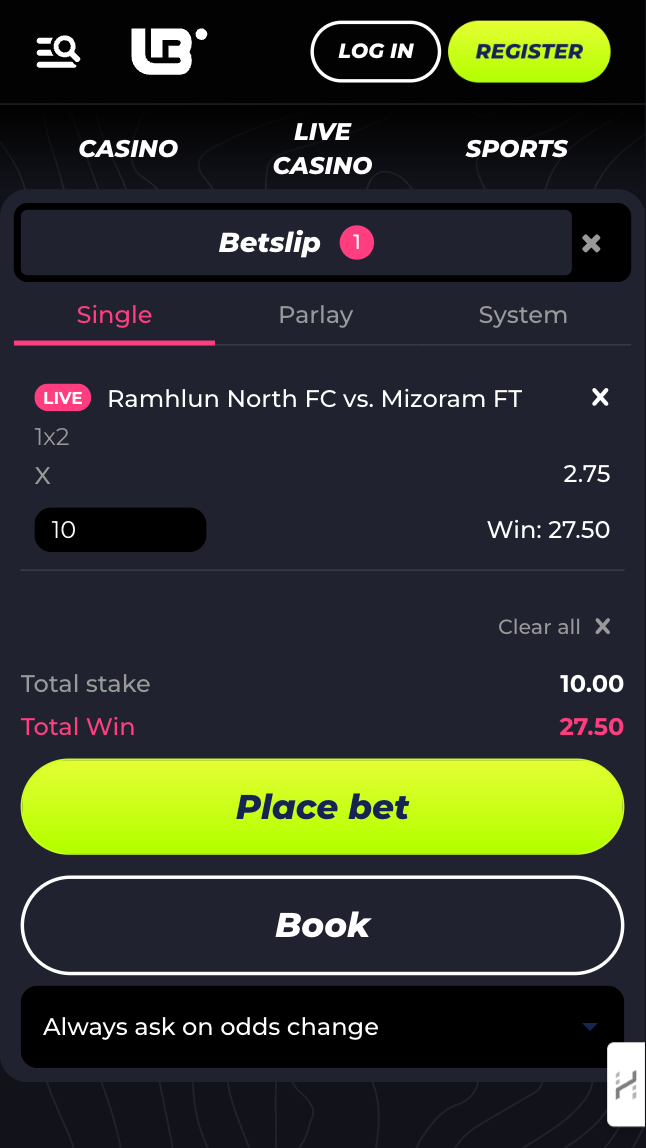
- Place Your Bet Tap on the odds, enter your stake in the bet slip, and hit “Place Bet.”
- Track Your Wagers Use the mobile dashboard or bet history tab to monitor ongoing or settled bets.
Betting Tips for Beginners:
- Start with low-risk, single-event wagers.
- Use live odds cautiously — they fluctuate rapidly.
- Check for mobile-exclusive promos before placing a bet.
Lunubet’s mobile interface makes it easy to go from zero to betting in just a few taps — all without needing to download an app.
Lunubet
Tips.GG Personal Opinion on Lunubet’s Mobile Experience
As a seasoned editor at Tips.GG and a regular bettor myself, I’ve tested dozens of mobile sportsbooks. Lunubet’s browser-based approach is one of the more streamlined experiences I’ve come across — especially for a platform that forgoes a traditional Lunubet app or APK.
The mobile site stands out for its simplicity and performance. It loads fast, handles real-time odds changes without crashing, and provides full access to sports, eSports, and account tools. Creating a shortcut on Android or iOS genuinely mimics the feel of an app — and it’s so lightweight, you barely notice it running.
Compared to industry leaders like Bet365 or BetWinner, Lunubet lacks certain features — namely, push notifications and a polished app UI. But it makes up for that with effortless access, cross-device compatibility, and a strong focus on functionality over flash.
For casual punters and serious cappers alike, Lunubet’s mobile platform strikes an excellent balance between utility and usability. While I’d welcome a native Lunubet app in the future, this shortcut-powered solution is more than capable for 2025 and beyond.
FAQ about Lunubet’s Mobile Betting
How to Access Lunubet on Mobile?
Simply visit Lunubet’s official website via your mobile browser and create a shortcut for instant access — no need to download a Lunubet app or APK.
Is Lunubet’s Mobile Site Secure?
Yes. The site is licensed by the Anjouan Gaming Commission and uses encrypted transactions to protect user data and payments.
Why Is the Lunubet Mobile Site Not Working?
Common issues include outdated browsers, cache overload, or poor internet. Try clearing your cache, updating your browser, or switching networks.
Can I Bet Live on the Lunubet Mobile Site?
Absolutely. Lunubet supports full-featured live betting with real-time odds on both sports and eSports events.
What Is a Browser Shortcut and Is It Safe?
A shortcut is a quick-launch icon added to your home screen. It links directly to the Lunubet site — offering app-like access without installation. It’s completely safe and uses no extra storage.